Audio "drops"(pause) for user(s)

Status
Not open for further replies.

TLCtech

Customer
Joined
Oct 12, 2020
Messages
263
Reaction score
29
  • 3CX Version, e.g. Standard Annual 16.0.9
  • Server OS, Raspberry Pi
  • 3cx hosted locally
  • Provisioning Method: Local
  • Trunk Provider: Call Centric
  • Has the Firewall Checker passed: YES
  • Are custom Phone Templates being used: NO
Ive been having some complaints where clients calling into our law firm and they said the audio cuts out when our end is speaking. We thought it was just local to one user and I asked them to record their calls when this happens. I haven't gotten a recording of that, but she received a voicemail that also had two medium chunks dropped. After listening to it, I pulled it into Audacity and the audio isnt dropping. Its freezing. For A second or so the audio cuts out and then continues exactly where it left off from, at least in this voicemail. If it helps I can make a redacted version of the VM. Im not 100% sure thats what is happening. I haven't heard any users on our end complain that it happens when they are listening, just clients on their end when our users are speaking and this VM. They may not even be related.

Do you have any suggestions?
 
Pi 2/3/4? How many extensions? What phones? Do you know what size/type/brand microSD card is being used?
 
  • Like
Reactions: VasilisV_3CX
Sorry, Raspberry Pi 4
All softphones, usually windows or browser based.
Its a samsung 32gb sd card class 10, though Im already looking at upgrading it. Its filling up slowly.
 
All that looks good, and I don't think there's anything wrong with the SD card. I'd make sure your codecs are all aligned with g.711u setup as primary on the extensions/soft phones. Unless it's bad hardware or network I'm assuming it's a transcoding issue.
 
That isnt what was set as first, so I moved it up. Ill go through and move those up. Is there a preferred order?

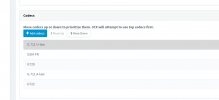
1618528807034.png
 
Stay with your sip provider preferred codec order everywhere
 
Just to first better understand the situation, you say:
Ive been having some complaints where clients calling into our law firm and they said the audio cuts out when our end is speaking.
This suggests outgoing audio is having issues.

I haven't gotten a recording of that, but she received a voicemail that also had two medium chunks dropped.
This suggests incoming audio is having issues.

Are you having audio quality issues in both directions or just one? If just one direction, which is that? Also, have you had any reports of this issue occurring for internal only calls as well or does it seem to only affect external calls?

Regarding transcoding, do know that it can indeed have an adverse effect on audio quality, that said, in v18 changes will be made to reduce transcoding as much as possible.

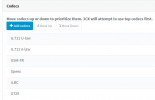
In the meantime, what you could do to reduce transcoding to a minimum, is to change the order of codecs to be the same across the whole 3CX PBX.

That means changes in:
SIP Trunks: SIP Trunks >> Edit
IP Phones: Extensions >> Edit >> Phone Provisioning >> Select corresponding IP Phone
3CX Clients: Extensions >> Edit >> Phone Provisioning >> Select 3CX App
3CX PBX: Settings >> General

You could have this setup on v16 until v18 comes out, then reevaluate the situation.
 
Just to first better understand the situation, you say:

This suggests outgoing audio is having issues.


This suggests incoming audio is having issues.

Are you having audio quality issues in both directions or just one? If just one direction, which is that? Also, have you had any reports of this issue occurring for internal only calls as well or does it seem to only affect external calls?

Regarding transcoding, do know that it can indeed have an adverse effect on audio quality, that said, in v18 changes will be made to reduce transcoding as much as possible.

In the meantime, what you could do to reduce transcoding to a minimum, is to change the order of codecs to be the same across the whole 3CX PBX.

That means changes in:
SIP Trunks: SIP Trunks >> Edit
IP Phones: Extensions >> Edit >> Phone Provisioning >> Select corresponding IP Phone
3CX Clients: Extensions >> Edit >> Phone Provisioning >> Select 3CX App
3CX PBX: Settings >> General

You could have this setup on v16 until v18 comes out, then reevaluate the situation.
Sorry, I just saw this reply.

So the user says it is only reported to her from clients that she's calling or that are calling in to her. She experiences none of it. And it doesn't matter if she uses the app, the computer, or the browser app.

Voicemails also have a similar glitch where the voicemail will stop for a few moments and pick back up.

I'll check again, but I recently changed the codes like Cobaltit suggested. I'll check these and see if they are different.
 
I did all you requested, following the guidelines from call centric HERE, but need some help finding "3CX Clients: Extensions >> Edit >> Phone Provisioning >> Select 3CX App"

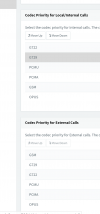
The last lin"3CX PBX: Settings >> General" are here. Im not sure what these need to be honestly. I havent found them in the Call centric settings.

1619471752558.png
 
The fact that only the external party is experiencing the issue means that the audio is problematic in one direction only. Where the issue lies however is a different matter as there are more than one nodes in between. To see if the 3CX PBX is the cause here I recommend investigating a bit by performing a packet capture on the 3CX PBX and checking to see if the audio is actually being sent to the SIP Provider. If it is, but still the external party does not receive it, you would then probably have to check with the SIP Provider so that they can also verify this on their end.

You could take a look at our training material that goes over basic troubleshooting here(slides 9 - 11): https://www.3cx.com/3cxacademy/videos/advanced/basic-troubleshooting/

Note: Click on the three dots and the "Open Speaker Notes" for additional info or watch the video.

Regarding the codecs used by the 3CX Clients, just do the following:

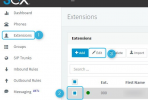
1. In the Management Console, click on Extensions >> Select Extension to edit >> Edit:
1619507194851.png

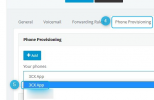
2. Click on Phone Provisioning and then select "3CX App" from the list:
1619507263981.png


The codecs in "Settings >> General" are the codecs used by the 3CX PBX, there is no one specific order they must be in, but if you want to minimize transcoding you must make sure that the order here also matches the order of the 3CX Clients/IP Phones and SIP Trunk(s).

3. Scroll down and make sure that the codecs order match the order of those on the SIP Trunk level. Change if necessary:
1619507306720.png


If you need additional assistance or information for investigating this issue I would strongly recommend contacting one of our 3CX Partners.
 
The fact that only the external party is experiencing the issue means that the audio is problematic in one direction only. Where the issue lies however is a different matter as there are more than one nodes in between. To see if the 3CX PBX is the cause here I recommend investigating a bit by performing a packet capture on the 3CX PBX and checking to see if the audio is actually being sent to the SIP Provider. If it is, but still the external party does not receive it, you would then probably have to check with the SIP Provider so that they can also verify this on their end.

You could take a look at our training material that goes over basic troubleshooting here(slides 9 - 11): https://www.3cx.com/3cxacademy/videos/advanced/basic-troubleshooting/

Note: Click on the three dots and the "Open Speaker Notes" for additional info or watch the video.

Regarding the codecs used by the 3CX Clients, just do the following:

1. In the Management Console, click on Extensions >> Select Extension to edit >> Edit:
View attachment 21792

2. Click on Phone Provisioning and then select "3CX App" from the list:
View attachment 21793


The codecs in "Settings >> General" are the codecs used by the 3CX PBX, there is no one specific order they must be in, but if you want to minimize transcoding you must make sure that the order here also matches the order of the 3CX Clients/IP Phones and SIP Trunk(s).

3. Scroll down and make sure that the codecs order match the order of those on the SIP Trunk level. Change if necessary:
View attachment 21794


If you need additional assistance or information for investigating this issue I would strongly recommend contacting one of our 3CX Partners.
Thank you so much. I had forgotten about packet capture and hadn't gotten this far in training.

So about packet capture: It seems like it has to stay running until I say stop, or until I navigate from the page. This happens sporadically. Is it reasonable to leave this on all day to see if we capture it? I know it has a limit on the packets. Would this also detect the weird voicemail phenomena where the audio pauses for several seconds and picks right back up? If it would help, I can grab one of those voicemails and attach it.
 
Running the packet capture via 3CX is not suitable for long periods of time meaning that ideally you should use it for issues you can replicate at will or at least after a reasonable number of attempts. If this is not the case, you might want to look into ways to run the packet capture on the OS level instead. Regarding the voicemail issue, it depends on what the cause is. The packet capture will capture anything traversing the 3CX PBX's network interface so if the audio is affected before it even reaches the 3CX PBX then it should be apparent in the packet capture as well.

As I mentioned before, I would strongly recommend contacting one of our 3CX Partners to help you with investigating this issue: https://www.3cx.com/ordering/find-reseller/
 
Im attempting a packet capture, but I think you are correct. Im going to consult our local partners. I want to become one, but this is a little above my paygrade.
 
  • Like
Reactions: ChrisC_3CX
Understandable, do let us know if you manage to reach a resolution!
 
Status
Not open for further replies.