The fact that only the external party is experiencing the issue means that the audio is problematic in one direction only. Where the issue lies however is a different matter as there are more than one nodes in between. To see if the 3CX PBX is the cause here I recommend investigating a bit by performing a packet capture on the 3CX PBX and checking to see if the audio is actually being sent to the SIP Provider. If it is, but still the external party does not receive it, you would then probably have to check with the SIP Provider so that they can also verify this on their end.
You could take a look at our training material that goes over basic troubleshooting here(slides 9 - 11):
https://www.3cx.com/3cxacademy/videos/advanced/basic-troubleshooting/
Note: Click on the three dots and the "Open Speaker Notes" for additional info or watch the
video.
Regarding the codecs used by the 3CX Clients, just do the following:
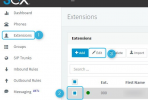
1. In the Management Console, click on Extensions >> Select Extension to edit >> Edit:
View attachment 21792
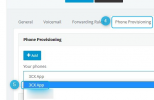
2. Click on Phone Provisioning and then select "3CX App" from the list:
View attachment 21793
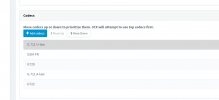
The codecs in "Settings >> General" are the codecs used by the 3CX PBX, there is no one specific order they must be in, but if you want to minimize transcoding you must make sure that the order here also matches the order of the 3CX Clients/IP Phones and SIP Trunk(s).
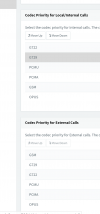
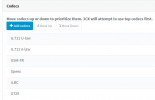
3. Scroll down and make sure that the codecs order match the order of those on the SIP Trunk level. Change if necessary:
View attachment 21794
If you need additional assistance or information for investigating this issue I would strongly recommend contacting one of our
3CX Partners.