


- Joined
- Nov 6, 2020
- Messages
- 38
- Reaction score
- 7
Hi,
We are with the University of North Florida’s Telecom Team and we have found a couple of issues that appeared after we performed an update to V20 Update 5 Build 20.0.5.551.
Issue 1:
We are no longer able to have more than 100 entries in our “Reformat incoming or outgoing caller ID” dropdown menu within our SIP Trunks Options tab. We currently use this feature extensively for all of our extensions in order to make sure their Caller ID’s are reformatted before they go to our on campus police department. We have to reformat Caller ID’s this way due to our M365 Integration. However, now we cannot update any existing rules or add any rules to this SIP Trunk to make sure we have accurate Caller ID’s. Below is the error message we get each time we try to save the SIP Trunk settings while there is more than 100 rules in place.
InCIDFormatting Error Message:
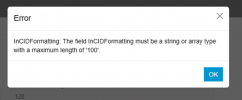
I have tested this issue on a separate Test PBX that is on the same version and as soon as I tried to add the 101st rule we got the same error. We have been adding these rules with no issues right up until we pushed this update so we are confident the issue has been caused by this update. Is there any way to fix this error and allow us to continue updating and managing more than 100 of these caller ID reformatting rules?
Issue Two:
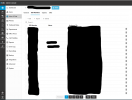
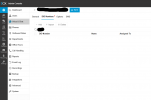
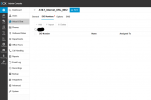
We noticed right after the update that we can no longer add or delete any DID’s on our main SIP Trunks either. The add button is greyed out and when I select a DID and delete it and try to save the change we get a red dot. See the two screenshots below of these two issues. These are not the SIP Trunks that have the reformatting rules in them either. We don’t know why only these two SIP Trunks are having a problem, all we know is that it only came up after Update 5 along with the earlier problem. Maybe it is related to the number of DID’s have, similar to the Caller ID issue being related to the number of Caller ID Rules we have. Is there anything we can do to make it to where we can manage our SIP Trunk DID’s on these two SIP Trunks again?
Greyed Out Add Button:
Red Dot After Deletion and Save:
If anyone has any idea of what is causing these problems and how to fix it, we would greatly appreciate it.
Thank you,
Anthony Howell
Network Engineer
UNF ITS Telecom
We are with the University of North Florida’s Telecom Team and we have found a couple of issues that appeared after we performed an update to V20 Update 5 Build 20.0.5.551.
Issue 1:
We are no longer able to have more than 100 entries in our “Reformat incoming or outgoing caller ID” dropdown menu within our SIP Trunks Options tab. We currently use this feature extensively for all of our extensions in order to make sure their Caller ID’s are reformatted before they go to our on campus police department. We have to reformat Caller ID’s this way due to our M365 Integration. However, now we cannot update any existing rules or add any rules to this SIP Trunk to make sure we have accurate Caller ID’s. Below is the error message we get each time we try to save the SIP Trunk settings while there is more than 100 rules in place.
InCIDFormatting Error Message:
I have tested this issue on a separate Test PBX that is on the same version and as soon as I tried to add the 101st rule we got the same error. We have been adding these rules with no issues right up until we pushed this update so we are confident the issue has been caused by this update. Is there any way to fix this error and allow us to continue updating and managing more than 100 of these caller ID reformatting rules?
Issue Two:
We noticed right after the update that we can no longer add or delete any DID’s on our main SIP Trunks either. The add button is greyed out and when I select a DID and delete it and try to save the change we get a red dot. See the two screenshots below of these two issues. These are not the SIP Trunks that have the reformatting rules in them either. We don’t know why only these two SIP Trunks are having a problem, all we know is that it only came up after Update 5 along with the earlier problem. Maybe it is related to the number of DID’s have, similar to the Caller ID issue being related to the number of Caller ID Rules we have. Is there anything we can do to make it to where we can manage our SIP Trunk DID’s on these two SIP Trunks again?
Greyed Out Add Button:
Red Dot After Deletion and Save:
If anyone has any idea of what is causing these problems and how to fix it, we would greatly appreciate it.
Thank you,
Anthony Howell
Network Engineer
UNF ITS Telecom
Attachments
Last edited:





