Dynamics 365 Intergration Always Creating New Contacts

Status
Not open for further replies.

WebMediafields

Bronze Partner
Basic Certified
Joined
Dec 1, 2017
Messages
20
Reaction score
1
We have been using the Dynamics 365 intergration for a while and it has worked fine. Recently it has constantly creating new contacts even when there is already a contact associated with the number. I've found the problem is that it only sends the last six didgets of the number. If you do the same query with the full number it finds the existing contacts. Is this a recent change to the Dynamics intergration?
 
It's a setting in 3CX. The template used to have it's own setting but now it follows the system.

Go to Advanced > Contacts > Options, and set the match policy to "Match Exactly."
 
  • Like
Reactions: edossantos
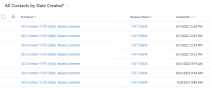
We are also experiencing this issue with v18 and Dynamics 365 CE. During testing with an existing contact in Dynamics the correct contact pops up but new contact is also created:

1662061577847.png

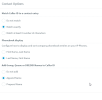
We have set contact matching in 3CX to use match exactly:

1662061629287.png

What else can we look at to ensure that 3CX don't continue to create contacts when an existing contact with a matching phone number already exists in the system?
 
We are also experiencing this issue with v18 and Dynamics 365 CE. During testing with an existing contact in Dynamics the correct contact pops up but new contact is also created:

View attachment 31789

We have set contact matching in 3CX to use match exactly:

View attachment 31790

What else can we look at to ensure that 3CX don't continue to create contacts when an existing contact with a matching phone number already exists in the system?
In order to investigate the issue, please enable verbose logs from the 3CX Console > Dashboard > Activity Log > Settings. Then make a test call where you reproduce the issue, and check the 3cxSystemService.log file that you can download from the 3CX Console > Dashboard > Activity Log > Logs button > Instance folder.
 
In order to investigate the issue, please enable verbose logs from the 3CX Console > Dashboard > Activity Log > Settings. Then make a test call where you reproduce the issue, and check the 3cxSystemService.log file that you can download from the 3CX Console > Dashboard > Activity Log > Logs button > Instance folder.
@edossantos we've enabled verbose logs and downloaded the 3cxSystemService.log file. What should we do next?

Thank you!
 
@edossantos we've enabled verbose logs and downloaded the 3cxSystemService.log file. What should we do next?

Thank you!
In this file you will have all the interactions between 3CX and the CRM. There you will see if the existing contact is being found or not. If the existing contact is not found, the logs will give you some hints about why, for example maybe the number being used in the API call is not exactly the same as the number stored in the CRM.
 
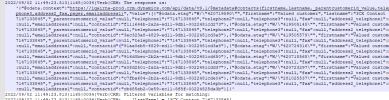
Hi @edossantos it appears that contacts are being found. I'm unsure why 3CX is continuing to create new contacts when multiple contacts with matching phone numbers are found:

Query: 1662478795816.png

Response:
1662478684261.png
 
It seems that you have many contacts matching this number. Maybe you had an issue in the past, but now it seems that the contacts are being matched. Can you try deleting those duplicated contacts from your CRM and see what happens?
 
It seems that you have many contacts matching this number. Maybe you had an issue in the past, but now it seems that the contacts are being matched. Can you try deleting those duplicated contacts from your CRM and see what happens?
Thanks for the reply @edossantos, here is the behavior once the duplicated contacts were deleted. Please note that this time no screen pop appeared for the found contact.

1662483101560.png
 
Can you send me the full 3cxSystemService.log in a private message?
 
Can you send me the full 3cxSystemService.log in a private message?
@edossantos no problem, I started a conversation. Should I copy and paste the entire log file contents into the message? I did not see a way to attach the log file. Thanks!
 
Please upload the file to the cloud, and send me the download link. Thanks.
 
  • Like
Reactions: ckobayashi
Status
Not open for further replies.

Latest Posts

Forum statistics

Threads
111,973
Messages
590,075
Members
164,895
Latest member
jasonkkrause