Fanvil X4U not Blind Transfer on Onhook

Status
Not open for further replies.

chance-wmt

Bronze Partner
Advanced Certified
Joined
Nov 23, 2020
Messages
96
Reaction score
30
Fanvil X4U not Blind Transfer on Onhook,
Option is enabled in the default supported template and latest firmware, and double checked by logging in, also enabled on phone for certain.
Trans > BLF/EXT > Hangup.
What it is doing is instead of transfering, it is hanging up and placing the original call on hold.

However, there is one phone out of three here that is working as intended. All phones are behind the same switch and SBC.
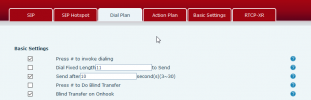
1618516618103.png
 
Temporary fix is to enable,
XML:
<Onhook_to_AXfer>1</Onhook_to_AXfer>
and,
XML:
<CallSemiXfer>1</CallSemiXfer>
 
Hello there,

I just tested this on a Fanvil X4U running firmware version 2.4.7 on 3CX v16.0.8.9 but could not replicate the issue. you are describing Putting the handset down after the number was dialed performs a blind transfer to that number as expected. I'd recommend avoiding making manual configuration to the phone or using custom templates as doing either would render the specific configuration unsupported. Simply make sure the device is running the latest 3CX Supported firmware, factory reset the device and re-provision using the 3CX default template.
 
Hello there,

I just tested this on a Fanvil X4U running firmware version 2.4.7 on 3CX v16.0.8.9 but could not replicate the issue. you are describing Putting the handset down after the number was dialed performs a blind transfer to that number as expected. I'd recommend avoiding making manual configuration to the phone or using custom templates as doing either would render the specific configuration unsupported. Simply make sure the device is running the latest 3CX Supported firmware, factory reset the device and re-provision using the 3CX default template.
It is running the supported firmware, something else to note, plug and play "adoption" was not working either. I've setup over 300 phones and this group something is off.
 
Could this be a multicast issue?
 
Depends on what exact step you are having trouble with. When you say you're having trouble with this Group what are you referring to? Is there something specific about this group of IP Phones, are they for instance behind the same 3CX SBC or Local but in a different subnet?
To first get a better understanding of your current setup, please provide the relevant information mentioned here: https://www.3cx.com/community/threads/information-to-provide-when-requesting-help.67558/

Regarding the issue, since you're using PnP, the following steps are required:
1. Make sure the device is running the latest supported firmware and factory reset.
2. In the Management Console, check the Phones section and identify the device to be provisioned.
3. Select the device and assign it to an extension.
4. The device should now re-provision and reboot depending on the model. (may take a couple of minutes depending on the situation)

At what step are you facing issues and what happens?
 
  • 3CX Version, Standard Annual 16.0.8.9
  • Server OS, 3CX
  • Is the 3CX Server Hosted and where? Vultr
  • IP Phone Make/Model/Firmware Fanvil X4U 2.4.7
  • Provisioning Method: SBC
  • Trunk Provider or Gateway Make/Model Telnyx
  • Has the Firewall Checker passed: YES
  • Are custom Phone Templates being used: NO

This is the first time with this issue, does multicast issues result in issues with transferred calls and PnP? I had to manually login to the phone web interface and add the provisioning link to get them going.
 
Also, if they are connected to a single switch with the SBC to the switch I get the same thing
 
1. PnP Multicast basically means that when a freshly reset phone boots up, it sends a message on 224.0.1.75 announcing its presence on the network.

2. The SBC "sees" this and makes the phone appear on your management console's Phones page as a new phone so you can assign it.

3. Once you assign it to an extension from the "Assign Ext" button, the SBC sends a message to phone with the provisioning URL.

4. The phone now needs to access your PBX over the internet to grab its provisioning file


To diagnose:

a) if the phone did not appear as "new" then the issue is somewhere between step 1 and 2 (usually the network equipment blocked the multicast message)

b) if the phone appears, and you assign it but it doesn't provision, then the issue is probably at step 4. It's usually either the phone cannot reach the PBX from its current location, or the PBX HTTPS port is not properly forwarded.


In answer to the previous question, no PnP does not affect transfers. It's just used for provisioning for your SBC phones. But currently it is not clear whether your phones were provisioned properly to begin with.
 
  • Like
Reactions: chance-wmt
I know some phones use multicast for transfers sometimes, I'll keep looking and keep this forum updated.
 
Status
Not open for further replies.

Members Online Now

Forum statistics

Threads
111,834
Messages
589,287
Members
164,664
Latest member
dominik.pepel