Solved Fanvil x4u-v2 router phone not connecting on SMB

Status
Not open for further replies.

Terri Griffiths

SMB User
Basic Certified
Joined
Jul 10, 2023
Messages
107
Reaction score
11
Hi All,

Brand new phone - x4u-v2 bought to be a router phone -
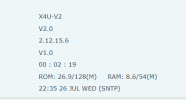
  • Latest version firmware - details displayed on Fanvil phone portal X4u-V2 - V2.0 - 2.12.16.17
  • Shows my name & extn details on display that is on the 3CX SMB Admin portal.
  • Shows in the Voice & Chat area as 3CX SBC Router phone - but has a red square next to it.
  • But won't call internally to another user, nor is it displaying changes made to my extension like a BLF amendment.
  • Fanvil portal doesn't look like it's updating with changes.
  • Still waiting on my SIP trunk that has been on order for a week, but I understand from Nick the fab 3CX trainer, that is should still work internally.
Can someone let me know if on SMB I must have SIP trunks to even dial internally? So I'm not chasing my tail here?

Many thanks in advance...

Terri
 
Hi @Terri Griffiths

Regarding the router phone version, kindly note that the firmware version it should be running is the latest 3CX Supported firmware which is 2.12.15.6 instead of the latest Vendor firmware. You may follow the below link to check or download all the 3CX Supported firmwares.
https://www.3cx.com/docs/phone-firmwares/

Regarding the internal calls, as you have already mentioned you do not need to have a Sip Trunk to make internal calls from extension to extension.
 
Youre running the incorrect FW to be used as a router phone.

read this

https://www.3cx.com/sip-phones/fanvil-x3-x5/

you want to be on 2.12.15.6

You can dial internally without a trunk but the router phone must be online and extensions registered.
 
  • Like
Reactions: NikolasA_3CX
So I have put the phone firmware to 2.12.15.6.

  • I still can't call internally. Says an invalid line when I try the same as before.
  • And its not recognising any changes to BLF changes etc on 3CX either.
  • And 3CX SBC Router phone still shows red square.
 
Dont worry about anything else other then getting that phone to show as registered. You're going to confuse yourself.

Check that your phone hasnt blacklisted from the MGMT console home page.
 
I did also delete it from my 3CX and reconnect it btw.

Will I need to clear anything down on the Fanvil portal? As that seem to be holding on to the first profile?
 
Dont worry about anything else other then getting that phone to show as registered. You're going to confuse yourself.

Check that your phone hasnt blacklisted from the MGMT console home page.
I don't have an MC as its SMB.
 
Ok then you should be able to factory reset the fanvil and it should autoprovision.
 
Ok then you should be able to factory reset the fanvil and it should autoprovision.
The last Factory reset I did on an x5u I had before this one, put the phone back to V1, and wouldn't let me upgrade to v2 for it to be used as a router phone. I then had to order this 2nd phone the x4u v2. So I am reluctant to reset to factory settings which caused even more problems last time.
 
Im holding down the # on firing it up, and it says Recovery mode Upgrade from http:// and an IP address. Its not saying post mode?
 
Exception for U / Pro / Lite / V or newer: wait for the MWI to turn on, then off. As soon as it turns on again, press “#” immediately.
 
OK, so I got to the Post mode on your instructions and did the *#168 which did reset it and kept the correct firmware version. Then I re-connected my 3CX to it, but now it's not provisioning at all. Its just displaying a default Fanvil display, not the user details from 3CX.
 
. Then I re-connected my 3CX to it

How?

All you should have done is add it to your extension as a router phone, reboot the phone and it provisions.
 
  1. I went to my user
  2. then to IP Phone
  3. Selected to add a router phone
  4. entered the correct phone type and MAC address
  5. It said to reboot the phone and it should reprovision.
  6. And it comes back as a default fanvil display
 
yes that all you should have to do.

Check fanvil is showing as the correct FW still.
 
Hi Terri,

Please try the following right now:

Hold down the ok button on your phone while its on the main idle screen, it will ask you to factory reset.

Carry out the factory reset and give it a couple of minutes to come up.

Let us know if the phone now works.
 
Driving me around the twist. I really appreciate any help btw...
 
Hi Terri,

Please try the following right now:

Hold down the ok button on your phone while its on the main idle screen, it will ask you to factory reset.

Carry out the factory reset and give it a couple of minutes to come up.

Let us know if the phone now works.
That was how I did the factory reset on the x5u. Which took it back to v1, and then wouldn't let me upgrade to V2...
 
Status
Not open for further replies.

Forum statistics

Threads
111,974
Messages
590,083
Members
164,899
Latest member
mazet