Inbound and Outbound Calls not working

Status
Not open for further replies.

worldsparrow3

Trainee Partner
Joined
May 4, 2023
Messages
10
Reaction score
0
Hello.. I have configured the Twillo trunk as instructed and also followed the 3CX instruction on configuring SIP and inbound and outbound calls but when I try to call from the 3cx webclient or desktop app it rings once and cut and doesn't ring on the destination phone. And the inbound call when I try to call the number given to me by Twilo is just drops immediately I dialled. I have been on this and not working at all and this is the message I got from my Activity Log:

05/05/2023 10:51:26 - Call to T:Line:10000>>0090017035399296@[Dev:sip:[email protected]:5060] from L:32.1[Extn:100] failed, cause: Cause: 400 Invalid phone number/INVITE from 54.172.60.0:5060
05/05/2023 10:51:26 - [CM503003]: Call(C:32): Call to <sip:[email protected]:5060> has failed; Cause: 400 Invalid phone number/INVITE from 54.172.60.0:5060
05/05/2023 10:51:25 - Call to T:Line:10000>>000017035399296@[Dev:sip:[email protected]:5060] from L:32.1[Extn:100] failed, cause: Cause: 400 Invalid phone number/INVITE from 54.172.60.0:5060
05/05/2023 10:51:25 - [CM503003]: Call(C:32): Call to <sip:[email protected]:5060> has failed; Cause: 400 Invalid phone number/INVITE from 54.172.60.0:5060
05/05/2023 10:50:54 - Call to T:Line:10000>>007035399296@[Dev:sip:[email protected]:5060] from L:31.1[Extn:100] failed, cause: Cause: 400 Invalid phone number/INVITE from 54.172.60.0:5060
05/05/2023 10:50:54 - [CM503003]: Call(C:31): Call to <sip:[email protected]:5060> has failed; Cause: 400 Invalid phone number/INVITE from 54.172.60.0:5060
05/05/2023 10:50:53 - Call to T:Line:10000>>00035399296@[Dev:sip:[email protected]:5060] from L:31.1[Extn:100] failed, cause: Cause: 400 Invalid phone number/INVITE from 54.172.60.0:5060
05/05/2023 10:50:53 - [CM503003]: Call(C:31): Call to <sip:[email protected]:5060> has failed; Cause: 400 Invalid phone number/INVITE from 54.172.60.0:5060
05/05/2023 10:50:09 - Call to T:Line:10000>>0016504894546@[Dev:sip:[email protected]:5060] from L:30.1[Extn:100] failed, cause: Cause: 400 Invalid phone number/INVITE from 54.172.60.0:5060
05/05/2023 10:50:09 - [CM503003]: Call(C:30): Call to <sip:[email protected]:5060> has failed; Cause: 400 Invalid phone number/INVITE from 54.172.60.0:5060
05/05/2023 10:50:08 - Call to T:Line:10000>>16504894546@[Dev:sip:[email protected]:5060] from L:30.1[Extn:100] failed, cause: Cause: 400 Invalid phone number/INVITE from 54.172.60.0:5060
05/05/2023 10:50:08 - [CM503003]: Call(C:30): Call to <sip:[email protected]:5060> has failed; Cause: 400 Invalid phone number/INVITE from 54.172.60.0:5060
05/05/2023 10:48:53 - Call to T:Line:10000>>00916504894546@[Dev:sip:[email protected]:5060] from L:29.1[Extn:100] failed, cause: Cause: 400 Invalid phone number/INVITE from 54.172.60.0:5060
05/05/2023 10:48:53 - [CM503003]: Call(C:29): Call to <sip:[email protected]:5060> has failed; Cause: 400 Invalid phone number/INVITE from 54.172.60.0:5060


Please what must have caused this as I am confused why after following all the instructions it is still not working...
 
Hi @worldsparrow3,

The errors that you have attached are replies from the provider in the Invite that the Phone System sends.
As you can see, they are replying with "400 Invalid phone number".

I would suggest contacting the provider for more information regarding their reply.
 
Hello GeorgeP_3CX,

Thank you very much and i will contact them and see how it goes . I will update you.
 
I have contacted Twilio and I can make calls from 3CX Call App but the funny thing is that the 3CX Call App rings but my destination phone is not ringing as Twilio said the 3CX is not sending the calls to Twilio.

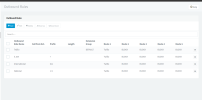
Please how can this be solved. Attached is my outbound configuration as I don't know what is happening.

I need Help on this .....

Thank you
 

Attachments

  • Outbound.png
    Outbound.png
    35.8 KB · Views: 28
Everything you need to know for troubleshooting is in the logs. If calls aren't going out it's because you are either sending them in the wrong format or using the wrong caller id. If they aren't coming in then you don't have your inbound rules formatted properly. Either way the logs will tell you what isn't working.
 
Calls are coming in fine as I have sorted that but for the outbound calls it rings on the 3CX Call App and don't ring on the destination phone. And this is the log:

  • Call or Registration to +1034500969@(Ln.10000@Twilio) has failed. 0.0.0.0 replied: 408 Request Timeout; internal
    SIP Server ID: 12294 07/05/2023 00:13:35
  • Call or Registration to 8034500969@(Ln.10000@Twilio) has failed. 0.0.0.0 replied: 408 Request Timeout; internal
    SIP Server ID: 12294 06/05/2023 21:45:47
  • Call or Registration to 7035399296@(Ln.10000@Twilio) has failed. 0.0.0.0 replied: 408 Request Timeout; internal
    SIP Server ID: 12294 06/05/2023 19:13:58

What can I do?
 
The issue I am having is that the my out going calls rings on the 3CX Desktop App and Webclient meaning it is working but it doesn't ring on phone I am calling and doesn't even reflect any incoming calls on my phone .

Please what must have been the issue as this I don't know why the calls doesn't get to my phone and it is ringing in my Desktop and Webclient.

And this is what my call log is saying:

Date/TimeFromToTalking
07/05/2023 22:27:44A*** (***)7035*******Not Answered
07/05/2023 22:20:48A*** (***)7035*******Not Answered
07/05/2023 22:19:43+2347035*******:Contact Line (+2347035*******)A****** (100)Not Answered
07/05/2023 21:50:11A*** (***)7035*******Not Answered
07/05/2023 21:26:16A*** (***)7035*******Not Answered
07/05/2023 21:25:24A*** (***)7035*******Not Answered
07/05/2023 21:20:59A*** (***)7035*******Not Answered
07/05/2023 21:20:27A*** (***)+2347035*******Not Answered
07/05/2023 21:20:21A*** (***)+2347035*******Not Answered

Please what muse have resulted to this?

Thank You
 
I think you need to work on our outbound rules.

In one example, you are sending +1034500969, which does not make sense, If you send +1, then it is a north American number consisting of 10 more digits, ad the digit after the 1 won't be a zero.

000017035399296... this number has too many leading zeros
0090017035399296... is this a North American number, because the first 5 digits don't make sense
Your provider may want something like...+17035399296 (the + meaning the next digit(s), will be a country code), or simply 7035399296

The issue I am having is that the my out going calls rings on the 3CX Desktop App and Webclient meaning it is working but it doesn't ring on phone
Do you mean that you hear ring-back, and assume it is working, yet the called phone does not ring? That doesn't really mean it is working. Continue to use the Activity log to see if the call reaches, and is rejected by your provider, as they are in the first log you posted. And confirm what format your provider wants to see.
 
Yes I hear ring-back, and assume it is working, yet the called phone does not ring and on my call log it says call not answered.

I have tried it several times and I am getting the same issue saying calls not answer

08/05/2023 04:22:20A*** (1**)703****Not Answered

I am using a North American number to call a Nigerian Number . The North American Number is the Twilio number and the Nigerian number is my phone number.

I don't know if I am missing something
 
What does the 3CX Activity Log show when trying to dial the +234 number?
Does it go though to your provider?
Is it rejected?
Does your provider currently allow you, to place calls to that county code?

In some cases, calls to certain countries, because of a higher cost, are blocked, unless you specifically have that restriction removed.
 
This is the 3CX Activity Log when I tried calling +234 number:

08/05/2023 16:59:06 - Call to T:Line:10000>>+035***@[Dev:sip:10000@+15****@j***.pstn.twilio.com:5060] from L:24.1[Extn:100] failed, cause: Cause: 408 Request Timeout/INVITE from local

This is the 3CX call log:

Date/Time From To Talking
08/05/2023 16:58:34 Ayomi*** M**** (1**) 703******* Not Answered
08/05/2023 16:53:07 Ayomi*** M**** (1**) 703******* Not Answered
08/05/2023 16:40:39 Ayomi*** M**** (1**) 703******* Not Answered
08/05/2023 16:10:29 Ayomi*** M**** (1**) 703******* Not Answered

My provider currently allows me to place calls to that country code as I have removed the restriction. So I don't know what the issue is really and I can't seems to figure it out.
 
These is the message I got from Twilio concerning the issue:

Thanks for the update and explanation.

Incoming calls are tagged as "Trunking Originating" and outgoing calls are tagged as "Trunking Termination".

The SIP trace from your 3CX PBX is not a complete one, However it looks like SIP Invite is timing out in your PBX itself. If your SIP invite is sent successfully to Twilio then for sure we will send either a "100 Trying, 200 OK or 4xx response" but we are not receiving any request from your PBX. And the logs show that "408 Request Timeout/INVITE from local".

Unfortunately, Twilio engineers does not have any control over PBX, and we have very limited knowledge on different type of PBX. I would highly recommend you to please engage your PBX vendor to check why request from your 3cx is failing locally.
-----

How can this be solved please...

I hope this helps. Feel free to write back if you have any further questions. I am here to help.
 
This is the 3CX Activity Log when I tried calling +234 number:

08/05/2023 16:59:06 - Call to T:Line:10000>>+035***@[Dev:sip:10000@+15****@j***.pstn.twilio.com:5060] from L:24.1[Extn:100] failed, cause: Cause: 408 Request Timeout/INVITE from local
If you are calling a number that begins with +234, why does the log show the number sent beginning with +035 ? Anything starting with +0 will be invalid. Are you using the E164 rules in 3CX, or just the outbound rules?
 
Yes I am calling a number that begins with +234 but it showing +035 and I don't know why. Now this is what I got after trying it again from my Event Log:

Call or Registration to +1035***@(Ln.10000@Twilio) has failed. 0.0.0.0 replied: 408 Request Timeout; internal

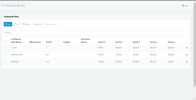
I think I am using the E164 rules in 3CX or is there a special way to use the E164 in 3CX ? please find attached my outbound rules
 

Attachments

  • Outbound rules.png
    Outbound rules.png
    33 KB · Views: 21
Status
Not open for further replies.

Forum statistics

Threads
111,973
Messages
590,071
Members
164,892
Latest member
Phone1stStop