IP blocked for Reason: Block WAN requests is ON but set to allowed?

MPServeline

Bronze Partner
Basic Certified
Joined
Mar 1, 2022
Messages
115
Reaction score
14
Hi all,

I'm getting lots of warnings stating:

SIP request (REGISTER) from xx.xx.xx.xx was rejected. Reason: Block WAN requests is ON.. Message: REGISTER.sip.xxx.3cx.uk:5060 SIP/2.0

The IP referenced is under IP Blacklist with action allow?

Please can someone advise as it seems to be affecting phones at that site trying to register?

Many thanks
 
That happens if your trying to connect the phones over stun and not with an sbc.
 
  • Like
Reactions: MPServeline
Hello MPServeline,

The error is: Block WAN requests is ON

Not something like Blacklisted IP....
I think this is part of the Extension setup:

Admin - Users - {user} - Options - Option - Block remote non-tunnel connections (insecure!)

But than again, please use an SBC as bitn2 did mention!

Paulo
 
  • Like
Reactions: MPServeline
Thanks both, there is an SBC onsite there, I have been advised that the phone we're looking at as well has an IP conflict on the display now after a reboot (Polycom VVX411) so working on that now as suspected unrelated.
1760447270850.png
 
Sometimes happens if the phone SBC is the wrong firmware too or was accidentally not set up as the SBC during provisioning.
 
  • Like
Reactions: MPServeline
Thanks it's on 18.1.3
 
Id double check this phone is provisioned to use the SBC
 
  • Like
Reactions: MPServeline
Thanks, I selected reprovision on it and it dropped out of 3CX so asked them to reboot it and they got the IP conflict so was going to try and find the conflicting device on the network.There was another SBC not showing in the screenshot that was on a server that is now decommissioned so looking at deleting that one in case it might be causing issues although showing as red so assuming not if it's offline?
 
The IP conflict will be a local network problem
 
  • Like
Reactions: MPServeline
  • Like
Reactions: MPServeline
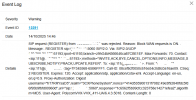
Thanks, looking into the IP conflict at the moment to see what the other device is. Still getting the below come through for that extension (111), unsure if any of the content is helpful to troubleshoot further at all?
1760449912197.png
 
I'll look at upgrading the firmware on the Fanvil V65
 
Sorry the SBC is on the latest version, I read the last one (18) from the Voice & Chat screen going into the SBC

1760450788636.png
 
  • Like
Reactions: MPServeline
Thanks, looking into the IP conflict at the moment to see what the other device is. Still getting the below come through for that extension (111), unsure if any of the content is helpful to troubleshoot further at all?
View attachment 49732
This is an indication of the problem, the Polycom VVX411 of user 111.
I do not think this is related to an IP conflict.

1. Factory reset it so it will stop trying to register incessantly.

2. Delete it from the user 111 and add it again, make sure this time you add it "Connect via SBC" and choose the SBC you want to use. Guide: https://www.3cx.com/sip-phones/polycom-vvx/

3. Do no forget to enable blocking of the non tunnel connections again, do not leave your account vulnerable.

This way the next time the phone registers, it will be via the SBC. You might want to DHCP-reserve the IP address of the SBC device, so that phones will always find a path to the PBX.
 
  • Like
Reactions: MPServeline
Thanks Paulo, I've checked and can confirm it's set to that.
 
  • Like
Reactions: MPServeline
Hi all,

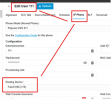
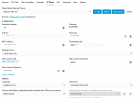
I believe the phone has been factory reset as it seems to have re-registered this morning. I deleted it from the User and re-added it again ensuring that SBC was selected but it still seems to be generating that alert every minute. The IP address conflict has been resolved:

1760605007786.png
1760605076017.png

1760605175356.png

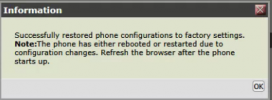
I can't get hold of the end user so have gone on to the phone web interface and done a factory reset through there?
1760606100352.png
 
What if it's not that specific phone that generates this from behind that public IP?

You could always unplug and find out if the messages continue (or leave it in a reset state if you are remote).
 
  • Like
Reactions: MPServeline
I would also add that maybe you can zero in on it from the Event Log message.

REGISTER FROM = Your public IP behind which this phone is making the registration attempt - confirm its from that office indeed.

VIA = The local IP of the device making the attempt (hopefully accurate, since you had conflicts you said). This should be a local IP, conforming to RFC1918 addressing, and using the private range NOT the public range.
 
  • Like
Reactions: MPServeline