Issue integrating 3CX with Bitrix

Status
Not open for further replies.

Gauravdxb

Joined
Dec 27, 2018
Messages
7
Reaction score
0
When i am making calls to 3CX , its not appearing in Bitrix.

I have followed this documentation - https://www.3cx.com/docs/bitrix24-crm-integration/

The Webhook configured in 3CX is sending the response. So this is working properly.

Any suggestions what to do. ?
 
In v15.5 this is what this integration does:
- When an inbound call arrives, the contact will be taken from Bitrix and imported into 3CX Contacts.
- The contact name will be shown as the caller name, no matter the phone you use.
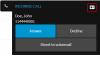
- If you use the 3CX Web Client, a button to open the contact record will also be shown, as follows:
upload_2018-12-27_15-6-17.png

In v16 we're adding new features: call journaling and automatic contact creation when the caller number is not found.

In order to make outbound calls, you need to use the click to call browser extensions:
https://www.3cx.com/phone-system/click-to-call/
 
So , my calls would not be recorded in Bitrix ? also the Bitrix lead / Deal or contact would not open up ? This was the main purpose of choosing 3CX as i though this was possible...
 
Calls will be registered in Bitrix in v16.

And you can open the contact / lead record in Bitrix, by clicking on the button shown in the 3CX Web Client. Also, in v16 this can be done automatically, so as soon as you receive an inbound call, the contact record is poped up immediately without user intervension.
 
Thanks Edossantos for the prompt reply, Any idea when v16 would be released ?
 
Also another question, in the v16 will the call be recorded and saved in Bitrix ?
 
You can try the v16 alpha right away. The final release is expected to be released during Q1 2019...

RE call recordings, no, they will not be included.
 
Hello , I have installed the V16, i dont see the popup coming on Bitrix. Do i need some extra configuration ?
 
You need to be using the 3CX Web Client to get the popup. Is this your case?
 
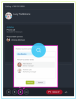
Hi Edossantos, I need a pop up to be coming in Bitrix as per the attached.
 

Attachments

  • Screen Shot 2019-01-07 at 11.49.58 PM.png
    Screen Shot 2019-01-07 at 11.49.58 PM.png
    726.2 KB · Views: 29
That's not how the integration works. You need to be using the 3CX Web Client, and then when you receive an inbound call from a known contact, the 3CX Web Client will open a new browser tab pointing to the contact record in Bitrix.
 
  • Like
Reactions: Gauravdxb
Status
Not open for further replies.

Latest Posts

Forum statistics

Threads
112,324
Messages
591,897
Members
165,475
Latest member
lastshadow