Issues with Jabra Evolve2 55 and 3CX Chrome Plugin – Delayed Microphone Activation

Status
Not open for further replies.

denko2k

Customer
Joined
Mar 20, 2018
Messages
63
Reaction score
6
Hello everyone,

We are currently using 3CX Version 18 Update 9 (Build 20) along with the 3CX Chrome Plugin (PWA) as our softphone. For headsets, we're using the Jabra Evolve2 55 (Bluetooth), UC version, and Jabra Direct is also installed.

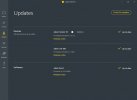
According to our Jabra Direct, all components are up-to-date (see screenshot).

The headset connects correctly with the 3CX Chrome Plugin and generally functions well (see screenshot).

However, we're encountering an issue: When we accept an external call using the Jabra headset, the microphone initially remains muted for about 3 to 4 seconds, meaning the caller cannot hear us at first. After this delay, the microphone volume of the Jabra headset starts very low and then adjusts to a normal level within about 1 second.

This issue only occurs with the Jabra Evolve2 55 headset. The issue only occurs when the headset is connected via Bluetooth. The Bluetooth dongle is plugged directly into the PC. When the headset is connected via USB cable, the problem does not occur. Also, we have not tested other Jabra headsets. Using a budget, wired, non-branded USB headset does not present this problem; the connection is immediately established in both directions.

Has anyone experienced something similar or has a solution for this issue?

Thanks in advance!

Additionally, we have reached out to Jabra support regarding this issue. Once we receive a response, we will definitely share the outcome here. Meanwhile, if anyone in the 3CX forum has encountered a similar problem or has ideas about what might be causing it, your insights would be greatly appreciated.

P.S. Big kudos to 3CX for the Chrome PWA plugin!
 

Attachments
  • Screenshot 2024-05-10 155445.jpg
    Screenshot 2024-05-10 155445.jpg
    108.7 KB · Views: 10
  • Screenshot 2024-05-10 160514.jpg
    Screenshot 2024-05-10 160514.jpg
    43.8 KB · Views: 10
Last edited:
Hello everyone,

We have now tested the 3CX Windows app (3CXDesktopApp-18.13.959.msi) with the Jabra headset, and unfortunately, we are experiencing the same delay issues with the microphone.

However, the following point is interesting and perhaps someone can help us:

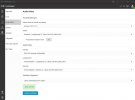
When the "Headset Integration" in the 3CX Windows app is deactivated, the connection setup works perfectly and immediately. However, the call acceptance with the headset does not work in this case, and the mute status is not transmitted to 3CX either.

See screenshot.
 

Attachments

  • Screenshot 2024-05-14 173957.jpg
    Screenshot 2024-05-14 173957.jpg
    23.6 KB · Views: 3
We are also in intensive contact with Jabra support, but unfortunately without any results so far. If a solution emerges, we will definitely post it here. In the meantime, I am hoping for some ideas from the community.

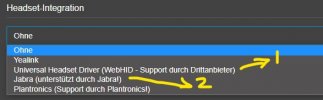
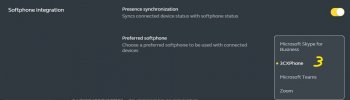
Can anyone explain the difference or the connection between the Jabra integration in the 3CX app (1+2) and the 3CX softphone support provided by the Jabra Direct software (3)?

Additionally, there are two different Jabra entries in the 3CX app:
1) Universal Headset Driver (WebHID) and
2) Jabra.

What is the difference between these and how do they relate to the Jabra Direct software?
 

Attachments

  • Screenshot 2024-05-14 174955.jpg
    Screenshot 2024-05-14 174955.jpg
    26.3 KB · Views: 5
  • Screenshot 2024-05-14 175049.jpg
    Screenshot 2024-05-14 175049.jpg
    25 KB · Views: 5
WebHID is a generic standard integration.
https://www.3cx.com/blog/docs/webhid-headset-integration/
https://www.3cx.com/blog/releases/v18-update-6-release-candidate/
https://www.3cx.com/community/threads/webhid-headset-integration-how-it-works.119133/

Jabra was a Jabra-written driver, as I understand it, added back in some point after 18u6 since it's not listed in the blog posts above.

We have Sennheiser/EPOS (because it was the supported brand back then) and one Yealink now, and are using the Desktop App. I've had other folks here, on occasional-to-rare internal calls, tell me they can't hear me for a few seconds, although I can hear them. I don't recall ever having that issue on external calls. (I'm using a Sennheiser)

re: Bluetooth, just to ask, have you tried playing a sound through it before the call? IOW, is it that it takes a few seconds to link up before transmitting sound?
 
Exactly, with an incoming call: I hear the caller immediately, but they only hear me after 2 to 4 seconds. My microphone is "muted" for that long.

However, if I disable the headset integration in the 3CX app, the connection is established immediately.
 
Last edited:
Without the integration I believe it uses the Windows sound driver directly. Not really an answer, but may help point fingers. As you noted the headset buttons don't work.

Sounds like the main difference between us is that it's persistent for you, and a very small percentage of calls for me.
 
Thank you. For me it is about 80% of the calls.
 
Hello everyone,

the Jabra support has now escalated my case to Level-2 support. It took a few days, and I received the following response:

17. Mai 2024, 15:42 MESZ
Hello,

Your ticket XYZ has been escalated to me.
Please direct all future correspondence directly to me by replying to this email.


I can see that you are experiencing some microphone delay challenges when using the Evolve2 55 with the 3CX softphone. I have spent some time reviewing your case, and from what I see this challenge is only present with 3CX.
I also see that the web-based version of 3CX performs differently than the desktop app version of 3CX.


Another key point I noted is when you disable the headset integration setting inside of 3CX, the delay challenge is resolved but you then lose the call control function. This may be something 3CX needs to look into, as they may have things on their end that could be contributing to how their softphone integration with our headset and call control is functioning.

With the information provided, we do not see this as a defect with our device, as the challenge is not present when testing on other softphones like Microsoft Teams, and the challenge is not present on other tested connections. Also, I would like to clarify, that Jabra Direct is not required to be launched for our headsets to integrate with 3CX.

At this time, we recommend that you reach out to 3CX, as they may be able to better investigate this concern from their end. We certainly welcome you to share any feedback they provide you with, but from the information shared, this appears to be isolated to 3CX not the Jabra headset.
 
@denko2k
Hi there.
Can you please advise if you are still using V18 of the 3CX System? And when you said you tried using PWA and Deskphone app, it was on that version too, right?

Thank you
 
Hi & Thanks.
Yes, we are still using version 18.0 Update 9 (Build 31). We tried the Windows App, as well as the PWA version for Chorme and Edge. The phenomenon is very comparable within every app.
 
Good news is that a New V20 Windows native application use a Jabra SDK that was provided by Jabra (it is not the same as the one in the V18 Deskphone app and PWA), so it should work much better.
If you wish to give it a try on the trial key new V20 and its new application, feel free to do so, and then plan on upgrading your 3CX System.
 
Ok, thank you. Due to issues with our SIP trunk templates (well discussed in that forum, SIP trunks can no longer be edited in v20, but this is another topic), we will have to wait for v20 until the summer. However, I will do a VM-v20-demo in the next few days and provide feedback here.
 
  • Like
Reactions: OlegR_3CX
Perfect, let us know how it goes.
 
Status
Not open for further replies.

Forum statistics

Threads
111,973
Messages
590,078
Members
164,896
Latest member
sameage