l am using 3CX live chat Wordpress plugin and l am unable to configure the Chat Hours

Status
Not open for further replies.

Ramsey555

New User
Joined
Mar 25, 2021
Messages
2
Reaction score
0
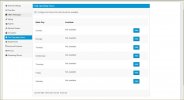
Hello the 3cx WordPress Plugin is phenomenally, great sadly l am unable to configure the chat availability hours despite there being a button that displays ADD,
I am unable to to add the working/active hours for the support agent since when l click Add button it's basically not clickable.
Kindly help
 

Attachments

  • Chat Active Hours.JPG
    Chat Active Hours.JPG
    83.2 KB · Views: 8
I just tried it and had no problem.

Try another web browser.
 
Hello the 3cx WordPress Plugin is phenomenally, great sadly l am unable to configure the chat availability hours despite there being a button that displays ADD,
I am unable to to add the working/active hours for the support agent since when l click Add button it's basically not clickable.
Kindly help
l did try with another browser and it failed.
 
Hi Ramsey555,
there is a known issue regarding that which will be fixed within our next release. It's a conflict between bootstrap js version used by 3CX Live Chat and another plugin or the theme that you have installed on your website.

That's an interface issue so you can proceed to the following steps in order to configure your Chat operating hours.
  1. Switch to a default WordPress theme like twenty twenty
  2. Try to add operating hours.
  3. Switch back to your preferred theme.
  4. If it doesn't work do the same for your plugins deactivating them one by one and try to add operating hours.
 
Status
Not open for further replies.

Forum statistics

Threads
112,149
Messages
590,964
Members
165,170
Latest member
SupportRock