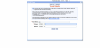
2: outbound proxy should be blank.
Authentication is Do not require - ip based
ID: leave blank
password: leave blank
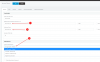
On options tab I have
Allow inbound checked
Allow outbound checked
Disallow video calls checked
PBX delivers audio checked
Supports re-invite checked
Support replaces checked
All other settings I left default
eg: protocol any IP mode any
codec 7.11u-law and g729 You can probably also put in g722 and g711 a-law in case one of their wholesale routes starts to support one of them)
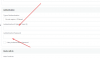
inbound parameters
callednum -> To: User part
caller name -> P-Asserted identity: display name
callernum From:user part
I leave call source identification unchecked.
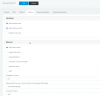
Outbound parameters is something you can play with to get the outbound call display like you want it. Probably not much needs to happen here to get basic functionality working.
From

isplay name for example I set to custom field so I can just type in the caller name I am sending (in canada so the switch will actually send this data unlike in the USA that requires LIDB and CNAM database lookup steps)
So to get an unsupported trunk going you really need to understand the SIP protocol since any problems will but up to you to solve. Get the SIP logs from the Anveo Direct CDR logs to help you through the troubleshooting. Between the CDR logs on their end, 3cx activity log and using the capture option with wireshark to decode the data it's usually pretty simple to figure out where your problem lies if you have the right understanding of how things are supposed to work.