Lost on Anveo Direct Inbound Setup

Status
Not open for further replies.

pbxuser73

Customer
Joined
Nov 27, 2019
Messages
14
Reaction score
0
Hey guys,

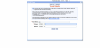
Im trying to get my inbound calls to come to 3CX however Im completely lost. What do I put in destination SIP URL on Anveo?

1583251636499.png
 
That's URI and not URL. They give an example right there. You would put in your 3CX info there. 3CXIPADDRESS:3CXPORT
 
Last edited:
Use:
$[E164][email protected]:5060

The $[E164]$ part is replaced with the DID number the caller was dialling so you do not need to make multiple inbound trunk settings for each and every DID number you have with Anveo Direct.

In 3cx trunks under inbound parameters I map "CallerName" to "P-Asserted Identitiy:Display Name" as that is the header Anveo tells me they use for call display info.

I also set the P-Asserted Identity headers on outbound calls to send the call display info (I'm in Canada so they use the info provided with the call instead of database lookups which is far superior to the USA CNAM lookup system)
 
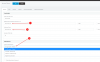
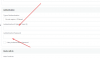
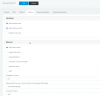
Got it. On teh 3cx system how do I set up the actual SIP for Anveo? That was the second part of the equation I didn't quiet get.

1583304845451.png

1583304869092.png

1583304926432.png
 
Anveo will have to supply the server settings but per your snips, if you chose 'Do not require - IP based' then you don't need a authentication ID or Password
 
This is where it's getting super complicated. They've configs for Asterisk based systems:

http://www.anveodirect.com/about/faq (at the end of the page), however no other info on how to do this on systems like 3CX.

I have setup

  1. $[E164][email protected]:5060
  2. Setup a new SIP Trunk in 3CX with Gateway Hostname: sbc.anveo.com | IP Based Authentication
No calls have been coming in with these settings.
 
So you don't need a trunk defined at all to have calls hit 3CX. You do need it for them to be successful. Does your system pass the firewall check? If you pass the firewall check and you put in the correct information in their trunk details page then you should see something in the activity log at a minimum.
 
@pbxuser73

Since you are trying to connect using an unsupported provider, you may benefit from running a pcap on the PBX as you test the various setting combinations. https://www.3cx.com/docs/capture-network-traffic/

You might also benefit from talking to the provider and getting the necessary documentation from them or better yet, inform them about our interop program so they can be added to our list of supported providers with their own template https://www.3cx.com/blog/docs/voip-provider-interop-explained/
 
@pbxuser73

Since you are trying to connect using an unsupported provider, you may benefit from running a pcap on the PBX as you test the various setting combinations. https://www.3cx.com/docs/capture-network-traffic/

You might also benefit from talking to the provider and getting the necessary documentation from them or better yet, inform them about our interop program so they can be added to our list of supported providers with their own template https://www.3cx.com/blog/docs/voip-provider-interop-explained/

Thanks for your reply JohnS! I did get bit further into my setup. Here are the recent captures from our server:

1583508796532.png

How do we go about getting that 407 Auth required?
 
It looks like you are having issues with Call source identification which means that the PBX cannot match the incoming call to your trunk. The following guide the mechanism the PBX uses to match the call to the trunk. https://www.3cx.com/docs/sip-trunk-inbound-calls/
The first step to do however is to open your trunk settings and navigate to Inbound parameters. Then make sure the "Call Source Identification" option is turned off and try again.

You should also consider switching to a 3CX supported provider to avoid all the guess work with the setup and also be fully supported in case you run into an issue.
 
2: outbound proxy should be blank.
Authentication is Do not require - ip based
ID: leave blank
password: leave blank

On options tab I have
Allow inbound checked
Allow outbound checked
Disallow video calls checked
PBX delivers audio checked
Supports re-invite checked
Support replaces checked
All other settings I left default
eg: protocol any IP mode any
codec 7.11u-law and g729 You can probably also put in g722 and g711 a-law in case one of their wholesale routes starts to support one of them)

inbound parameters
callednum -> To: User part
caller name -> P-Asserted identity: display name
callernum From:user part

I leave call source identification unchecked.

Outbound parameters is something you can play with to get the outbound call display like you want it. Probably not much needs to happen here to get basic functionality working.
From:Display name for example I set to custom field so I can just type in the caller name I am sending (in canada so the switch will actually send this data unlike in the USA that requires LIDB and CNAM database lookup steps)

So to get an unsupported trunk going you really need to understand the SIP protocol since any problems will but up to you to solve. Get the SIP logs from the Anveo Direct CDR logs to help you through the troubleshooting. Between the CDR logs on their end, 3cx activity log and using the capture option with wireshark to decode the data it's usually pretty simple to figure out where your problem lies if you have the right understanding of how things are supposed to work.
 
Status
Not open for further replies.

Latest Posts

Forum statistics

Threads
111,939
Messages
589,844
Members
164,826
Latest member
Ravex comms