- Joined
- Oct 27, 2020
- Messages
- 54
- Reaction score
- 10
Hi,
We are running an on-premise 3CX instance with 115 extensions. We have Microsoft 365 synchronization enabled to allow for SSO.
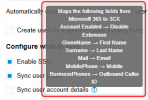
During the initial deployment, we enabled the 'Sync user account details' option. We later disabled it so we could manually edit first and last names directly within 3CX.
The issue we're facing now is that whenever we add a new user, the M365 synchronization does not activate for them.
I opened a ticket with 3CX France support, but their suggested solution didn't work for us. They recommended re-enabling 'Sync user account details' and restarting the 3CX server. However, doing so would overwrite and rename all our existing accounts, which we need to avoid.
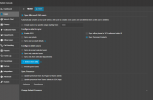
Please find attached a screenshot of our current M365 configuration settings in 3CX.
If anyone has dealt with this issue before, I would love to hear your thoughts!
We are running an on-premise 3CX instance with 115 extensions. We have Microsoft 365 synchronization enabled to allow for SSO.
During the initial deployment, we enabled the 'Sync user account details' option. We later disabled it so we could manually edit first and last names directly within 3CX.
The issue we're facing now is that whenever we add a new user, the M365 synchronization does not activate for them.
I opened a ticket with 3CX France support, but their suggested solution didn't work for us. They recommended re-enabling 'Sync user account details' and restarting the 3CX server. However, doing so would overwrite and rename all our existing accounts, which we need to avoid.
Please find attached a screenshot of our current M365 configuration settings in 3CX.
If anyone has dealt with this issue before, I would love to hear your thoughts!