- Joined
- Nov 4, 2026
- Messages
- 3
- Reaction score
- 1
I'm new to 3CX, I'm building out the system slowly, Have got internal calls working over WAN using physical and soft phones.
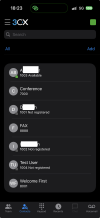
I'm looking at the contacts page on the iOS app which shows the entries listed in the screenshot.
Two problems:-
1. I don't want Fax, Welcome First (Digital Receptionist), Conference listed, how do I hide these and why do they only show up in iOS app and not on my windows contacts, they only show up when ALL is selected, any other option, Company, Personal, CRM, M365, Google, iOS shows no entries at all?
2. Extension 1001 and 1002 are Yealink T42s phones, on the users tab showing registered (Green box) against the user and the associated phone, So why are they showing as not registered on my iOS app?
Screenshot attached.
I'm enjoying the product so far! It's always a fun challenge to get a PBX setup.
Thanks
I'm looking at the contacts page on the iOS app which shows the entries listed in the screenshot.
Two problems:-
1. I don't want Fax, Welcome First (Digital Receptionist), Conference listed, how do I hide these and why do they only show up in iOS app and not on my windows contacts, they only show up when ALL is selected, any other option, Company, Personal, CRM, M365, Google, iOS shows no entries at all?
2. Extension 1001 and 1002 are Yealink T42s phones, on the users tab showing registered (Green box) against the user and the associated phone, So why are they showing as not registered on my iOS app?
Screenshot attached.
I'm enjoying the product so far! It's always a fun challenge to get a PBX setup.
Thanks