


- Joined
- May 7, 2021
- Messages
- 21
- Reaction score
- 6
Hi,
This(like the image below) is what I'm getting during calls from one extension to another extension. After every 5/6 seconds, there is no audio for a couple of seconds. Though irrelevant information but this is the actual recording using Audacity keeping the desktop 3CX app microphone mute and playing music in front of the other extension on Fanvil X7A extension which is provisioned. Both the extension is in the local network. It is happening for both local calls (I've tested every combination of all 3 extensions I have) and outbound/inbound calls. And this started in the last 9/10 days.
Can anyone tell me what could be the issue?
Thanks in advance.
Environment:
3CX installed on Raspberry Pi 4B
Extensions are provisioned locally on Windows 10, Fanvil X7A,
3CX version 18.0.237 (Standard Annual)
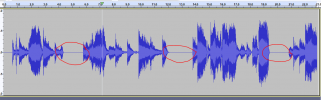
This(like the image below) is what I'm getting during calls from one extension to another extension. After every 5/6 seconds, there is no audio for a couple of seconds. Though irrelevant information but this is the actual recording using Audacity keeping the desktop 3CX app microphone mute and playing music in front of the other extension on Fanvil X7A extension which is provisioned. Both the extension is in the local network. It is happening for both local calls (I've tested every combination of all 3 extensions I have) and outbound/inbound calls. And this started in the last 9/10 days.
Can anyone tell me what could be the issue?
Thanks in advance.
Environment:
3CX installed on Raspberry Pi 4B
Extensions are provisioned locally on Windows 10, Fanvil X7A,
3CX version 18.0.237 (Standard Annual)


