Office hours and DND mode. Alternative options.

Status
Not open for further replies.

MHRAdmin

Forum User
Basic Certified
Joined
Mar 25, 2020
Messages
23
Reaction score
4
We have our system set up to automatically switch during office hours. But it puts all phones in DND mode. This would be fine, especially with people working from home. Unfortunately we have some over zealous sales people who would like to work outside of those hours on occasion.
When the system puts the phones into DND it will not let you go out of DND till this next morning. Then the reps start using their personal lines...... which is forbidden.

Is there a means of making the system do one of the following instead of the behavior above.
Allow the user to take themselves out of DND
Have the system put users into "Away" instead of DND

Only disable the queues instead of all the phones in OOO mode

If it is not possible to do any of these options. How do I get access to the "Ideas page". It says I do not have adequate privileges.
 
Well difficult to give you a specific answer as we don't know what is your usual call flow.
How many line numbers? Is all traffic coming on one main number ? DID's ?
Where is trafic forwarded during OH ? IVR ? Q ? RG ?

Sales wants to work OOH but are they at office or from anywhere? are they using APP on their smartphones?
 
Last edited:
We have 40+ DiDs, most come through IVRs first, followed by "chasing" queues. Others hit an IVR that only connects to the extension or its VMB. I do have one line that runs through a custom call flow.

Because 2020 is a real ^%^#$, a majority of them are working from home using a desktop app or the browser extension.

AH calls still hit their perspective IVRs unless a direct dial number is used. If they are not available calls are either forwarded to their personal VMB, or the group VMB I have set up for each dept. Where calls end up obviously depends on the line they dial in on, and the choices they make in an IVR if they are given ANY choices at all.

However, what impact do call flows have on picking up the phone to make a call? We cannot get out of DND mode AH to place a call.

I realize that I can change extensions to a different set of hours, etc. This however would allow the phones to continue ringing.

It should be as simple as hit button, not available. Inevitably people WILL forget, and calls would slip though the cracks while the extension serenades the spiders at night.

It SHOULD be as simple as, hit button, not in DND. Obviously, it is not that simple.
 
Hi,

Not sure I understood your situation correctly, but an extension in DND is not prevented from making outgoing calls

You should check you haven't enabled " Block Outbound calls outside of Office Hours " under the extension settings, and also "Automatically disable Outbound calls on all Ports outside Office hours" because this will stop the trunks from allowing outgoing calls altogether.
 
  • Like
Reactions: Evolute IT
Also, even in OOO via auto-switch, you should be able to get off DND. I do that regularly.
 
Also, even in OOO via auto-switch, you should be able to get off DND. I do that regularly.

That would be fantastic, ...... if I could replicate that. That is exactly the biggest problem. If auto-switch puts extensions into DND it will not let them come out. Is it possibly a setting i am overlooking?
 
do all user have thata problem or only a few, can it be broken down to the client they use. What are the extension settings/options?
The users with softphone, create be BLF for Status Active, maybe that works (not possible on webclient)
 
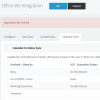
Are you by any chance using Office 365 Calendar Sync?

1607346620624.png
 
do all user have thata problem or only a few, can it be broken down to the client they use. What are the extension settings/options?
The users with softphone, create be BLF for Status Active, maybe that works (not possible on webclient)
All users have the same issue. On my extension I have tried several settings. under Extensions>Extension #>Options>Restrictions I have nothing checked. The issue is still there.
 
Last edited:
All users have the same issue. On my extension I have tried several settings. under Extensions>Extension #>Options>Restrictions I have nothing checked. The issue is still there.
did you tried it with BLF as well?
 
This is not default behavior, wondering if there have been any other 3rd party things added to the instance, or whether this is just a misunderstanding.

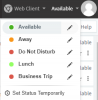
Once your extension auto-switches to DND, if you log into your webclient and click available, what happens?

1607354021685.png
 
This is not default behavior, wondering if there have been any other 3rd party things added to the instance, or whether this is just a misunderstanding.

Once your extension auto-switches to DND, if you log into your webclient and click available, what happens?

View attachment 19470

We have nothing else integrated into the system except for voicemail transcription.

I will try from the webclient tonight when it forces them into DND mode.
 
Status
Not open for further replies.

Latest Posts

Forum statistics

Threads
111,990
Messages
590,161
Members
164,926
Latest member
tohoken1