Perpetual license for previous version (15.5)

Status
Not open for further replies.

Jennings Smith

Customer
Joined
Feb 21, 2018
Messages
5
Reaction score
0
We currently have 2 3CX licenses. One is a perpetual license with active maintenance that we use as our main/primary 3CX server (currently on 15.5). We also have a second license that we used as a failover (also perpetual, version 15.5). Due to a change in how our server was communicating with the internet, the failover would no longer work, so we opted to let the maintenance expire on it as we weren't using it. We thought that since it was a perpetual license, we should be able to use it again in the future if needed.

We now are changing all of our servers to Linux servers (from Windows Server 2016), and wanted to use the second license temporarily while we migrate the primary. I took a backup of our currently active 3CX server, and I installed what I thought was 15.5 on the other server. (I used an older 3CX Debian install disk that I remember making sometime around the 15.5 release). The install went just fine, the backup was restored, but the server must automatically update to the newest version and I can't replace the license from the primary to our failover license.

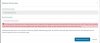
I don't know if this is just because it's version 16, or if because we don't have active maintenance, but it gives us the error shown in the attached image. I can't seem to find anywhere that offers a download of the older version, and even though I'm using an install disk for what I thought was version 15.something, I ended up with a version 16 install automatically. Hoping someone else that has successfully re-activated a perpetual license could offer assistance. We have no partner to turn to as ours went out of business, but we have an IT technician here that is basic 3CX certified and has been managing our install just fine.
10129
 
Hello @Jennings Smith

If you installed V16 i would recommend staying with V16. With your key you have 2 options, you can either buy maintenance so you are able to replace it on V16 or you can trade it in and get an annual key that is free for the first year.
 
Thank for your reply @YiannisH_3CX

The main problem with staying with 16 is that our license is perpetual for 15.5 and we're outside the window to re-purchase maintenance on that license. I don't understand how we can have a "perpetual" license if there is no way to actually get the version that we have the license for. Does this mean that particular license is completely useless at this point?
 
Not sure what's hard to understand. I have a perpetual license for Wordperfect 6 but if I ever lose my floppy disks isn't not going to do me any good. Perpetual license does not guarantee that they will make the installation available to you. Just like you are saving money by not buying maintenance, 3CX is saving money by not worrying about keeping the install files around for you. If you want to make sure your old software versions are still around, you should save them somewhere yourself. That being said the forum is littered with threads on how to downgrade from folks who auto-upgraded to v16. Here's the short version:

Debian:
  • apt-get remove --purge 3cxpbx
  • apt-get install 3cxpbx=15.5.15502.6
Windows:
- https://downloads-global.3cx.com/downloads/3CXPhoneSystem155.exe
 
I understand that it's not their responsibility to keep an installation available, but I have an install disk that is for version 15 (it's the prepackaged 3CX with Debian 9 ISO) and when I installed it it gave me version 16 without even informing me that it upgraded.

I looked through forums, but didn't look specifically for down-grading. Thank you for pointing me in the right direction, though! I'll try the purge and version install commands and see how that goes. I appreciate your help!
 
@Jennings Smith

Gotcha. So that installation disk is basically a stock Debian install with a custom 3CX setup script. The actual 3CX install files aren't on there but rather are downloaded during installation which is why you ended up with v16. You can do a manual Debian install following the guide here:

https://www.3cx.com/docs/manual/installing-debian-linux-pbx/

Just use the 'apt-get install 3cxpbx=15.5.15502.6' line instead.
 
The main problem with staying with 16 is that our license is perpetual for 15.5 and we're outside the window to re-purchase maintenance on that license.
You have a window to buy maintenance for your licence key at the moment so you can upgrade to V16.

but I have an install disk that is for version 15 (it's the prepackaged 3CX with Debian 9 ISO) and when I installed it it gave me version 16 without even informing me that it upgraded.
The ISO provided does come with the 3CX repositories included. The wizard will install the latest version from those repositories. You need to specify the version you want to install with the commands @cobaltit provided
 
So we finally got a chance to try this out today, and unfortunately we still can't apply that license to the version that we installed. Installing version 15.5.15502.6 went off without a hitch, but trying to change the license still gives me the same error as before.

If we look at our license in the customer portal, however, that license says it's for 15.5.0. Would we need to be on that version for it to actually work? Or should that license work for any version of 15.5? I tried doing "apt install 3cxpbx=15.5.0" and "apt install 3cxpbx=15.5" but it wasn't able to find either version.

@YiannisH_3CX you mentioned that we have a window to buy maintenance. I was sure that the window to re-purchase maintenance had expired. However, after looking at our customer portal keys page, it would seem that is no longer the case. If we were to use this license for anything other than holding us over while I transition another server, I might consider it. Thank you for pointing that out.

If we still can't get the "change license key" option to work, would there be any merit to trying to install without a backup and just importing things like extensions and contacts manually? Or is there a way to back up everything other than the license and FQDN information that could work?
 
Status
Not open for further replies.

Latest Posts

Forum statistics

Threads
111,920
Messages
589,743
Members
164,794
Latest member
avmullins