Predictive Dialer calls multiples number at the same time

Status
Not open for further replies.

360 Con

Customer
Joined
Jan 18, 2024
Messages
13
Reaction score
8
Hello,
I just deployed a Predictive Dialer on our 3CX. We were working with a Power Dialer before but we need the flexibility a Predictive Dialer can offer.
I am trying with example data for now. My 3CX console has a new queue, with me as agent. Queue´s extension is also written in the CFD as queue to check for the predictive dialer. I set up my CRM so the data that will be accessed during this test phase are regarding 2 phone numbers : my mobile phone and a colleague's who sits next to me, so I have a chance to see "live" what happens. And what happens is not what we expected from a Predictive dialer:
The first number gets called. If picked up, the second number won´t be called until the first call ends. That´s actually good.
BUT, if the first called number doesnt pick up fast enough (8-10 sec. to be precise) another call will be issued for the second number, having both phones ringing. That´s not what we want. We need the second, or consequent, call to start when we are done calling the first number. In addition to that, if either of the phones pick up while both are ringing, the other one will keep ringing and eventually end up in the WaitingMusic "room".
Am I setting up something wrong here?
 
  • Like
Reactions: Evolute IT
hello,

are you using a database? if yes probably you may have to add a function that updates the status of the call once its dialled and the routine for picking new numbers uses this status to know if its a dialled number or not.
 
A predictive dialer will work better when you have more agents in the queue. In your test, the second call is triggered because the agent is still free. This is less likely to happen when you have more agents. Also, you have the Optimization parameter that lets you control a bit this behavior: you should set it to Callees if you don't want that customers wait on the queue. More information here.
 
Yes, I am using a database and yes, we have already a system that saves already-dialed numbers on another table of the database which gets queried before creating the list of calls to make for a specific agent.

Yes @edossantos. Problem is our agents have queue assigned to them and they should stay that way. They work different hours and have different targets to reach, so having more than 1 agent in the queue is not really useful for us.

We tried yesterday again and had a testing session with one of the agents with actual data regarding calls to make. Predictive dialer meets our requirements better than a power one, but it´s still not at the point that we need and we need to find out why.
During testing with actual data we had a total of 2 aborted calls in the time we spoke to 3 clients,that means that 2 more calls where executed when the agent was talking to either one of the 3 clients who respondend. I am pretty sure that the problem stands on overlapping ringing times. The dialer has 2 numbers ringing at the same time while what we need is :

- Call number 1 and let ring for x seconds
- after x seconds, on ringing end, call number 2 and let ring for x seconds
- after x seconds, on ringing end, ...

Now it seems that number 2 starts ringing 2 seconds or so before the ringing on number 1 is done. That´s what we need to fix
 
  • Like
Reactions: Evolute IT
Well, you will need to adjust the logic in the CFD app. An option could be using a Power Dialer instead, so you can control the number of parallel dialers and the pause between dialer cycles. This way you can be sure that you call the second number after X seconds. You will need to manually check if the queue has the agent logged in, for that you will need to use the Get Queue Extensions or Get Queue Status components: https://www.3cx.com/docs/manual/cfd-components/#h.iu8vhnbz548w
 
  • Like
Reactions: Evolute IT
That sounds feasible, yeah. Sounds like that having the ability to check how much time there should be between every cycle and how many parallel Dialers there can be at any given time, we might be able to achieve what we are looking for.
Give me a couple of days to modify, implement, test and see what it looks like.

Thanks @edossantos
 
So, here we are again with news : some good, some bad. On the good side there´s to say that setting up a Power Dialer to have only 1 Parallel Dialer and giving it an adequate time to pause between each cycle is kinda fixing the problem we had before. Now indeed, before calling a new number, the ringing on the previous one is done and if agent is on a call, no further calls will be executed. Excellent.
But : now we are facing another problem.
Every call made by the dialer that isnt picked up at all by the customer will make anyway Agent´s extension ring and eventually will connect the Agent to the Customer´s voicemail.
Is there a way to just drop the call if it isn´t answered, skipping the part in which the Agent will answer just to find out he´s talking to the voicemail?
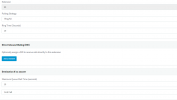
1706123921757.png
Even setting up the queue´s setting to "End Call if no answer" doesnt seem to actually end the call
 
So, here we are again with news : some good, some bad. On the good side there´s to say that setting up a Power Dialer to have only 1 Parallel Dialer and giving it an adequate time to pause between each cycle is kinda fixing the problem we had before. Now indeed, before calling a new number, the ringing on the previous one is done and if agent is on a call, no further calls will be executed. Excellent.
But : now we are facing another problem.
Every call made by the dialer that isnt picked up at all by the customer will make anyway Agent´s extension ring and eventually will connect the Agent to the Customer´s voicemail.
Is there a way to just drop the call if it isn´t answered, skipping the part in which the Agent will answer just to find out he´s talking to the voicemail?
View attachment 39371
Even setting up the queue´s setting to "End Call if no answer" doesnt seem to actually end the call
Voicemails are considered "answered", since something DID answer the call.

However, most voicemails trigger after 30-45sec of ringtime.

Thus, setting the MakeCall timeout to something like 25 can really help avoid some VMs.
 
  • Like
Reactions: 360 Con
Okay, thanks. Ringing my phone, a VM would be triggered after 10 secs. Today we have testing again with actual data, let´s see how that goes. I will keep you updated
 
  • Like
Reactions: Evolute IT
Okay, testing won´t happen for another week, but I think there´s enough material here to come to a solution soon. Should we close as solved? In case I will open another thread?
 
  • Like
Reactions: Evolute IT
Okay, testing won´t happen for another week, but I think there´s enough material here to come to a solution soon. Should we close as solved? In case I will open another thread?
Let us know when you test!
 
  • Like
Reactions: 360 Con
So, we are going ahead with Testing and we are still not where we want to be. We are all a bit disappointed by the overall behaviour, but we made notes and hopefully we can come to a solution.
So:
Well, you will need to adjust the logic in the CFD app. An option could be using a Power Dialer instead, so you can control the number of parallel dialers and the pause between dialer cycles. This way you can be sure that you call the second number after X seconds. You will need to manually check if the queue has the agent logged in, for that you will need to use the Get Queue Extensions or Get Queue Status components: https://www.3cx.com/docs/manual/cfd-components/#h.iu8vhnbz548w
Yes, it does work, BUT, the behaviour of outgoing calls that aren´t picked up within the set amount of time it´s not really a good one.

If I a customer gets called by my dialer and they don´t pick it up, we noticed that 2 scenarios can happen:
1. if the customer has no Voicemail activated on their provider, their phone will just ring indefinetely and if they will ever pick it up then, a voice will warn them that no agent is available. Then hang up.
2. if the customer has a Voicemail set to take over after Y secs, then, the call will result as answered, as suggested by @ConceptsWeb:
Voicemails are considered "answered", since something DID answer the call.
But that´s not ideal either, because at the end of the DialerCycle we will find an amount of "Abandoned" calls in our registry, as many as unanswered called numbers with VM activated. Plus, weirdly, on these VMs a 5 sec message singing the WaitingRoomSong is left.

Isn´t it possible to just END whatever call we are making after X seconds? Like just hanging up on that number?

Call Business XYZ and after the Dialer has been ringing them for X second, just break whatever call there is towards them and go on with Business ABC
 
Isn´t it possible to just END whatever call we are making after X seconds? Like just hanging up on that number?
It should be ending the call after the timeout set in the MakeCall component.
 
is it possible to set the timeout only from the MakeCall component?
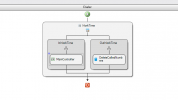
why my dialer looks like this? In the c# code there are all the components and everything but I cant edit them singularly on the CFD
1706802781284.png
I'm now desperate
 
It should be ending the call after the timeout set in the MakeCall component.
Actually not, that timeout is to monitor the outbound call and wait for the establishment. But there is no way to drop it once it started. Usually the SIP trunk drops it after some time.
 
  • Like
Reactions: Evolute IT
Actually not, that timeout is to monitor the outbound call and wait for the establishment. But there is no way to drop it once it started. Usually the SIP trunk drops it after some time.
But it should still return false if the timeout was reached before the call connected anywhere, right?
 
But it should still return false if the timeout was reached before the call connected anywhere, right?
Yes, correct, but the call will not be dropped.
 
  • Like
Reactions: Evolute IT
Status
Not open for further replies.

Latest Posts

Forum statistics

Threads
111,940
Messages
589,845
Members
164,828
Latest member
Vera Lea Kristensen Raage