Solved Public IP Being blacklisted by 3CX- How to know?

Status
Not open for further replies.

varunbhagaloo

Bronze Partner
Basic Certified
Joined
Apr 19, 2021
Messages
31
Reaction score
6
Hey,

I'm installing an instance for a customer, but the system cannot states 'Unable to connect with 3CX License server. Check your network and try again.', and cannot generate SSL info.

The system was previously installed offsite and worked perfectly, but is getting issues to register smartphone extension (Android, iOS) or refresh the licence key information when the appliance is brought to the customer location.

I suspect the public ip is being blacklisted by 3CX as it is a shared ip. Can anyone confirm if the ip is indeed blacklisted?

181.118.35.244
ds4.php
 
Hello @varunbhagaloo

Thank you for posting in the 3CX Community Forums.

It appears that the license key in question is still on a V16. Mobile apps for V16 no longer work.

Please follow the guide on how to upgrade to V18 to upgrade to the latest version and have access to mobile apps again.

Best Wishes,
Monika
 
The system is indeed V18. The forum form did not give me the option to use my customer's correct license key to create this post, I could only choose one of my NFR keys.

The system works perfectly fine at my office, it installs and activates fine with all features working. If I try to install it at the customer, mobile features don't work and a reinstall gives alot of errors related to activation and the system basically installs with zero simultaneous calls.

The IP was just given to us by the ISP, so I suspect it was used previously and blacklisted.
 
3CX Blacklist would prevent you from connecting to other 3CX instances using the Global Blacklist. AFAIK there is no 3CX blacklist to prevent someone from reaching the activation server. I'd take a closer look at the network, make sure there's no proxy/smart firewalls in the path, and using Google DNS on the device you are trying to activate from.
 
The PBX appliance is connected directly to the ISP's router, with nothing in between and it is set to a DMZ. I set the appliance to use Google DNS but there's no change.

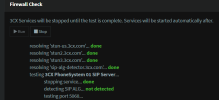
And no, the firewall check does not pass, the port tests never complete. I know in the case of incorrect port forwarding, the firewall test would display the ports that are not forwarded properly, but in this case, the port tests simply do not complete, and no output is given.

The screenshot describes what i'm saying. After 'testing port 5060' it does not say passed / failed. It's just blank. All the other ports (9000.. etc.) are also blank with no passed / failed status.
 

Attachments

  • 3cx firewall.png
    3cx firewall.png
    17.1 KB · Views: 12
Would it matter anything that the ISP is providing a shared IPV4 address? (Using carrier grade NAT)
 
Yes, could be possible that it doesnt work for you. You need a routable IP adress.
 
  • Like
Reactions: varunbhagaloo
I was able to activate successfully. Turns out the ISP's equipment is not respecting the Static IP set for the appliance, it might be a bug in their firmware. Once I disabled static IP and allowed the appliance to pull an IP through DHCP, I was able to activate the instance.


Now the only issue remaining is the registration of smartphone extensions, which I'm guessing won't work with carrier grade NAT or solely through IPV6?
 
You can forget about CG-NAT ever working correctly with an on-premises system. It's a technical impossibility.

Switch to a 3CX Hosted cloud instance (so all your apps can connect from anywhere) and if you have any IP phones at the customer site, you can install our 3CX SBC which will be able to bypass the CG-NAT and allow the IP Phones to work.
https://www.3cx.com/ordering/pricing/hosted-info/


PS: And no, installing an SBC + your Appliance will not solve the issue in case you were wondering - the PBX needs to be in the cloud, outside of the CG-NAT zone. The appliance can still be useful (if it is a PC) since you can convert it to an SBC
 
Thanks John, your reply is much appreciated!

I did end up hosting the instance on cloud and running an SBC onsite and everything works perfectly. I was even able to get my FXO gateway connected and making / receiving calls just like if the appliance was onsite.
 
  • Like
Reactions: JohnS_3CX
Excellent news @varunbhagaloo

We can mark this one as solved then ;)
 
Status
Not open for further replies.

Forum statistics

Threads
111,974
Messages
590,081
Members
164,899
Latest member
mazet