SBC keeps registering and then failing

Status
Not open for further replies.

RHopkinson

Bronze Partner
Basic Certified
Joined
Mar 31, 2019
Messages
84
Reaction score
15
We have a customer with an SBC on a Raspberry Pi that was working for months, but they called in yesterday morning and reported that the phones were not working. We found that the SBC was registering OK then failing to register about 30-33 seconds afterward, reregistering about 28-40 seconds after that, and then repeating the cycle, even though we get constant replies from pings to the SBC and can SSH into the device without issue. We rebooted the SBC and the hosted PBX but the problem persisted. Nothing in the event logs except the following repeating items:

Trunk SBC 'hqsbc01' (96.76.73.17/192.168.2.15) has changed status to Up
SBC / Tunnel ID: 4102 05/17/2022 11:27:08 AM
Trunk SBC 'hqsbc01' (96.76.73.17/192.168.2.15) has changed status to Down
SBC / Tunnel ID: 4102 05/17/2022 11:27:03 AM
Trunk SBC 'hqsbc01' (96.76.73.17/192.168.2.15) has changed status to Up
SBC / Tunnel ID: 4102 05/17/2022 11:25:30 AM
Trunk SBC 'hqsbc01' (96.76.73.17/192.168.2.15) has changed status to Down
SBC / Tunnel ID: 4102 05/17/2022 11:25:18 AM

We figured it might be bad hardware, so we deleted the old SBC, created a new one, replaced the Pi hardware, reformatted the SD card, and installed the 3CX SBC software anew. The problem is still occurring. Nothing else in the network (at least on our side of the ISP's CPE) has been changed. Any ideas what would be causing this?

Thanks,
Russell Hopkinson
Professional 18.0 (Build 461)
 
Last edited:
faulty port?

As a test, install the SBC on a Windows PC and see if it stays up.
 
I considered the port, but we're getting consistent sub-millisecond replies every second on the pings.
 
Do you still have the old SBC? Plug it in somewhere else (not in that same office/internet) and see if it has the same issue. Sounds like the internet connection or the path between that office and where ever 3CX is.
 
  • Like
Reactions: JohnS_3CX
This doesn't directly answer your question, but normally SBC Down events take a few minutes...IIRC the check is every 5 minutes (as opposed to it waiting 5 minutes). Up events are immediate. The distinction being, a random Up is usually a momentary connection loss. So, Down implies longer connection breaks.

Try pinging in to or out from that office 1000 times, preferably from the SBC since you have SSH.
 
Last edited:
So this is interesting...pinging an external IP (8.8.8.8) from the SBC yields about 50% packet loss, even though pings to the SBC are 100% good. However, packet capture on the inside and outside interfaces of the firewall shows the pings going out and coming in--even when the SBC is not recording receipt of the sent packets. We're going to configure another SBC from scratch in our test environment (after creating an internal network with the same IP addressing scheme and DG) and monitor it for an hour or so. Then we'll move it to the customer site if all seems OK. If the same issue recurs, we know it has to be something with their network. I'll post the results.
 
pinging an external IP (8.8.8.8) from the SBC yields about 50% packet loss, even though pings to the SBC are 100% good
That is odd. Is its gateway correct? (not an asymmetric routing issue?)
 
As an update, we configured a new SBC in our office and it maintained registration for over 10 minutes before we shut it down and shipped it to the client. After plugging in the new SBC, it is exhibiting the same symptoms as the others, and it definitely has the correct IP, gateway, and DNS info. We are now turning our attention to the firewall, ISP CPE, and switch. Even though we know that it's not an issue with the 3CX SBC or PBX, I'll keep updating this thread as we progress (in case anyone here is interested).
 
  • Like
Reactions: JohnS_3CX
As an update, we configured a new SBC in our office and it maintained registration for over 10 minutes before we shut it down and shipped it to the client. After plugging in the new SBC, it is exhibiting the same symptoms as the others, and it definitely has the correct IP, gateway, and DNS info. We are now turning our attention to the firewall, ISP CPE, and switch. Even though we know that it's not an issue with the 3CX SBC or PBX, I'll keep updating this thread as we progress (in case anyone here is interested).
Some firewalls may be a little too "trigger-happy" with terminating connections. The packet loss may be a result of this.

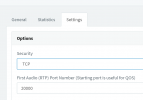
Also, some have SSL inspection which might mess with TLS traffic. You can try switching it to TCP mode, and reprovisioning it to apply.
1652950827183.png

If the connection stops dropping, you can at least start pointing the finger at SSL inspection, and investigate in that direction via the CPE and firewall settings.

I am assuming you are using our latest SBC version, 18.1.36 (if not please upgrade before you do any other testing).
 
I really doubt it's the firewall (I know, "it's always the firewall"), but this setup has been working fine for months and no config has been changed. We are on 18.1.36 of the SBC. I doubt it's the switch, because connections between other devices would be experiencing issues, and we've tried different switch ports. I did get another piece of the puzzle this morning, though: someone drove a rental truck into a utility pole last weekend, which knocked power and Internet out to the site, so we're now turning our attention to some malfunction or changed setting on the ISP's CPE. Before we reach out to them, is there anything like a port not allowed, SIP setting, etc. that would cause this behavior that we should specifically ask them to check?
 
Before we reach out to them, is there anything like a port not allowed, SIP setting, etc. that would cause this behavior that we should specifically ask them to check?

Nope. The only requirement is don't block outbound tcp traffic (which would cause it to stop working entirely).
 
I'm very happy to report that the issue is resolved. We configured a low-end router with the internal 192.168.2.x network, disconnected the firewall (which disconnected the rest of their internal network) from the ISP's CPE and connected the router. We initially saw the Internet bouncing up and down, but it settled down after a few minutes. We then connected the SBC to the router and it stayed up and registered without issue. We then unplugged the router, plugged the firewall back in to the CPE (reconnecting everything in their internal network) and plugged the SBC back into their core switch. It has been happily running without issue for 12 minutes now.

I am not 100% sure of what happened here or why, but unplugging stuff from the ISP's CPE and then plugging stuff back in resolved it. Anyway, reiterating that this 100% not the fault of the SBC or PBX, but rather some weird networking/device issue. Thanks to all for the replies and suggestions.
 
You unplugged patch cables, or power, from it? It's rare but I've seen routers get stuck at 100% CPU usage for some process, which messes with latency.
 
You unplugged patch cables, or power, from it? It's rare but I've seen routers get stuck at 100% CPU usage for some process, which messes with latency.
Just patch cables. We never disconnected power from the ISP's router.
 
Did you ever check the port status on the WAN uplink? I know with AT&T out here we when you have ports set to auto-negotiate they will link at 100M half duplex which will crap cause problems on the upload and we have to force the port to 100M full. Wondering if the port speed/duplex changed when you unplugged/replugged.
 
Did you ever check the port status on the WAN uplink? I know with AT&T out here we when you have ports set to auto-negotiate they will link at 100M half duplex which will crap cause problems on the upload and we have to force the port to 100M full. Wondering if the port speed/duplex changed when you unplugged/replugged.
Never checked the port config on the firewall, although it is currently set to 1000 Mbps - Full Duplex. I guess it's one of those things where we'll never know for sure. I hate those things.
 
Glad to hear the situation has improved, but keep an eye out for a few days since we didn't find anything too apparent.
 
Status
Not open for further replies.

Members Online Now

No members online now.

Forum statistics

Threads
111,831
Messages
589,277
Members
164,660
Latest member
RJenkinsROCK