Transcription for Voicemail on 3CX V20 - Pro, or Enterprise only?

Status
Not open for further replies.

sravasti

Customer
Joined
Dec 11, 2023
Messages
5
Reaction score
2
I am on a hosted install, PRO license, and configured Transcription via Google with the old method (using this documentation: https://www.3cx.com/docs/voicemail-transcription/). It worked fine on V18, update 9 .

Today I upgraded to V20, and proceeded to follow the documentation (https://www.3cx.com/docs/manual/google-speech-api-v2/) for Google API V2.

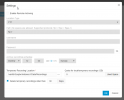
I hit an obstacle at the final step of configuring 3CX. Under step 5 item 4 says: "Select the option “Enable Transcription to automatically transcribe a Voicemail or a Recordings to text.” However, that option is greyed out and the hover tip says "Available in Enterprise only"

I've left two voicemails that were emailed to the user with audio file, but there was no transcription.

Everything else appears to be configured correctly - I was able to upload the json key and the bucket name populated in the 3CX window. On the Google side, I see that there was an authentication to the service account, but no subsequent traffic. I do not see any objects in my bucket. I don't see any errors under bucket "observability," only traffic that seems to be from me querying the bucket via the cloud console interface.

So - is "enable transcription to automatically transcribe voicemails or recordings to text" really only for Enterprise? Isn't voicemail transcription a feature of PRO? Or, is it likely a different issue?
1702340042199.png
 
Ran into the same thing just now. I'm guessing/hoping, but since this is still not full production yet, that someone coded the version check wrong and the next release will allow us to enable it for Pro. The alternative is that they removed a pretty crucial feature with, as far as I can tell, no notice.
 
  • Like
Reactions: sravasti
Hi Team
This is a bug. Should be in PRO and ENT.
Will be adjusted in the next update. Thank you so much for reporting.
 
@nikolascx I noticed that Voicemail Transcription in v20 requires Remote Archiving using Google Storage. This is a significant change from previous versions where only a Google Cloud Speech to Text API key was needed - especially where we are supporting dozens of systems using the feature. Please consider an option to utilize an API only method for voicemail transcriptions - according to Google the v2 API should only require the addition of an AutoDetectDecodingConfig message.
 
  • Like
Reactions: sam.phillips
@nikolascx I noticed that Voicemail Transcription in v20 requires Remote Archiving using Google Storage. This is a significant change from previous versions where only a Google Cloud Speech to Text API key was needed - especially where we are supporting dozens of systems using the feature. Please consider an option to utilize an API only method for voicemail transcriptions - according to Google the v2 API should only require the addition of an AutoDetectDecodingConfig message.
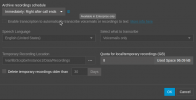
The reason for the bucket is to avoid the 1-minute file limit. When posted to GBuckets, the API can transcribe the whole file.
 
@ConceptsWeb that makes sense for call recordings, but not as much for voicemail transcriptions. There is also a note in the 3CX Google Speech API v2 document that voicemail is still limited to 1 minute - but it does say "...3CX does not yet have the capability to Archive". I have v20 setup as described and voicemails stop transcribing at 1 minute.

It sounds like 3CX intends to move the voicemails at some point to archive so the entire vm can be transcribed. That's good, but it will require manually touching each upgraded v18 system after the upgrade.

I also have a related issue where we use SFTP for remote archiving of call recordings. If we need voicemail transcription on those systems, the current v20 configuration will require we move call recording archives to Google Storage. Some of our clients require 7 years of call recording retention, so this is not an insignificant issue as there will be cost and migration considerations.
 
  • Like
Reactions: sam.phillips
@nikolascx I noticed that Voicemail Transcription in v20 requires Remote Archiving using Google Storage. This is a significant change from previous versions where only a Google Cloud Speech to Text API key was needed - especially where we are supporting dozens of systems using the feature. Please consider an option to utilize an API only method for voicemail transcriptions - according to Google the v2 API should only require the addition of an AutoDetectDecodingConfig message.
Not only this, it now requires referencing a Google project with enabled Speech Service in all requests sent to the engine, the previous standalone "billing key" is not supported anymore.
 
  • Like
Reactions: Evolute IT
@accentlogic
Yes it is technically possible to have a "small" Google project just for the sake of transcribing and billing, but this needs more time to implement.
 
Was wondering why speech to text was not working after upgrading to V20 from the link below this it suggests that we have to use Google Storage, but we use SharePoint?
https://www.3cx.com/docs/manual/google-speech-api-v2/
This worked in V18 just fine with transcription on Google and storage in SharePoint is this a planned development for final release?
 
  • Like
Reactions: MHedish
Hi Team
This is a bug. Should be in PRO and ENT.
Will be adjusted in the next update. Thank you so much for reporting.
Thank you for confirming that this is a bug.
 
  • Like
Reactions: technigogo
@accentlogic
Yes it is technically possible to have a "small" Google project just for the sake of transcribing and billing, but this needs more time to implement.
@ivank Thank you. IIRC a project was needed to enable Speech To Text API v1, but maybe that was a step I had done that was not necessary. A google project and API keys that can be used for many vm transcription instances would be appreciated and simplify setup for most users that don't need to transcribe call recordings, even if it means a 1 minute limit.
 
Hi Team
@accentlogic
Yes previous implementation stopped at 1 minute. We used it for round about 2 years now and Google came with a new version.

We upgraded to google buckets v2 to remove this limitation and also keep up with the latest and greatest api from Google Speech.
The change is a 10 min investment so you spend 10 min now, and all voicemails and all content will be transcribed. Fire and forget.
It sounds like 3CX intends to move the voicemails at some point to archive so the entire vm can be transcribed. That's good, but it will require manually touching each upgraded v18 system after the upgrade.

Yes - you are right. But we cannot keep the product behind because of manual work that would need to be done on site. Otherwise we will never made progress.
Google cloud API devs did not take this into consideration either. They did not keep the API the same to save me from coding and updating my installs. We had to update. Everyone needs to make a move. The migration does not happen automatically.

1702445347825.png

Also we cannot have one API v1 that transcribes voicemails and another one v2 for recordings. 1 API > 1 move forward.
Looking at previous Google API patterns, that v1 does not have much life remaining. So we better make the changes now because that will be shot down and discontinued soon.

To conclude, we are investigating other cheaper, cooler and full AI driven transcribers. This part is going to be fun. Let's keep in touch on this topic because the innovations in this area of transcription are very intriguing.
 
@nikolascx Thanks for the detailed reply. I've heard some about the coming AI in Tampa and very much looking forward to it. We only sell 3CX based solutions, so I'm with you.

I understand we'll have to setup a new project for each client and make the storage change and reconfigure the API, but it's more than 10 minutes. We need to do this on all of our hosted systems and will need to set and maintain new permissions for our staff on each project and we cannot schedule these upgrades to occur overnight as we do now.

I also have a lot of clients using SFTP for storage of call recordings, and all of them will need to be migrated from SFTP to buckets so they can keep voicemail transcription. This is really my biggest issue and why I had the idea of using two API v2 keys - one for voicemail and one for recordings. It was just an idea to more seamlessly migrate the existing installed base and facilitate an easier solution for those that simply need voicemail transcription.
 
@nikolascx Thanks for the detailed reply. I've heard some about the coming AI in Tampa and very much looking forward to it. We only sell 3CX based solutions, so I'm with you.

I understand we'll have to setup a new project for each client and make the storage change and reconfigure the API, but it's more than 10 minutes. We need to do this on all of our hosted systems and will need to set and maintain new permissions for our staff on each project and we cannot schedule these upgrades to occur overnight as we do now.

I also have a lot of clients using SFTP for storage of call recordings, and all of them will need to be migrated from SFTP to buckets so they can keep voicemail transcription. This is really my biggest issue and why I had the idea of using two API v2 keys - one for voicemail and one for recordings. It was just an idea to more seamlessly migrate the existing installed base and facilitate an easier solution for those that simply need voicemail transcription.
You can keep this under one project. Create a bucket and a service account for each client. Limit the service account to only the client's bucket.
 
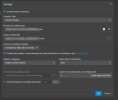
Okay so in the latest edition, which is a PRO 16SC license. We don't see the transcription setup even. Did this get completely removed? or moved and not yet documented.

1708539463329.png
 
Okay so in the latest edition, which is a PRO 16SC license. We don't see the transcription setup even. Did this get completely removed? or moved and not yet documented.

View attachment 39851
I saw that it has to be stored in a google bucket, so until you set that up, likely won't show.
 
  • Like
Reactions: Evolute IT
It is showing up (after selecting Google storage) and working for us on Version 20.0 Update 0 (Build 1609 Beta)

Screenshot from 2024-02-21 11-42-20.png
 
I see this now! Thank you so much, however its a bit odd I have to enable Remote Archiving of recordings for voicemail transcription. These features should be separated. Most of our customers want VM Transcription but don't do recordings.

Unless I misunderstand and there is nothing different than before other than it needs a private key (JSON) vs the API Key.
 
I see this now! Thank you so much, however its a bit odd I have to enable Remote Archiving of recordings for voicemail transcription. These features should be separated. Most of our customers want VM Transcription but don't do recordings.

Unless I misunderstand and there is nothing different than before other than it needs a private key (JSON) vs the API Key.
My understanding was that the remote archiving of recordings is needed so that the Google speech-to-text API has access to the audio to actually do the transcription. It doesn't look like the recordings are actually saved in the Google Cloud Bucket after transcription.
 
Unless you are using Google for recordings there is no longer an option to use transcription using the split modalities as was available in V18.
For example, users using SharePoint in V20 for recordings are no longer offered the split configuration as they were in V18 and will have to wait to upgrade until they either restore the split option or they deploy other transcription engines like Copilot as @Nick Galea has suggested in other post... We have customers that will be held back because of this so we are hoping for a solution sooner than latter...
 
Status
Not open for further replies.

Forum statistics

Threads
112,274
Messages
591,616
Members
165,387
Latest member
Jeff_MKC