Update 6 Alpha - The Next Generation 3CX!

Status
Not open for further replies.
Where is the option to set up a supported phone as an SBC? I am on 18.0 Update 6 (Build 861)Version and I have a SIP-T54W on firmware version 96.86.0.74 and I just can't seem to find it in the admin panel or the web client. Any direction would be appreciated, thanks!
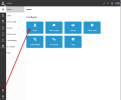
This is done via the Web Client Admin panel. Give your self admin rights, log into your web client and go to your users.
When you add an IP phone to a user, you will have the option for a Router Phone
1670312520855.png

1670312582149.png
 
Hello, i see that a lot of new features are implemented and welcomed. And that's great 3cx still improve.

Unfortunately, i don't see any explanation about the new provisioning method, especially with the provisioning link changing for each device which will only cause harder deployment. Some may think that physical devices are now useless but we are working with a lot a paramedic associations who have those physical device "in case of".
That decision alone remove the usage of DHCP Option 66 for on premise installation and complicates even the migration from other PBX currently having SIP Phones (Snom, Yealink, Aastra which will work on 3CX) to 3CX...

Is that a bug or a "feature"?

Having this feature for STUN only why not, but keeping it for LAN... (i know, LAN and other prov methods doesn't matter since 3CX will be open on the internet).
 
There will be changes for - of course we will update our rps server to allow for mass provisioning of phones. Give us a little more time. Meanwhile you can use old way.
 
@Connexium - Thanks for the heads up, nice to hear!
@MidiTélécom - Thank you for the nice words - group membership and more display improvements will come to the web client, the management console will be reserved for just a number of more advanced matters. All new style management and new features will be from the web client.
@Brian Buell - Thanks! Re reports - yes certainly this will be something we look at when we revamp our reporting next year....
@CentrexJ - Good to hear we are looking for SBC on the phone feedback as its completely new - from 3CX side but of course also phone vendor firmware side.
@ConceptsWeb - We will check...
You said that the reports will be revamped next year, which is something that has needed to be done for a while. Do you know when this will take place and can you offer some insight into the changes that will be coming?
 
  • Like
Reactions: SDG1990
  • Like
Reactions: JohnS_3CX
@Nick Galea Having a play with the U6 on our demo system. Not sure if this is the place to post bugs or not.

I updated this from U5 but the welcome email that are sent for users doesn't have the email address in it.
The old welcome email refers to %%EXTNUMBER%% and the new one %%LOGIN%%. But both of them on our demp system show the extension number in the welcome email.

Another thing i found, might just be a alpha thing or something i've missed. With the Group Owner membership. When i select this I can see all of the groups admin settings such as users and groups. But I can no longer set status for other users. I get this is becuase the default owner group has this unselected..
Generally the owner of a group will be a valid user that takes calls and uses the system like normal. Plus then also does the admin on the system.
But as we can't edit the new groups or add a user to multiple groups memberships im not sure how this is supposed to work.
As how would you add a user to Group owner and also have them change users status without 2 separate accounts?
This is also the case for Group administrator,system owner, system admin. It fixes the admin side of things but you can't even park or intercom when your this membership.

Hope this makes sense.

Thanks
 
@Nick Galea
Please clarify the phone provisioning changes in U6 and going forward. Our environment is an on-premise install, all physical devices on the same LAN, with split-DNS configured, using the FQDN for the provisioning URL in all cases.

Also @cdesbouche-acp

We will continue to support DHCP 66, just in update 6 it has been locked down for security reasons but we will make an option for you to use it again, although you have to really lock it down using your firewall....
 
Looking good :)

I hope we se "Department" and "Skill" fields options under "Users" soon
 
Last edited:
It will be great also added to Desktop Client App ability to choice User Desk Phone from Virtual Dallier window .
At this moment Dallier has two option , Use for talk Mobile App or Desktop App but already configurate IP Desk phone are missing from choice . This is a small but important feature for users who prefer Dial a number on Desktop app But talk on the Desk phone
 
We are seeing the ip desk phone on our dialer with U6 alpha:
3cxdialer.png
 
  • Like
Reactions: tronic and Knight!
It will be great also added to Desktop Client App ability to choice User Desk Phone from Virtual Dallier window .
At this moment Dallier has two option , Use for talk Mobile App or Desktop App but already configurate IP Desk phone are missing from choice . This is a small but important feature for users who prefer Dial a number on Desktop app But talk on the Desk phone
This works on supported phones. What model / firmware version were you using?
 
Cisco SPA series phones - this is not supported, they are legacy phones so it won't appear

Grandstream - This should work for supported GXP and GRP phones, give it a go and if not let us know
 
  • Like
Reactions: Knight!
Hi there. It seems this U6 broke my twilio sms. I made a post on this under the SMS area here. Just would like to get this looked into or for help. I miss our SMS ability that worked so well under the U5.

Thank you

Doug Holcombe
 
We will continue to support DHCP 66, just in update 6 it has been locked down for security reasons but w

Hello @Nick Galea and thanks for the answer.

Ofc option 66 will still be used since phone are using it. I just really hope we can still set up a unique option-66 URL for a whole client on his own DHCP (at least for LAN). Otherwise, adding physical phones will become a nightmare :).
 
I see to be missing the voice and chat option to setup SMS on my instance. I'm hosted.
 
I've had a play with the alpha and am really encouraged by a lot of what I'm seeing. I have one or two questions/comments about future plans though.

  • Is there any plan to associate DIDs with a group for timings and holidays, but still allow it to have its own call routing (ie to its own DR/RG etc? For example a car yard with a sales number and a service number, each going to a different IVR, they'd be associated with the same group, but the only way I could see to handle this at the moment would be to create a group for each to handle routing.
  • Is there a plan to set up holiday specific routing and messages for groups? I might be wrong but it appears at the moment that they're sent to the out of office rule.
  • I understand that an SBC is the preferred method of remote connectivity, and really appreciate the work that 3CX and the vendors have put into simplifying getting these on site with them being built into phones. I would strongly ask that Direct SIP capability not be removed however (even if 3CX stops supporting it), as we have a few deployments where installing an SBC isn't as simple, like retail chains where the only device on each site is a DECT base and handset for example, or WFH situations where a staff member has been given a low cost handset for their home office.
 
Hello All,
I have been experimenting with new Alpha update and im a happy with these group changes.
Not sure if this has been mentioned yet but when i setup routing on a group level and assign a number to it from the webclient, i can see it has made an inbound rule in the management console but the routing on the trunk level doesn't match what the inbound rule shows.
The routing still works but its confusing when the truck says its going to extension system admin but the inbound rule says its goes to the group.
Is this a bug?

Also with all these changes to the groups is there now an actual group voicemail setup? What i mean by this is sending calls to a group and being able to upload your own audio file. Everyone in that group gets the voicemial on their phone and if someone listens to it the notifications disappears for everyone else?
The existing "group voicemail" setup by sending calls to a ring group where a defaut message plays and then sends an email to all members just isn't viable.

Also with the new user roles. I can select a user to be a group owner and enable management console access but not allowing the access to edit the SIP trunks but even with these settings the user can still edit the trunks from withint the webclient. Am i missing something here or is this a bug?
 
Last edited:
Status
Not open for further replies.

Latest Posts

Forum statistics

Threads
111,973
Messages
590,075
Members
164,895
Latest member
jasonkkrause