V18 Alpha 5: New Native Desktop App

Status
Not open for further replies.
Bug : screensharing not working in the desktop app

When you click it's not working inside the electron app, whereas it works in chrome
This is a known issue currently and will be addressed once it becomes final v18. It is a permission thing, if you use it in chrome directly all is okay...
 
If the "new, more modern" interface is retained, is it at least possible to move the "Q" button back to the header and make it available from anywhere? This is elementarily important in customer service!
 
I have noticed that my sites/customers that are running 3CX V16 on Raspberry pi 4's currently don't have the option coming up to upgrade to the v18 alpha build. At the moment is not an issue as I would not put a customer onto an alpha build anyway. What I would like to check is that when the official V18 build comes out the upgrade option will be available on theses sites?

all my other sites that are not using pi 4's including ones on a raspberry pi3's are showing the V18 Alpha upgrade.

Thanks.
 
Hello,

Currently using the new V18 desktop app on Windows with my Jabra Bluetooth headset. Seems to run great, good audio quality etc. However, the buttons on the headset to pick up or end the call don't work. I would think: Jabra integration. But at the same time, I think: isn't this basic bluetooth functionality? Perhaps it still needs to be allowed inside the app?
 
Hello,

Currently using the new V18 desktop app on Windows with my Jabra Bluetooth headset. Seems to run great, good audio quality etc. However, the buttons on the headset to pick up or end the call don't work. I would think: Jabra integration. But at the same time, I think: isn't this basic bluetooth functionality? Perhaps it still needs to be allowed inside the app?
Currently Jabra integration is not supported.
 
  • Sad
Reactions: Colorian
Not sure if this has been asked already but will the upgrade from 16 to 18 require an admin to manually upgrade or will it upgrade with auto updates enabled?
 
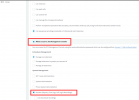
We hope that the specific extensions can generate the call reports, then we set the extension rights like this:
extension settings.png

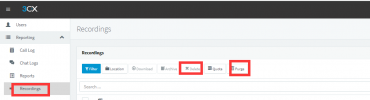
After that, the specific extension logins the 3CX management console, in the recording page, we find two options(purge and delete), and they are not safe for all the recording files.
recording files.png

Can we stop the extensions using two options? or can the extensions just manage its own recording files?
 
Just recently updated to v18 a5
I can send MMS but when i receive mms, it just shows up as a blank grey text.
Anyone else getting this with MMS and telnyx? Please see picture attached.
 

Attachments

  • Screenshot from 2021-06-25 10-52-25.png
    Screenshot from 2021-06-25 10-52-25.png
    7.7 KB · Views: 19
Just recently updated to v18 a5
I can send MMS but when i receive mms, it just shows up as a blank grey text.
Anyone else getting this with MMS and telnyx? Please see picture attached.
It works for us. Have you cleared your cache? The webclient changed a lot.
 
Can you please add full contact sync to deskphones and DECT phones and not just mobile number. This is such a show stopper.
We have lost some projects because of this. Customers need this. Not everbody can use 3cx app in a business environment esp. industry customers.
 
I cannot find screen sharing in the renewed video conference. Not ready yet? Or did I miss it? I can only find remote control via the plugin
 
I cannot find screen sharing in the renewed video conference. Not ready yet? Or did I miss it? I can only find remote control via the plugin
FIrst, it works only if you're trying to remote into a Windows machine.

Secondly, the way to use it in V18 is via Participants > (right-click the user) -> Remote Control.
 
  • Like
Reactions: VoIPTools
So I (as presenter) can not presenr,only remote control?
 
Hello, reading all previous comment on future V18 webclient change, seems although giving anxiety to lot of people.
Why so much change? we don't need you reinvent the wheel each time .
When users are familiar with daily use actions, why giving new stress to search where vanished the function ,and lose time.

I'm not a big fan of Microsoft products with perpetual OS interface change, where your skills are always lost at each update and need time to retrieve where previous easy access feature went in the new labyrinth presented as better as it was , please 3CX don't follow their way, and when something is majority loved, then keep it as is. Thanks.

Really few end users are geek and asking for perpetual change to have something new to discover, most want to work with ease and without thinking all the time how to do things they knew previously.

This comment is not for a fight or irrespect to 3CX, just to say product is loved and just try to improve it without making a revolution :)
 
On V18 web conferencing has the active video feeds been increased? and if so what is the new limit?

Thanks :-)
 
I have setup a test video meeting in V18 and found that on the new windows app it has only giving the meeting link as the IP address of the phone system instead of the fqdn but on the Web client it has correctly listed the FQDN.
(the outlook .ics calendar entry has listed both)

Is there a setting on my system that I need to update or is this something that is being fixed in the next release?
The system is installed on premise.

Thanks.
 
Status
Not open for further replies.

Latest Posts

Forum statistics

Threads
111,982
Messages
590,116
Members
164,908
Latest member
FarizQasimov