- Joined
- Oct 12, 2020
- Messages
- 263
- Reaction score
- 29
Afternoon all,
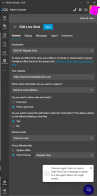
I hope this is a relatively simple fix. We have Live Chat on our website. At first, it was just going to one person. Now bosses want it to go to a group of 3 people. Each person is available at different times throughout the day, and week. Usually there is one person who covers 80% of the office ours, and the other two are sporadically available. When it was just the one person, when she went to lunch or left for the day, the system just told people no one was available. Now, all three can be DND or Away and it still rings.
We have set office hours globally, but how do I make it aware when the members of the group are all away from their phones?
I hope this is a relatively simple fix. We have Live Chat on our website. At first, it was just going to one person. Now bosses want it to go to a group of 3 people. Each person is available at different times throughout the day, and week. Usually there is one person who covers 80% of the office ours, and the other two are sporadically available. When it was just the one person, when she went to lunch or left for the day, the system just told people no one was available. Now, all three can be DND or Away and it still rings.
We have set office hours globally, but how do I make it aware when the members of the group are all away from their phones?
Last edited: