- Joined
- Mar 25, 2022
- Messages
- 2
- Reaction score
- 1
Hello,
we have two users, that use a Yealink W60B DECT behind an SBC.
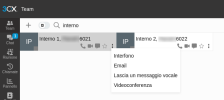
Under the Team page of the dashboard they show a grey box, without saying not registered, and won't let me monitor call quality.
But under the Admin page they are registered, when calling they work properly.
The DECT is on the latest firmware version and we are on Version 20.0 Update 8 (Build 1121)
What could be the problem? Do we need to reset it and provision it from scratch?
Is it because there are two user provisioned on the DECT?
We have another user, with the same DECT behind an SBC, but is provisioned alone, and he let me monitor call quality.
And we also have other SNOM M900 DECT with multiple user that let me monitor call quality.
Thank you.
we have two users, that use a Yealink W60B DECT behind an SBC.
Under the Team page of the dashboard they show a grey box, without saying not registered, and won't let me monitor call quality.
But under the Admin page they are registered, when calling they work properly.
The DECT is on the latest firmware version and we are on Version 20.0 Update 8 (Build 1121)
What could be the problem? Do we need to reset it and provision it from scratch?
Is it because there are two user provisioned on the DECT?
We have another user, with the same DECT behind an SBC, but is provisioned alone, and he let me monitor call quality.
And we also have other SNOM M900 DECT with multiple user that let me monitor call quality.
Thank you.