





Key steps to secure access, networks, endpoints, backups and system monitoring.
Security hardening is more than one setting. In 3CX V20, protection spans user access, the Admin Console, firewall rules, SIP and media traffic, endpoints, updates, backups and monitoring.
The best approach is to reduce unnecessary exposure first, secure access to the system and then make security part of ongoing PBX management.
Use this checklist to review the key areas of your 3CX deployment and identify where additional controls may be required.
Protect Identity and Admin Access
PBX credentials provide access to business communications and should be treated accordingly. Use unique credentials for system owners, administrators and users, and review access whenever staff or responsibilities change.
Keep administrator accounts separate from day-to-day calling accounts, disable stale users and regularly review who can manage users or access the Admin Console.
Provisioning files, QR codes, SIP credentials and voicemail PINs should also be treated as sensitive information. Changes to SIP authentication, provisioning or device credentials may require phones or apps to be reprovisioned, so plan these changes before resetting them.
Use SSO and Limit Admin Exposure
Where your organisation already uses MS365 or Google identity with MFA, SSO can reduce password sprawl and bring PBX authentication under the same identity controls.
SSO changes how an administrator authenticates, while 3CX roles continue to determine what they can access. Review privileges and keep a tested recovery route before making SSO the primary sign-in method.
You can further reduce exposure using Console Restrictions. Limit Admin Console access to trusted public IP addresses, controlled VPNs or the networks administrators actually use. Verify that your current administrative IP is allowed before applying restrictions to avoid accidental lockout.
Console Restrictions and the IP Blacklist serve different purposes. Console Restrictions control where administrators can access the Console, while the IP Blacklist allows or denies traffic and works with the 3CX Global IP Blacklist. Use whitelist entries carefully, as whitelisted traffic bypasses anti-hacking checks.
Secure the Network, Voice Traffic and Endpoints
For on-premise and self-hosted deployments, the firewall forms part of the PBX security boundary. Open only the SIP signalling, RTP media, HTTPS and tunnel traffic required by your deployment and SIP provider. As part of the network review:
- Use a supported FQDN and configure internal and external DNS correctly
- Configure split DNS where internal clients need to use the same FQDN
- Disable SIP ALG or other SIP helpers that rewrite signalling
- Run the 3CX Firewall Checker after setup and following network changes
- Use network ACLs to limit access between the PBX and unrelated sensitive networks
Responsibilities vary by deployment. Self-hosted administrators are responsible for areas such as the operating system, firewall, DNS, segmentation and public network access. Hosted by 3CX reduces the infrastructure under direct administrator control, while identity, roles, endpoints, integrations and operational security remain important.
Encrypt SIP and Protect Endpoints
Where supported across the complete call path, use Secure SIP with TLS for signalling and SRTP for voice media. At extension level, SRTP Mode can be set to Enabled where secure and non-secure RTP need to coexist, or Enforced after all endpoints on the call path have been tested.
Endpoint security is equally important. Keep supported phone firmware current, protect phone web interfaces and credentials and avoid exposing management interfaces publicly. Plan for reprovisioning whenever extension credentials, provisioning files or QR codes are reset.
3CX's built-in anti-hacking controls can detect failed authentication and abusive activity and automatically block offending sources. Review the configured protection thresholds, the Automatic Global IP Blacklist and blacklist activity as part of your regular security checks.
Keep Security Part of PBX Operations
Hardening also depends on what happens after deployment. Keep the PBX and its supporting platform updated, maintain protected backups and verify that systems can actually be restored. A practical recovery process should include:
- A protected backup destination and an owner responsible for recovery
- Regular restore or recovery testing
- The PBX host, cloud or hypervisor account, SIP provider, DNS and endpoints
- The expected impact of credential, certificate or provisioning changes
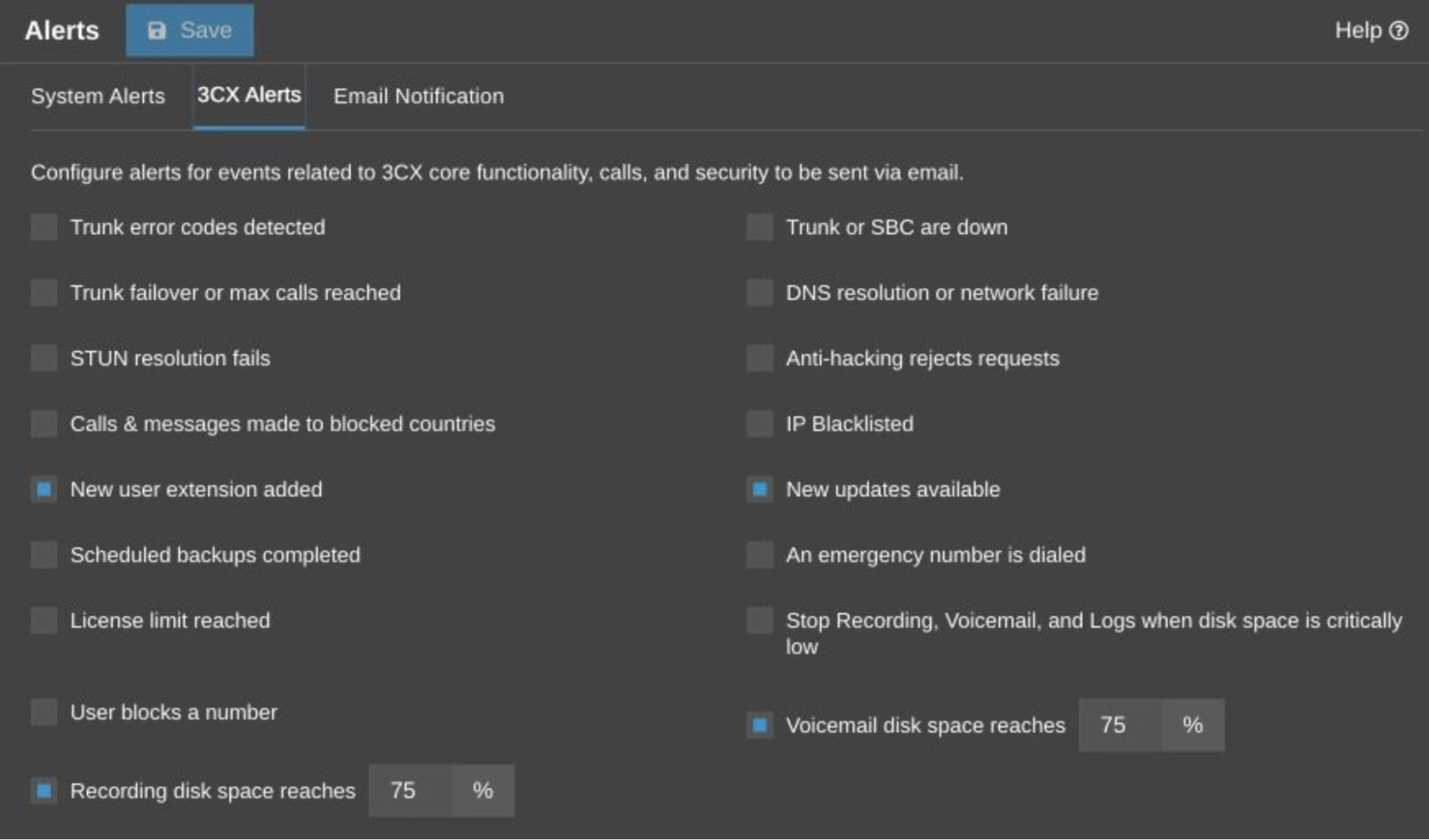
Use System Alerts and 3CX Alerts for events that require action, such as anti-hacking blocks, network or DNS failures, trunk or SBC outages, available updates, backup status and low disk space. Send alerts to a monitored mailbox or operations workflow with a defined owner.
For organisations using a SIEM or central monitoring platform, 3CX Remote Syslog can forward operational, security and audit events to an external Syslog collector. This allows authentication failures, blocked IP addresses, policy events and administrator changes to be reviewed alongside the rest of the security environment.
Keep local audit information available as well, and define appropriate retention and access controls for externally stored security events.
Join the Discussion
Join the 3CX discussion in our dedicated Partner or Customer Forums. Follow us on X and LinkedIn to stay-up-to date on latest news and feature releases.









 Copyright © 2026