Nick Galea

About Nick Galea - Page 72

CEO, 3CX

Nick is the CEO and Founder of 3CX. His love for innovation, visionary leadership, and 35 years in the software development industry have helped drive 3CX towards becoming one of the top communications systems across the globe. Presently, he continues this mission by placing most of his energy towards company operations, product strategy and vision.

3CX Partner training day, Sydney Australia

Helping our Partners build their business and revenue 3CX Asia/Pacific recently hosted a partner training day at Microsoft Australia headquarters in Sydney Australia. Partners were free to come to this whole day event and all parts of the 3CX system were discussed.  Some partners stayed behind at the end of the day and tried their hand at the 3CX certification. . An XBOX 360 &a [...]
By |March 12th, 2010|Comments Off on 3CX Partner training day, Sydney Australia

Analyzing a successful call setup between extensions within 3CX

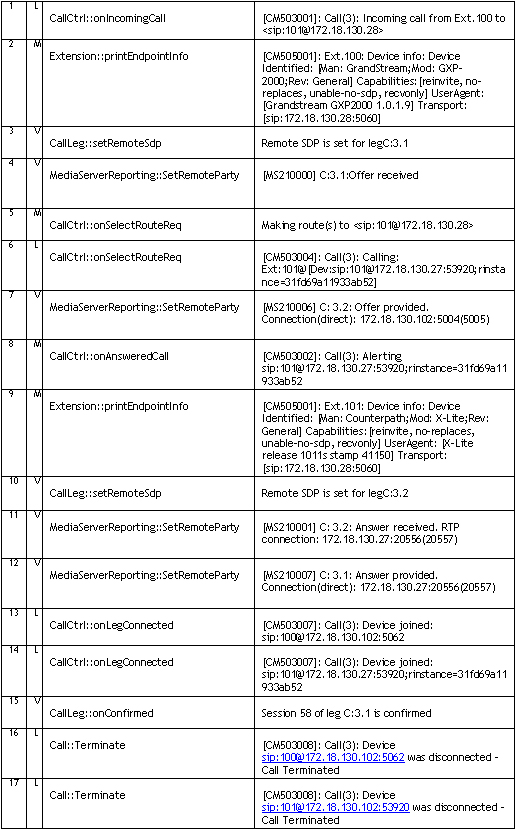
Introduction This chapter gives you an overview of how a call is established within 3CX and how you can trace through these steps by reading the server activity log. The Server activity log can be accessed by clicking on the Server Activity Log node in the 3CX Management Console. This server status log lists all important events that 3CX Phone System is processing, and is the m [...]

By |March 11th, 2010|Comments Off on Analyzing a successful call setup between extensions within 3CX

Troubleshooting IVR Errors with IIS installs

The 3CX Phone System IVR service is based on VXML and therefore integrates with the web server that you have chosen to use with 3CX. If there are problems with the web server integration, the IVR service may return the following prompt - “The call cannot be completed at this time. Sorry”. This article describes what you can check if you are running IIS. In some cases, other app [...]

By |March 9th, 2010|Comments Off on Troubleshooting IVR Errors with IIS installs

3CX Phone System Backup and Restore Troubleshooting

This article helps you recover from Backup and Restore Errors including some tips to make this operation quick and seamless: The option "Include voice prompts and music on hold" should be enabled in the 3CX backup and Restore Tool.  This will ensure that all your custom and system prompts along with voicemail intro-prompts are fully backed up and eventually restored.  Delete an [...]

By |March 9th, 2010|Comments Off on 3CX Phone System Backup and Restore Troubleshooting

ISDN Outbound caller ID and how to reformat it on a BeroFix

This guide describes the different caller ID formats and how to alter /rewrite the caller ID before it gets sent to the Telecoms provider when using beroFix VoIP Gateway cards. In this document we will use a German number (National code +49) from Dusseldorf (area code 0211) as an example how to format the caller ID: A telephone line-number (TelN) 12345600 (where "00" are the op [...]

By |March 8th, 2010|Comments Off on ISDN Outbound caller ID and how to reformat it on a BeroFix

The main SIP INVITE Header Fields explained

This article explains the main fields included in a SIP INVITE, which is sent to set-up a VoIP call. A SIP INVITE message contains typically between 4 and 6 header entries with contact information inside them. Different devices or providers use these headers in different ways and therefore, an understanding of the “normal” scope of these headers, together with a close analysis [...]

By |March 8th, 2010|Comments Off on The main SIP INVITE Header Fields explained

Creating a dial plan for a Beronet berofix that can select a line

With a Beronet Card, and proper configuration, you are able to choose the exact line/port from which to dial out. This feature is requested for lines that have different MSN/DID/DDI numbers. In addition it is useful for companies that are sharing a PBX and want to have each company use their telephone line to ensure transparent billing. This article explains how to configure th [...]

By |March 5th, 2010|Comments Off on Creating a dial plan for a Beronet berofix that can select a line

SIP Messages (Request, Status) Explained

All SIP phone calls consist of messaging for call setup and media for the actual audio. SIP Messaging is carried using UDP or TCP (normally UDP) SIP packets – It is used for device registration, call setup/teardown, on-hold notification, call transfers, DTMF signals. Typically the PBX Server is expecting to receive SIP messages on port 5060, so the PBX Server must be able to re [...]

By |March 5th, 2010|Comments Off on SIP Messages (Request, Status) Explained

Configuring MS Exchange Server 2007/2010 Unified Messaging with 3CX Phone System

Edit 16th September 2015: Please note that 3CX Phone System only works with MS Exchange Server 2013 and 2013 SP1 This article describes how to setup Microsoft Exchange 2007/2010 server as a Unified Messaging Server and configure 3CX Phone System to use it for voice mail and auto attendants. For Microsoft Exchange 2013 read Configuring MS Exchange Server 2013. Important Note: Of [...]

By |March 2nd, 2010|Comments Off on Configuring MS Exchange Server 2007/2010 Unified Messaging with 3CX Phone System

3CX Training Webcast for Thursday 11 March 2010 at 1500hrs (GMT+1)

3CX provides monthly free training Webcasts, and the next one is scheduled for Thursday 11 March 2010 at 1500hrs (GMT+1). This will be presented via Microsoft Live Meeting using its built-in VoIP for audio – so there will be no need to call into a conference call number. To Join the Webcast: Go to https://www.livemeeting.com/cc/meetwith3cx/join?id=GZ3M8K&role=attend and fol [...]

By |March 1st, 2010|Comments Off on 3CX Training Webcast for Thursday 11 March 2010 at 1500hrs (GMT+1)