




The 3CX Phone System frequently communicates across LANs and establishes calls between devices (softphones, hardphones, gateways, VoIP providers, and PBX bridges) which are located on different networks. The PBX communicates both with devices that are inside the PBX's LAN (internal devices), as well as with devices that are outside the PBX's LAN (external devices). 3CX needs to [...]

Introduction HTTP provisioning of IP Phones is useful for an administrator as it helps to automate the process of configuring an IP Phone for a particular extension. The administrator creates the extension as usual, and in addition specifies the MAC address of the phone. 3CX includes ready phone provisioning templates for the most popular IP Phones in the market. However, in so [...]
This document describes how a SIP call is established in 3CX Phone System, and what events will be written to the "Server Activity Log" page in the 3CX Management console. Using this call flow description, and by analyzing the events, you will be able to better understand what’s going on and troubleshoot potential problems. Note that the call flow below is identical for both in [...]

If you want to manage and configure 3CX Phone System on Windows 2008 server operating systems, you will have to disable IE ESC on the server. Go to Start and click on “Server Manager”. Click on “Configure IE ESC” located on the right-hand section of the window. The Internet Enhanced Security Settings page will be displayed. Disable necessary options. IE ESC is now disabled. [...]
The issues with Microsoft ISA server 2004 and 2006 Unlike most professional firewalls, Microsoft ISA server is not able to do static port mapping. Without static port mapping it is not possible to reliably connect to a VOIP provider or remote extensions. This is not a 3CX issue but an ISA server issue. The best solution is to buy a firewall such as from Linksys, Cisco, Netgear [...]
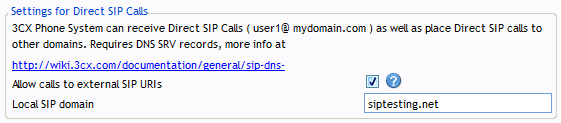
During set-up you are prompted to enter the FQDN of the phone system server OR the SIP domain. This SIP domain is used if you wish to use Direct SIP calls (more info here), but it also affects your installation in case you wish to use FQDNs in the phone configuration. If you intend to address the PBX using IP Addresses only, and do not intend to use "Direct SIP", then all you w [...]
How can I adjust the configuration for unsupported VOIP providers or gateways? 3CX performs extended tests with a number of VoIP Providers and Gateways. This allows us to create optimized templates for use with these tested Providers and Gateways, based on the information collected during the course of these tests. It is STRONGLY RECOMMENDED that if at all possible, you use a V [...]
What is a FoIP FoIP – FAX over IP, is the technology used to allow faxing via the computer network. Because Fax is not ideally suited to travel via a normal phone call, the T38 protocol was developed. A FoIP (FAX) call is very similar to a normal VoIP (voice) call. In essence it is a call that transmits FAX data over an IP network. How the 3CX Phone System FAX Server Service re [...]
Important Note: The following article applies only to 3CX Phone System V14 and below It is possible for a user to make an outbound call via the Voicemail menu. Dial 999 -> Enter PIN -> Press 9 (for options) -> Press 3 (to dial an external number) -> Dial external number. When dialing the outbound number if no digits are entered for more than 1.5 seconds (1500ms) the [...]

This guide is outdated please refer to the latest guide. Introduction This document describes the configuration of a Cisco Router for the use with 3CX Phone System. Status In general Cisco routers are know to work correctly and can be used as gateway in front of a 3CX Phone System to connect Voip Provider, direct Remote Extensions (STUN) and 3CX Tunnel connections. Due to the c [...]

 Copyright © 2026