




This document explains step by step how to upgrade the firmware of your Patton to the latest version. This doc uses the Patton 4554 as an example, however all other Patton devices follow an almost identical procedure. Step 1: Download the appropriate firmware for your Patton 1. Go to the firmware repository on the Patton website. 2. Now choose the Smartware firmware version you [...]
This information is relevant for installations that that are NOT using the default US prompt set. Customers that do not use the default US prompt set need to take additional steps when performing an upgrade. This is because version 8 has additional features that require additional prompts. After you have performed the restore, you must go to the updates page and download the pr [...]

This FAQ explains how to configure your Patton Gateway for the first time by connecting it to the network, discovering it’s IP Address and then configuring the network settings. You will then be able to import the configuration to it. There are 2 ways to log into a Patton Device. Connecting a Patton to the network using the Patton SmartNode Discovery Tool Step 1: Connect the de [...]

Important Notice: This article contains outdated content and is here for archival/informational purposes. For the 3CX Session Border Controller view: https://www.3cx.com/docs/3cx-tunnel-session-border-controller/ What is the 3CX SIP Proxy manager? The SIP Proxy Tunnel can combine all SIP (signaling) and RTP (media) VoIP Packets from one location (typically a remote office) and [...]
The 3CX Phone System frequently communicates across LANs and establishes calls between devices (softphones, hardphones, gateways, VoIP providers, and PBX bridges) which are located on different networks. The PBX communicates both with devices that are inside the PBX's LAN (internal devices), as well as with devices that are outside the PBX's LAN (external devices). 3CX needs to [...]

Introduction HTTP provisioning of IP Phones is useful for an administrator as it helps to automate the process of configuring an IP Phone for a particular extension. The administrator creates the extension as usual, and in addition specifies the MAC address of the phone. 3CX includes ready phone provisioning templates for the most popular IP Phones in the market. However, in so [...]
This document describes how a SIP call is established in 3CX Phone System, and what events will be written to the "Server Activity Log" page in the 3CX Management console. Using this call flow description, and by analyzing the events, you will be able to better understand what’s going on and troubleshoot potential problems. Note that the call flow below is identical for both in [...]

If you want to manage and configure 3CX Phone System on Windows 2008 server operating systems, you will have to disable IE ESC on the server. Go to Start and click on “Server Manager”. Click on “Configure IE ESC” located on the right-hand section of the window. The Internet Enhanced Security Settings page will be displayed. Disable necessary options. IE ESC is now disabled. [...]
The issues with Microsoft ISA server 2004 and 2006 Unlike most professional firewalls, Microsoft ISA server is not able to do static port mapping. Without static port mapping it is not possible to reliably connect to a VOIP provider or remote extensions. This is not a 3CX issue but an ISA server issue. The best solution is to buy a firewall such as from Linksys, Cisco, Netgear [...]
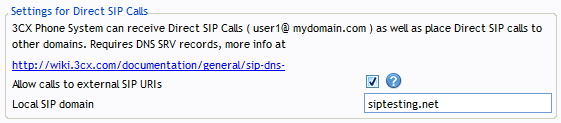
During set-up you are prompted to enter the FQDN of the phone system server OR the SIP domain. This SIP domain is used if you wish to use Direct SIP calls (more info here), but it also affects your installation in case you wish to use FQDNs in the phone configuration. If you intend to address the PBX using IP Addresses only, and do not intend to use "Direct SIP", then all you w [...]

 Copyright © 2026