



How can I adjust the configuration for unsupported VOIP providers or gateways? 3CX performs extended tests with a number of VoIP Providers and Gateways. This allows us to create optimized templates for use with these tested Providers and Gateways, based on the information collected during the course of these tests. It is STRONGLY RECOMMENDED that if at all possible, you use a V [...]
What is a FoIP FoIP – FAX over IP, is the technology used to allow faxing via the computer network. Because Fax is not ideally suited to travel via a normal phone call, the T38 protocol was developed. A FoIP (FAX) call is very similar to a normal VoIP (voice) call. In essence it is a call that transmits FAX data over an IP network. How the 3CX Phone System FAX Server Service re [...]
Important Note: The following article applies only to 3CX Phone System V14 and below It is possible for a user to make an outbound call via the Voicemail menu. Dial 999 -> Enter PIN -> Press 9 (for options) -> Press 3 (to dial an external number) -> Dial external number. When dialing the outbound number if no digits are entered for more than 1.5 seconds (1500ms) the [...]

This guide is outdated please refer to the latest guide. Introduction This document describes the configuration of a Cisco Router for the use with 3CX Phone System. Status In general Cisco routers are know to work correctly and can be used as gateway in front of a 3CX Phone System to connect Voip Provider, direct Remote Extensions (STUN) and 3CX Tunnel connections. Due to the c [...]

The installation checker is no longer available for download. You can check that 3CX Phone System has been completely uninstalled by using the 3CX Installation Checker Tool. The tool will provide information about any traces of 3CX files that could still be on the system. Traces can remain on the system for numerous reasons - Example: a log file was kept open during un-installa [...]

This is because the Sangoma NetBorder software is configured for the PSTN side to provide the ringing, so if it is not then you will not hear any ringing. To fix this issue we must tell Sangoma NetBorder Express to provide the ring back tone. To do this, follow the steps below. First go into the "Gateway Manager" web interface and then click on "Configuration / PSTN Config". Ne [...]

This article applies to ISDN lines and ISDN gateways only. An ISDN line can either be point-to-point or point-to-multipoint. If you have a point-to-point connection, you can only attach one device to your ISDN line. If you have point-to-multipoint connection you can attach more than one device. You have to configure the ISDN lines connected to the Patton to be either point-to-p [...]

If you are using 3CX Phone System 10, please visit the Salesforce CRM integration article, which can be found here. Introduction 3CX Assistant CRM Integration allows Salesforce.com users to automatically dial contacts simply by clicking "Call this contact". The call will be triggered and setup to the users desktop phone WITHOUT having to actually dial the number on the phone. T [...]

Connecting to a Fax to Print to Fax from a Windows XP Computer The scope of this article is to be able to send faxes to a shared printer. This shared printer can be any printer - hardware and software. However in relation to 3CX Phone System, the shared printer in this case would eventually be a computer/server with the 3CX Fax Sending module installed. The 3CX Fax Sending modu [...]
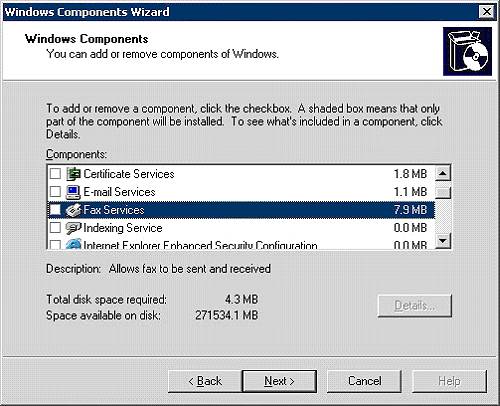
Note: The 3CX Fax Sending module is deprecated, and no longer supported. This article is for informational/historic purposes only. This guide is imporant to be able to enable Fax on Windows Server 2003 The Fax Sending module can then be installed on this machine and can be used to send faxes through Microsoft Fax Step1: Enable Windows Fax Go to Control Panel, Add Remove program [...]

 Copyright © 2026