





With the launch of 3CX StartUP we’ve revamped our 3CX WordPress plugin. Unfortunately this plugin is not compatible with 3CX V18 Update 3. So if you are using live chat, we ask that you temporarily disable auto updates until we release 3CX v18 Update 4. Update 4 will be compatible with the new plugin.
Do this before 16th of May 2022!
On this date we will update the plugin and this will no longer work with Update 3. You must disable auto-updates for the plugin before!
How to disable auto updates
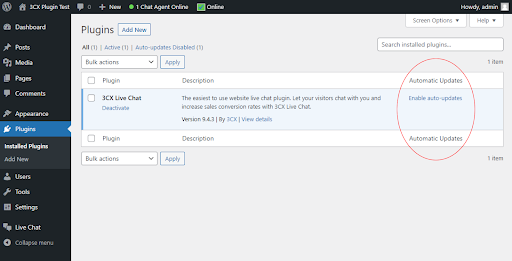
By default, auto-updates for new plugins is disabled, but you could have enabled it while in use. To check the automatic updates status, see the last column of the Plugins list. If “Disable auto–updates” is shown, this means that auto-updates is enabled and you have to click to disable it. If you see “Enable auto-updates”, it means that the plugin auto-update is already disabled.
- Sign in to the WordPress Admin Panel and go to the Installed Plugins section.
- Find 3CX Live Chat Plugin list
- Disable Auto-updates








 Copyright © 2026