





UC Expo 2021 is back and 3CX will be attending! Make sure to visit booth #P44 at the ExCeL in London on 6th and 7th of October. UC Expo, is the biggest Unified Communications and Collaboration exhibition in Europe, attracting more than 6.500 industry leaders. It is the place to be when it comes to sharing the latest technologies in terms of UC, networking, cloud computing, AI a [...]

Live chat on your website is no longer reserved for large corporate Enterprises with huge budgets, and a whole team of dedicated administrators or developers to set it up. Now anyone can achieve this using 3CX Live Chat for free. Expert Review IT expert, YouTuber and coffee addict, NetworkChuck, has used 3CX to incorporate Live Chat into his website. He also added Facebook mess [...]
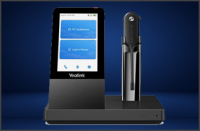
Update 1 Beta 2 has been released, adding support for Yealink headsets as well as optimizing the way images are sent. This Beta has been thoroughly tested on Windows operating systems, ensuring bugs and issues are ironed out, prior to the final stable release on Windows, due shortly. Yealink Headset Integration The Web Client now includes integrated support for Yealink headsets [...]

Overall, the 3CX upgrade script upgrades Linux based customers from Debian 9 with v16 to Debian 10 with v18 with a success rate of 92%. In this blog post, we will cover common solutions for the remaining 8% of cases that failed to upgrade successfully. Take a Backup Before you attempt any software update, take a full backup of your 3CX System and download it off the host runnin [...]

Following the release of v18, we have also updated 3CX Live Chat! With this update, website visitors can choose to start a Live Call from the get-go and administrators can track visitor interactions with Google Analytics. Instant Live Call Some customer problems or queries are best resolved via voice. The minimized chat bubble now presents a “Call us” option right at the start [...]

Following partner conversations on our community forum, we have updated our Microsoft Teams integration guide which now includes the steps required to obtain an SSL certificate, as well as adding to our MS Teams FAQ guide. Complexities Simplified If you ask someone if Microsoft is easy to configure, you normally get two answers. For some, it’s a breeze and for others, not so. O [...]

Following his first video review of 3CX, Chris Titus, Tech YouTuber, has given his impression of 3CX Video Conferencing. He outlines how easy it is to create a quick meeting along with scheduling and some of the other cool features included. Features fit for any Enterprise 3CX Video Conferencing is bursting with Enterprise features such as: Attendees join in a browser. No app [...]

Administrators can utilise Windows Terminal Servers to deploy the 3CX Windows Desktop app en-masse, eliminating time-consuming installation and provisioning. How to deploy via Windows Terminal Server With Administrator rights, install the application onto the server via the Control Panel. Here’s how: Open “Control Panel > Programs > Install Application on Remote Desktop…” In the pop-up message click “Yes” [...]

V18 Android App Beta has just been released. Now with updated libraries for a more robust and secure application. Try out the new “Keep Active” feature to never lose a call and check out the various enhancements on video conferencing management. Keep Active With this version, we are introducing a “Keep Active” functionality. Our latest Android client provides the ability [...]

An updated 3CX app for iOS, fully compatible with the upcoming iOS 15 is now available for testing. Using the latest SDKs and libraries, this robust and up-to-date application offers increased reliability and responsiveness. Try out the Beta version, for new features including the ability to share data from other applications, and added support for scheduling a video conference [...]

 Copyright © 2026