





Use your preferred service for PBX alerts, reports, invitations and welcome emails.
System email keeps important 3CX messages moving. From Admin alerts and reports, to invitations, password resets and user welcome emails 3CX gives Administrators several delivery choices:
- 3CX SMTP
- Microsoft 365
- Google Workspace
- Custom SMTP services such as Zoho
- SendGrid with the release of V20 Update 10
In this blog, we look at SendGrid and Zoho, including why you might use your own email provider along with how to configure your preferred email provider. Read on to learn more!
Why Use Your Own Email Provider in 3CX?
Whilst 3CX continues to support its built-in SMTP service and other providers. The best choice for your company will depend on which service your team already trusts and how much control you want over sender identity, delivery activity and account management.
For many companies it makes sense to use the email service their organization is already managing to make delivery easier to monitor and align with existing security and account policies.
SendGrid: A Dedicated Option
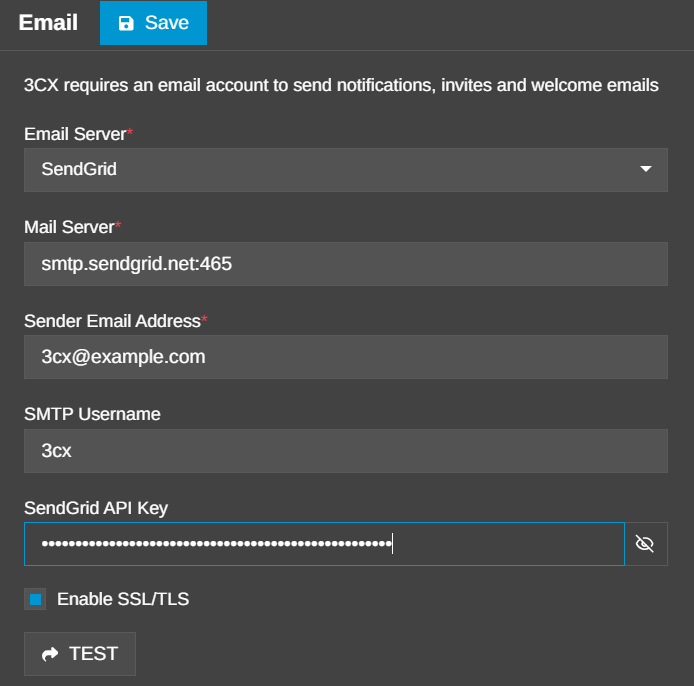
V20 Update 10 adds SendGrid native API connectivity as a 3CX system email option.
The benefits of using the SendGrid native API over the generic Custom SMTP route are a simpler overall configuration by using the standard HTTPS port, which can simplify firewall setups, and no more need to determine SMTP settings manually.
By using the API you can also make use of other advanced SendGrid features, such as dynamic templates, from inside your SendGrid configuration pages, if you wish.
For the steps needed to enable native SendGrid email sending, read the SendGrid setup guide.
Zoho: Flexible Custom SMTP
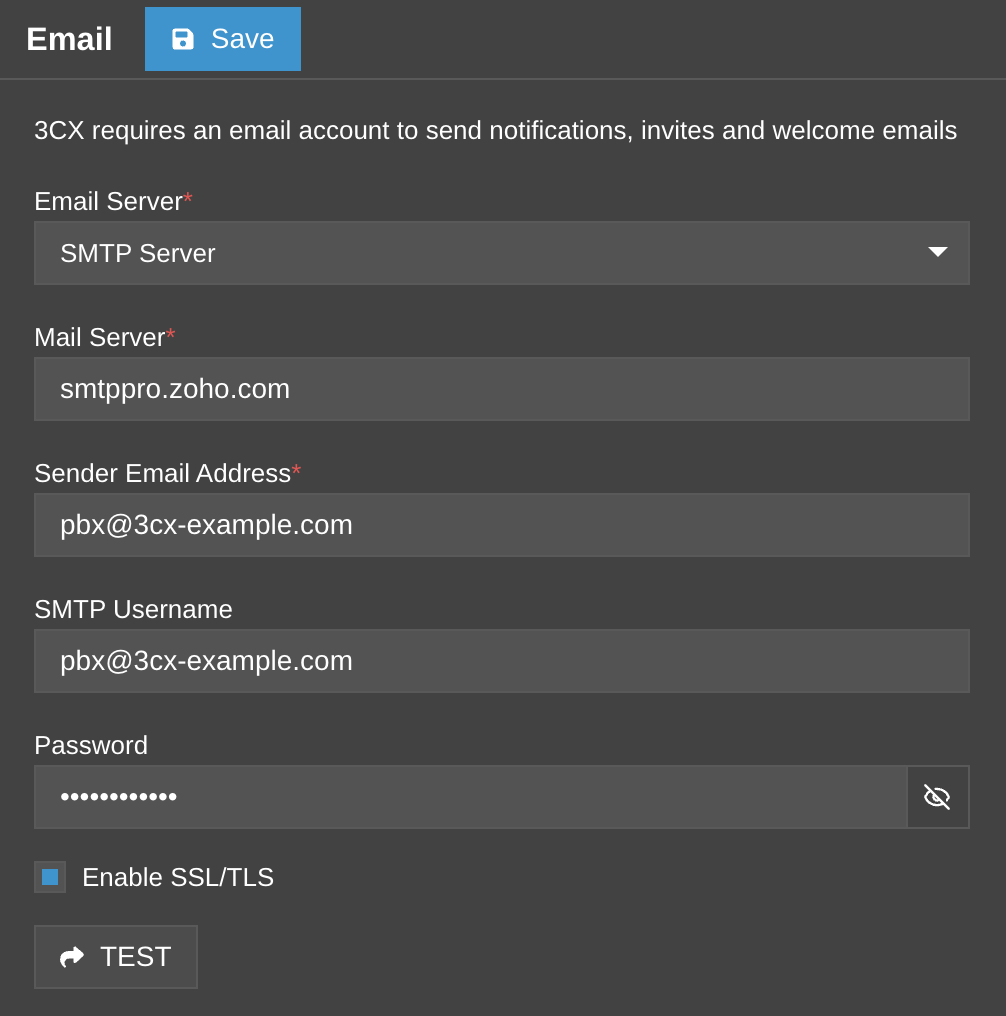
Zoho remains available through the Custom SMTP option. It is a natural choice for organizations that already use Zoho Mail and want 3CX system email to follow the same account and security policies.
Depending on your Zoho security configuration, you may need an application-specific password. The Zoho email setup guide covers that requirement and the full configuration process.
Choosing Between SendGrid and Zoho
As both services can deliver the same PBX-generated messages choose based on the email platform your organization already manages:
- SendGrid if you already have a SendGrid account and want the dedicated 3CX option available in V20 Update 10 or later.
- Zoho if Zoho Mail is part of your existing email environment and you are comfortable using the Custom SMTP path.
- Keep your current 3CX SMTP, Microsoft 365, Google Workspace or Custom SMTP configuration if it already meets your needs.
Configure Your 3CX System Email
In the 3CX Admin Console, go to Admin > System > Email and select the service you want to use. Follow the provider-specific guide for the required account details.
Use TEST to confirm that 3CX can send through the service, then save the configuration. The provider guides include the complete account and troubleshooting details.
Join the Discussion
Join the 3CX discussion in our dedicated Partner or Customer Forums. Follow us on X and LinkedIn to stay-up-to date on latest news and feature releases.









 Copyright © 2026