





Update 10 brings a more personal touch to every call, with per-department Music on Hold.
First impressions are everything in business, and that includes the audio your customers hear when they're waiting to connect. Introduced in Version 20 Update 10, the new Department Music on Hold feature is a great addition for businesses helping their communication align to their needs at the department level.
Each department can use its own audio instead of the system-wide Music on Hold. This is also useful in multi-company setups, where each company can maintain its own audio and messaging.
Admins can choose between system audio, upload or record department-specific audio, or use existing Shared prompts. Company Owners can also manage their own Music on Hold in multi-company mode. Read on to learn more.
Configure Department Music on Hold
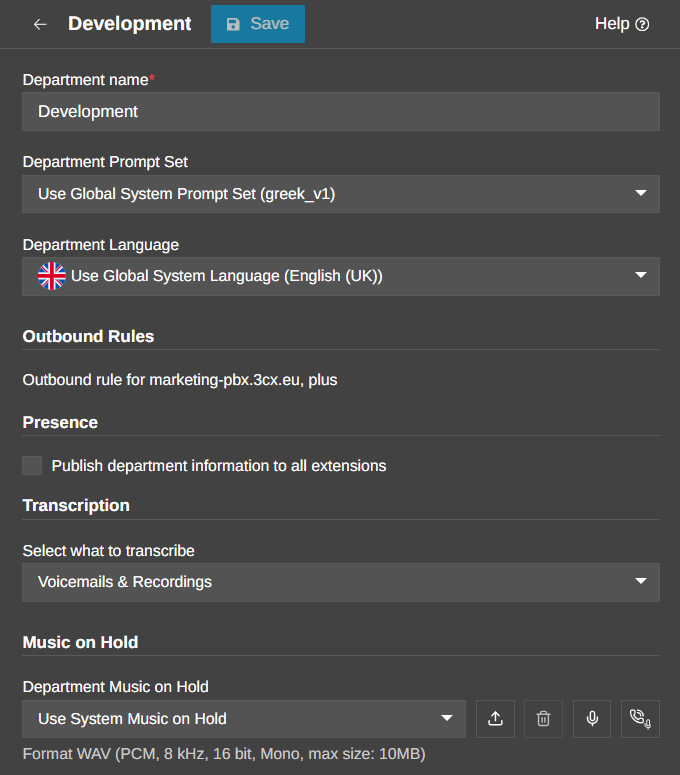
Set up is very simple. As a System Owner or System Administrator, simply navigate to Admin > Departments in your 3CX Admin Console. Select the specific Department you want to customize and click on the Options tab.
Once you're in the options menu, you have several flexible paths to choose from:
- Use System Music on Hold: Continue using the Music on Hold configured for the whole system. Learn how to configure your playlist here.
- Custom audio: Upload a WAV file or record audio using a microphone, IP phone or 3CX App.
- Shared Library: Select an existing shared prompt.
This gives each department more control over the caller experience. For example, Sales and Support can use different audio or announcements. Departments operating in different languages can use their own recordings, while organisations can also include department-specific information or notices.
Department Music on Hold for Multi-Company Setups
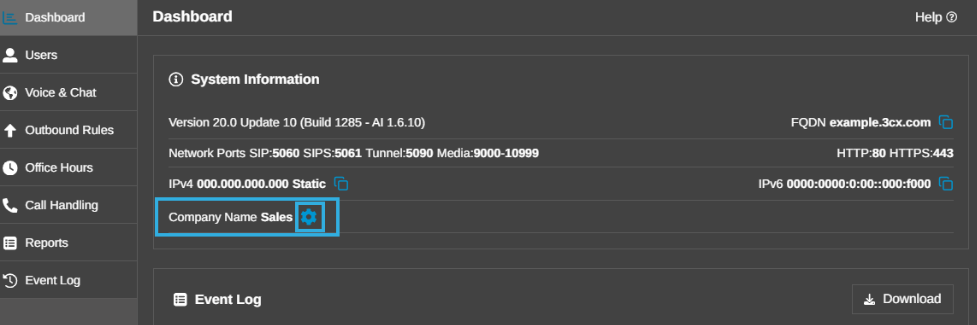
In a multi-company setup, each company can use its own Department Music on Hold rather than sharing the same audio across the PBX. Company owners can manage this directly from the Admin Console Dashboard. Select the gear icon next to the Company Name to configure the audio.
Audio added is stored at the department level and remains private to that company. This lets each company manage its own on-hold audio while the System Owner or System Administrator maintains the overall PBX configuration.
Join the Discussion
Join the 3CX discussion in our dedicated Partner or Customer Forums. Follow us on X and LinkedIn to stay-up-to date on latest news and feature releases.









 Copyright © 2026