





Our latest Beta includes a small but useful update to the “Schedule Conference” feature to ensure inviting participants to your meetings is even easier and more professional. We’ve also added two popular SMS providers, made a change to improve the performance of Live Chat, among other things.
The new, best way to schedule a conference
Selecting the correct calendar will ensure your invitees are able to RSVP and add the meeting to their own calendars. As some users were met with confusion about which one to select, we’ve updated the options to make this clearer.
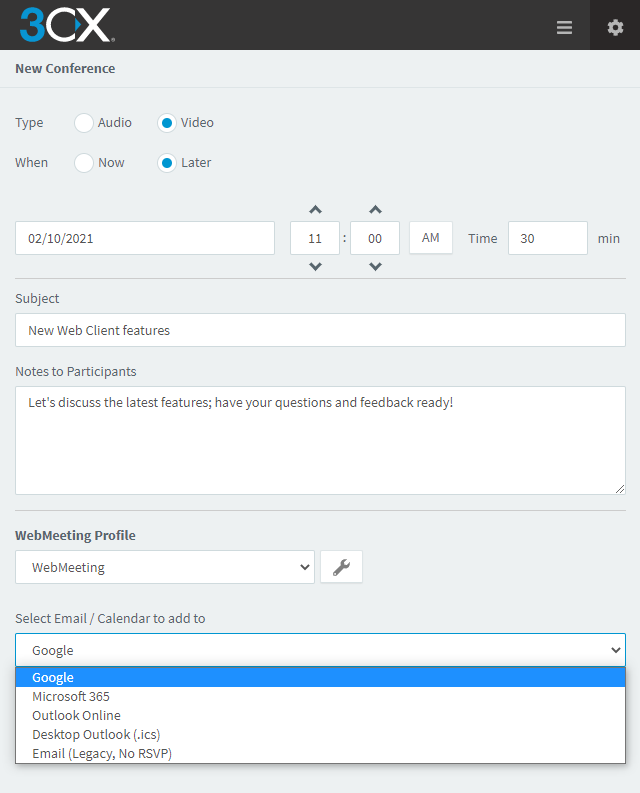
Google, Microsoft 365 & Outlook Online
If you’re using one of these browser-based mail services, you just need to be logged in and a new, pre-filled calendar event will open in your browser when you click “Create Meeting”. Simply add your participants and you’re all set!
Desktop Outlook (.ics)
If you’re using desktop Outlook, the process is still super easy and takes just seconds. Instead of opening a new browser tab, an .ics file will automatically download, creating a new Outlook calendar event on your desktop when opened. You can then add your participants and send the invitation.
Email no longer supported
Selecting “Email (Legacy, NO RSVP)” will do just that - this is a bare bones email invitation in which the RSVP function does not work. For this reason, we highly recommend you choose one of the other options - Google, Microsoft 365, Outlook online or desktop.
Check out the user manual for a step-by-step guide on scheduling a conference.
New SMS providers: Bandwidth & HostProfis
We’ve also added two new SMS providers; you can now use Bandwidth (USA) and HostProfis (DACH). These are joining existing providers Flowroute and Twilio. We’ve made sure to only include leading providers, so while your current provider may not be listed, you have a number of great options to choose from.
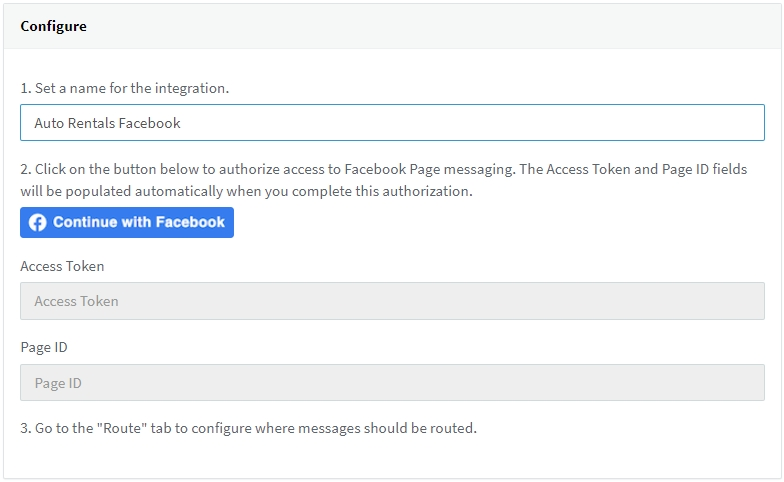
New simplified Facebook integration
The Facebook integration configuration process has been condensed down to just a few steps, reducing the time and effort previously needed. Simply fill in the required fields, connect your Facebook page, configure your internal settings and the integration is complete! Check out the manual to see just how easy it is.
Other fixes & improvements
- Adjusted the Microsoft Dynamics 365 CRM template due to a Microsoft update.
- Removed option for custom Firebase instance configuration.
- Fixes related to Windows App.
- Updated Translations.
How to get V16 U8 Beta
If you are running 3CX v16 Update 7, click on “Updates” in the Management Console’s dashboard. Follow the prompts to update and install the latest version on your PBX.
If you do not have Update 7 installed, download 3CX v16 on Debian 9 ISO or 3CX V16 Update 7 on Windows to install it, then proceed to the Management Console to update to U8 Beta as described above.
View the change log for this version and don’t forget to give us your feedback in the 3CX Community Forum!









 Copyright © 2026