3cx Max Extension Policy

netzwerkadmin

Premier Customer
Joined
Jul 9, 2024
Messages
8
Reaction score
1
Hello. We have several questions regarding the Maximum Extension Policy enforcement.
We manage a 3cx system (with active license purchased before the announcement) that is over the max extension limit per the number of simultaneous calls.
The license will expire in April 2027.

Given the above, we would like to clarify the following points:
1. Is there an official date when the limit will be enforced?
2. What restrictions will apply to the 3cx server after the policy comes into effect (apart from the inability to create support tickets)?
3. Will outbound and inbound calls stop working?
4. Will extensions above the limit be disabled or deleted?
5. Will we still be able to create additional extensions before the active license expires?
6. When the current license expires, what restrictions can we expect during the process of license renewal?

We would be glad to receive an official response from a member of the 3cx team.
 
Solution
I’d like to clarify how the extension limit works in 3CX. I’m running **3CX PRO 20.0, Self Managed, with a 24 SC license**. The dashboard shows **208 / 120 extensions** and displays a warning.

What I don’t understand is: if the limit is 120, why did the system allow me to create 208 extensions? What is the actual limit, and what happens to the extensions that exceed it?

I’d also like to know how many extensions I could have if I upgrade the license, and whether that limit depends on the number of SC, the edition, or both. I need to confirm this before offering an upgrade to my client.

Hello @folazo

Please note that the maximum number of users/extensions is determined by the Simultaneous Calls...
1. When the U10s make it to the final
2.You cannot create new extensions and no longer receive support.
3. no
4. No, you get a transition period to adjust either the license or the extensions.
5. no
6. No renewal to the same licence size.
 
1. When the U10s make it to the final
2.You cannot create new extensions and no longer receive support.
3. no
4. No, you get a transition period to adjust either the license or the extensions.
5. no
6. No renewal to the same licence size.
Thank you for the detailed response.
We would like to clarify the following points:

1. You stated that after the release of U10, we will not be able to create new extensions. Will this restriction apply to our system if we stay on the current version (U8) and do not update the system to version 10?

2. If the restriction does apply, will we be able to edit or reassign existing extensions to other employees?
 
Thank you for the detailed response.
We would like to clarify the following points:

1. You stated that after the release of U10, we will not be able to create new extensions. Will this restriction apply to our system if we stay on the current version (U8) and do not update the system to version 10?

2. If the restriction does apply, will we be able to edit or reassign existing extensions to other employees?
U10

1788512131744.png

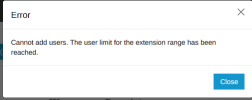
You can edit the extensions and probably can do a Clear & Assign but you wont be able to delete and add.

But basically Im hearing youre trying to get around the FUP by not updating which would go against TCs anyway and likely make your system unsupported.

Who knows what the symptom could be if you stay breaching FUP - maybe your license becomes deactivated and takes your system offline.

I'd upgrade to be in line.
 
Thank you for the detailed response.
We would like to clarify the following points:

1. You stated that after the release of U10, we will not be able to create new extensions. Will this restriction apply to our system if we stay on the current version (U8) and do not update the system to version 10?

2. If the restriction does apply, will we be able to edit or reassign existing extensions to other employees?
We updated a lab server that we have massively over provisioned with test accounts. In our testing on U10 Alpha, you could edit existing, but not add beyond the consumption limit. If you don't update, you won't run into the issues, but you'll not have security updates and a ton of new features coming with update 10. I imagine at renewal time you also won't be able to renew.
 
  • Like
Reactions: netzwerkadmin
Also about once a year a specific update becomes required to maintain license activation.
 
If you upgrade now, you don't have to pay for the whole year.
You only buy the remaining months till you have to renew your subscription.
There is no need to buy a new license
 
If you upgrade now, you don't have to pay for the whole year.
You only buy the remaining months till you have to renew your subscription.
There is no need to buy a new license
Thank you for the clarification.
I would like to know whether the discount is valid temporarily or until the end of the license expiration. Is there an official reference to this information so that I can send it to my management?
 
Thank you for the clarification.
I would like to know whether the discount is valid temporarily or until the end of the license expiration. Is there an official reference to this information so that I can send it to my management?
The current sc upgrade discount expires at the end of September.
 
  • Like
Reactions: netzwerkadmin
I got this information from my austrian distributor.
 
  • Like
Reactions: netzwerkadmin
I’d like to clarify how the extension limit works in 3CX. I’m running **3CX PRO 20.0, Self Managed, with a 24 SC license**. The dashboard shows **208 / 120 extensions** and displays a warning.

What I don’t understand is: if the limit is 120, why did the system allow me to create 208 extensions? What is the actual limit, and what happens to the extensions that exceed it?

I’d also like to know how many extensions I could have if I upgrade the license, and whether that limit depends on the number of SC, the edition, or both. I need to confirm this before offering an upgrade to my client.
 
  • Like
Reactions: netzwerkadmin
I’d like to clarify how the extension limit works in 3CX. I’m running **3CX PRO 20.0, Self Managed, with a 24 SC license**. The dashboard shows **208 / 120 extensions** and displays a warning.

What I don’t understand is: if the limit is 120, why did the system allow me to create 208 extensions? What is the actual limit, and what happens to the extensions that exceed it?

I’d also like to know how many extensions I could have if I upgrade the license, and whether that limit depends on the number of SC, the edition, or both. I need to confirm this before offering an upgrade to my client.

Hello @folazo

Please note that the maximum number of users/extensions is determined by the Simultaneous Calls of your license.

For a 24 SC license, the maximum supported number is 120 users/extensions. This is why the Admin Console currently displays 208/120 and shows the referenced warning.

Regarding your current number of users/extensions, kindly note that previous versions allowed systems to exceed the extension count, as mentioned in our 'Extension Fair Usage Policy' blog post. With Update 10, once the applicable capacity is reached, the creation of additional users will no longer be allowed.

You can also review our 'Enterprise AI Edition Pricing Correction' blog post for the applicable user limits according to the license size.

Therefore, if the system needs to maintain its current 208 users/extensions, you should review the available license upgrades based on the required extension capacity.
 
Solution
Thank you for the clarification and for sharing the relevant documentation. That explains why the system was able to exceed the current limit.

The client previously associated with this license created the extensions, and I hadn’t noticed that the total had reached 208. I’ll proceed with the upgrade to 48 SC to accommodate the current number of users.

I appreciate your responses and support.
 

Forum statistics

Threads
112,311
Messages
591,829
Members
165,454
Latest member
Rich Hopkins