

- Joined
- Sep 14, 2020
- Messages
- 59
- Reaction score
- 14
Thanks but this wont help a bitHi Thomas,
Try this if it helps you:
https://yourFQDN:5001/webclient/#/call?phone=123456
Just replace your FQDN and the number you wish to dial


Thanks but this wont help a bitHi Thomas,
Try this if it helps you:
https://yourFQDN:5001/webclient/#/call?phone=123456
Just replace your FQDN and the number you wish to dial

It turns out there was some Custom Template that was causing this, probably due it either a wrong parameter or file format error.Hi Nick,
I think I know the reason already, the template section is completely empty.
The question is, does this happen with everyone or is this an incident.
And how can we solve this.
Strange, it wasn't working after the upgrade - though admittedly I didn't try removing and then re-provisioning. I'll try giving it another go this weekend.@mcoacollins - The old Windows app continues to work with V18 and is not deprecated yet. It just won't receive new features. Running executables from a web based application is going to present problems though from a security perspective. At some point another mechanism will have to be found....

Unfortunately the CFD can't help here because the call is not being handled by this app. The queue is a different entity, and the decisions it makes are unknown to the CFD app. You can also rely on CDRs, but those are generated when the call ends, and that might be too late.I suppose if CFD had the ability to return which agent the caller was given to I could probably just store that in a database, and then have my application query that to determine the caller. Or if there was a 3CX API to see active calls that could work too.


It's not currently planned, but as an alternative, you could grant individual Users/Extensions with Rights to log into the Management Console, so that not everyone uses the "admin" account.The auditing does not show which user via SSO signed in to MGMT console admin - is this due to be improved?

Hi Nick,
I think I know the reason already, the template section is completely empty.
The question is, does this happen with everyone or is this an incident.
And how can we solve

@[email protected] and @[email protected] I had the same issue on one old system that had been moved to cloud. Extensions with desk phones would not allow opening/editing, and the Templates section was empty.It happened to me as well on two different 3CX installations. After the upgrade from V16 to V18 the template section is completely empty and I cannot access the user extensions or phones.
The error is related with the custom templates that are in the PBX that they might have entries that are no longer supported in V18. In order to resolve this issue it is required to remove or delete the custom templates from the server (the default location is /var/lib/3cxpbx/Instance1/Data/Http/Interface/provisioning/randomprovisioningname/CustomTemplates ) and restart the ManagementConsole service in the PBX.
Since the provisioned devices are not using any custom template they will not face any issue otherwise it will be required to factory reset the phones and provision with the default template.
I am wondering what advantage 3CX has. Seems to me that the license we need to buy is an E5 which already includes phones or add the phone system or business voice which again is the PSTN connection. The customer would know there is no advantage to paying additional money when they get that included for the price at Microsoft
Yep, fixed thankyou for the Sydney servers. I've had a conference running for several hours today without issue. Thank you for your response and the fix.Please try again, our team identified a configuration that needed updating in a specific zone.
In a case we investigated yesterday, it was one of the Custom Templates that was causing the issue:It happened to me as well on two different 3CX installations. After the upgrade from V16 to V18 the template section is completely empty and I cannot access the user extensions or phones.
You can't integrate any 3rd party SMS Providers, it must be one the ones in the drop-down.Hello to all,
Anyone help me out for SMS Gateway Intergration. I need to integrate my thirdparty SMS services rather than Twilio, Bandwidth etc which are in SMS gateway list by 3CX. My concern only is if anyone callin and during a IVR it press "2" (as an example) he/she receive a SMS on his dialed number.
Your quick reply is highle apperciated.
Thanks for your reply, so it is not possible, suggest me if anyway to do somesetting in Call Flow App where I can set any trigger for sms ?You can't integrate any 3rd party SMS Providers, it must be one the ones in the drop-down.
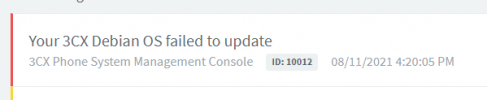
If you haven't rebooted your machine since the failed update attempt, there should be a file /tmp/UPDATE.log that you can check for more details.View attachment 23512
Private hosted on Digital Ocean. Is there a log I can view with more details? Currently running 16.0.9. Hoping it's something simple so we can update a bunch of our instances there...
This IVR that you want to have this 'trigger', you could replace it with a CFD, then before the 'transfer' action, you could use the "HTTP Request" or "Web Service REST" components to communicate via API with the system that would send the SMS.Thanks for your reply, so it is not possible, suggest me if anyway to do somesetting in Call Flow App where I can set any trigger for sms ?
Founded in 2005, when VoIP was an emerging technology, 3CX has gone on to establish itself as a global leader in business communications.


