- Joined
- Dec 19, 2019
- Messages
- 48
- Reaction score
- 10
Hi everyone,
I hope someone can help, I have looked at many different threads relating to W60B and SBC for registering remote phones and in particular the DECT Yealink W60B, but I've hit a brick wall and the thread info is not consistent with the 3CX documentation on the SBC setup at least Ports wise. What ports need simply to be allowed in, and on which firewall device/entity (LAN, GCP), and what ports specifically need to be forwarded to which device/entity (LAN, SBC, GCP), in order for the SBC to work with a remote PBX in Google Cloud and a remote handset behind a dynamic public IP address?
I have checked the base firmware is on the latest version (77.83.0.20) using the Yealink's site to that which is:- https://www.yealink.com/products_48.html
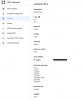
At the same time I also uploaded the latest firmware for the handset while i was at it, but still no joy "registering" the W60B. (As seen on the Account tab in the phone's Web GUI page.
The SBC (raspberry PI 4) shows a green light in 3CX Management Console SIP Trunk area and appears to have had no issues in the install phase and is UP.
I have a 3CX PBX in Google Cloud (GCP) installed using PBX Express (Debian 9 Stretch)
I can see one potential issue at this point, and although I believe it should be irrelevant given i'm using an SBC, when I run the 3CX firewall checker it gives me this warning/error:-
testing 3CX SIP Server... failed (How to resolve?)
testing port 5060... full cone test failed (How to resolve?)
Now I am fairly certain that this failure is due to the fact I have restricted the Inbound traffic (INGRESS) by IP's into the PBX's GCP Firewall to only ALLOW my Office's LAN's IP address, and the necessary ports that were setup by default before i restricted the IP as reommended to avoid all the port scans and hacking attempts we seemed to get before I did that.
I think, therefore, that this "failure" does not matter, but I would be interested to know if this is a correct assumption as it also potentially points to a problem of some kind that could affect the W60 from being unable to register even though the phones in the office work fine.
The PBX Express install onto GCP actually makes all IPs allowed for INGRES into the PBX via specific ports including 22,443, 5060, 5090 and 9000-10999 etc. the defaults.
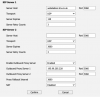
I can successfully provision the W60B phone, as it says "Provision Success!" on the phone if is either configured to use the SBC or not, however it still fails to "register", and this seems to me to perhaps be down to the Proxy Server setting -> currently set to the LAN IP and Port of the SBC, set in the W60B Account tab in the Phone Web Page GUI. (see screenshot)
Presumably, the SBC is port 5060, as it's a default setup.
If I avoid using the SBC for provisioning (so remote/disable the proxy server entry) as long as I have a firewall rule to ALLOW, INGRESS for my Home/remote IP dynamic address, then the W60B works fine in this scenario; but the whole point is I want the phone to work using the SBC with the security that it intrinsically provides, and 3CX, with an SBC in place, as the point of registration, should not care what the remote phone's IP address is, and because remote phones in home setups are generally behind dynamic public IP addresses, not static, this is kind of the whole point of the SBC! So adding the IP address at this point is only a temporary measure to make the phone work for now. So the aim is clearly to remove that entry if i can get the phone to register without it.
The phone provisions happily over 5001 as we allowed this port to forward to the SBC on our CISCO firewall in the office. We did see during the config process that the NAT entries could not be created for a group object, however do we have access to remote CCTV cameras etc fine, and with no specific NAT rules, however the CISCO router ACL (Access control List) has been setup for both our office cameras which work and also the SBC ports 5001 and 5090 allowed in and forwarded to the SBC, in the same way and is presumably why the phone provisions successfully. Is anything missing in our setup here?
What part do ports udp:9000-10999 play in the SBC to PBX and remote phones setup, are they needed as we believe those ports are already being used, at least some of them, and would they prevent the registration?
We tried forwarding ports 5060 as well but that did not work and only then cut off our LAN based handsets from talking to the PBX because they would be then going back through the SBC and not out to the PBX directly. Even with Port 5060 forwarded temporarily to the SBC, the phone would not register and neither did the handset in the office register when i provisioned a handset to use the SBC to see if that made any difference.
So we then removed the port forward for 5060 as we want to use the SIP Server for a door entry device as well so basically we want our LAN phones to provision and work using the LAN provisioning/config method and I want the DECT W60B to use the SBC remote provisioning method.
The DECT W60 B is using the default port 5060.
Does anyone have any ideas where to go next with this as I am lost what we are trying to do with the SBC in terms of incoming ports and what to forward to where?
Outgoing connections from our LAN firewall should just connect and reach the PBX in GCP no problem. The phone provisions successfully over 5001 once we forwarded that port to the SBC. So what am I missing? Surely the outgoing connections and ports like 5090 should just work.
I would be most grateful for your help as I have no way to diagnose where it's going wrong and have spent hours on this problem. I can't tell if the issue of registering is happening at the LAN side or the PBX side, and there seems to be no definitive document from 3CX to say what ports where must be open for the SBC on a LAN behind a firewall to work with remote phones.
Kind Regards,
Oliver
I hope someone can help, I have looked at many different threads relating to W60B and SBC for registering remote phones and in particular the DECT Yealink W60B, but I've hit a brick wall and the thread info is not consistent with the 3CX documentation on the SBC setup at least Ports wise. What ports need simply to be allowed in, and on which firewall device/entity (LAN, GCP), and what ports specifically need to be forwarded to which device/entity (LAN, SBC, GCP), in order for the SBC to work with a remote PBX in Google Cloud and a remote handset behind a dynamic public IP address?
I have checked the base firmware is on the latest version (77.83.0.20) using the Yealink's site to that which is:- https://www.yealink.com/products_48.html
At the same time I also uploaded the latest firmware for the handset while i was at it, but still no joy "registering" the W60B. (As seen on the Account tab in the phone's Web GUI page.
The SBC (raspberry PI 4) shows a green light in 3CX Management Console SIP Trunk area and appears to have had no issues in the install phase and is UP.
I have a 3CX PBX in Google Cloud (GCP) installed using PBX Express (Debian 9 Stretch)
I can see one potential issue at this point, and although I believe it should be irrelevant given i'm using an SBC, when I run the 3CX firewall checker it gives me this warning/error:-
testing 3CX SIP Server... failed (How to resolve?)
testing port 5060... full cone test failed (How to resolve?)
Now I am fairly certain that this failure is due to the fact I have restricted the Inbound traffic (INGRESS) by IP's into the PBX's GCP Firewall to only ALLOW my Office's LAN's IP address, and the necessary ports that were setup by default before i restricted the IP as reommended to avoid all the port scans and hacking attempts we seemed to get before I did that.
I think, therefore, that this "failure" does not matter, but I would be interested to know if this is a correct assumption as it also potentially points to a problem of some kind that could affect the W60 from being unable to register even though the phones in the office work fine.
The PBX Express install onto GCP actually makes all IPs allowed for INGRES into the PBX via specific ports including 22,443, 5060, 5090 and 9000-10999 etc. the defaults.
I can successfully provision the W60B phone, as it says "Provision Success!" on the phone if is either configured to use the SBC or not, however it still fails to "register", and this seems to me to perhaps be down to the Proxy Server setting -> currently set to the LAN IP and Port of the SBC, set in the W60B Account tab in the Phone Web Page GUI. (see screenshot)
Presumably, the SBC is port 5060, as it's a default setup.
If I avoid using the SBC for provisioning (so remote/disable the proxy server entry) as long as I have a firewall rule to ALLOW, INGRESS for my Home/remote IP dynamic address, then the W60B works fine in this scenario; but the whole point is I want the phone to work using the SBC with the security that it intrinsically provides, and 3CX, with an SBC in place, as the point of registration, should not care what the remote phone's IP address is, and because remote phones in home setups are generally behind dynamic public IP addresses, not static, this is kind of the whole point of the SBC! So adding the IP address at this point is only a temporary measure to make the phone work for now. So the aim is clearly to remove that entry if i can get the phone to register without it.
The phone provisions happily over 5001 as we allowed this port to forward to the SBC on our CISCO firewall in the office. We did see during the config process that the NAT entries could not be created for a group object, however do we have access to remote CCTV cameras etc fine, and with no specific NAT rules, however the CISCO router ACL (Access control List) has been setup for both our office cameras which work and also the SBC ports 5001 and 5090 allowed in and forwarded to the SBC, in the same way and is presumably why the phone provisions successfully. Is anything missing in our setup here?
What part do ports udp:9000-10999 play in the SBC to PBX and remote phones setup, are they needed as we believe those ports are already being used, at least some of them, and would they prevent the registration?
We tried forwarding ports 5060 as well but that did not work and only then cut off our LAN based handsets from talking to the PBX because they would be then going back through the SBC and not out to the PBX directly. Even with Port 5060 forwarded temporarily to the SBC, the phone would not register and neither did the handset in the office register when i provisioned a handset to use the SBC to see if that made any difference.
So we then removed the port forward for 5060 as we want to use the SIP Server for a door entry device as well so basically we want our LAN phones to provision and work using the LAN provisioning/config method and I want the DECT W60B to use the SBC remote provisioning method.
The DECT W60 B is using the default port 5060.
Does anyone have any ideas where to go next with this as I am lost what we are trying to do with the SBC in terms of incoming ports and what to forward to where?
Outgoing connections from our LAN firewall should just connect and reach the PBX in GCP no problem. The phone provisions successfully over 5001 once we forwarded that port to the SBC. So what am I missing? Surely the outgoing connections and ports like 5090 should just work.
I would be most grateful for your help as I have no way to diagnose where it's going wrong and have spent hours on this problem. I can't tell if the issue of registering is happening at the LAN side or the PBX side, and there seems to be no definitive document from 3CX to say what ports where must be open for the SBC on a LAN behind a firewall to work with remote phones.
Kind Regards,
Oliver
Attachments
Last edited: