Solved Extensions showing not registered for soft phone users V20

Status
Not open for further replies.

MikeAJTC

Silver Partner
Basic Certified
Joined
Dec 27, 2024
Messages
1
Reaction score
0
Hello,

I have a client who a majority of users work remotely. They use their cells to register their extensions to their 3CX app. I have been noticing when the users close the app on their cells that the extension becomes unregistered in the PBX. Calls cannot be transferred to these users and the calls go to their VMs when they are transferred.

I tried to look through some other posts, but didn't really get any information to this specific issue. Unless I just completely whiffed and missed the forum.
 
Which app is this specifically?

On their mobile apps do they have push enabled? Or do they have it configured to "Keep Active" and not with push?

Ultimately they shouldnt need to keep it active as they would be able to get calls through push.
 
I have the same issue.

Using latest version 20.0 Update 5 Build 384 Alpha

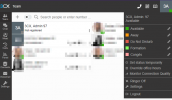
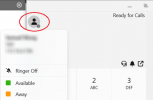
Here for instance I'm connected with the owner extension 97, with status as "Available" and I can place calls.

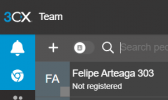
But in the Team tab, it shows as "Not registered" and is unable to get incoming calls, even direct on it's extension number 97.

Several extensions with in the same issue.

1736781245537.png
 
I have the same issue.

Using latest version 20.0 Update 5 Build 384 Alpha

Here for instance I'm connected with the owner extension 97, with status as "Available" and I can place calls.

But in the Team tab, it shows as "Not registered" and is unable to get incoming calls, even direct on it's extension number 97.

Several extensions with in the same issue.

View attachment 45936
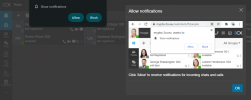
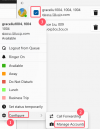
Please reset the permissions in the browser, then click on the bell icon that is in the top right corner and accept the notifications

1736793474432.png

1736793487502.png


once done the extension status will change to registered

1736793519377.png

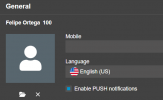
Also check that the PUSH Notification is enabled too

1736793545040.png
 

Attachments

  • 1736793460951.png
    1736793460951.png
    12.7 KB · Views: 6
Please reset the permissions in the browser, then click on the bell icon that is in the top right corner and accept the notifications

once done the extension status will change to registered

Also check that the PUSH Notification is enabled too

Thanks @Alejandro_3CX but this does not work.

I've reset the permissions, and it still shows as Unregistered (push is Enabled too)
And by the way, already tested before on 2 different computers (Mac and PC), everything cleared, private mode. Same behavior.

The issue is NOT that we don't get notified about the calls, but that the extensions shows as Unregistered like if they were not connected at all.
 
Thanks @Alejandro_3CX but this does not work.

I've reset the permissions, and it still shows as Unregistered (push is Enabled too)
And by the way, already tested before on 2 different computers (Mac and PC), everything cleared, private mode. Same behavior.

The issue is NOT that we don't get notified about the calls, but that the extensions shows as Unregistered like if they were not connected at all.
these users are in the same local LAN or remote? do you have the same issue with the apps in a different network?

are you using a 3cx fqdn or a custom one?

are you using the webclient with edge or chrome?
 
these users are in the same local LAN or remote? do you have the same issue with the apps in a different network?

are you using a 3cx fqdn or a custom one?

are you using the webclient with edge or chrome?

Again it's not an issue with not getting notified about the calls, but extensions showing Unregistered so we get ZERO incoming calls (direct to voicemail) on those extensions.

All our 3CX servers are hosted in the Cloud, so all users are "remote", using 3CX FQDN.

We have the issue on different 3CX servers, different networks, different browsers (Chrome on PC, Safari on Mac...)

Another customer is telling us they have the issue, and they are 100% with Yealink deskphones (so no softphones)
 
Again it's not an issue with not getting notified about the calls, but extensions showing Unregistered so we get ZERO incoming calls (direct to voicemail) on those extensions.

All our 3CX servers are hosted in the Cloud, so all users are "remote", using 3CX FQDN.

We have the issue on different 3CX servers, different networks, different browsers (Chrome on PC, Safari on Mac...)

Another customer is telling us they have the issue, and they are 100% with Yealink deskphones (so no softphones)
Hi David, please open a support ticket in order to review the server and logs.

Thanks!
 
Hi David, please open a support ticket in order to review the server and logs.

Thanks!
Okay, I've opened a ticket.

What seems strange to me is that it seems to happen only on non-synced to Microsoft 365 extensions.
 
Was there any update on this? We are seeing this exact issue on several of our customers installations.
 
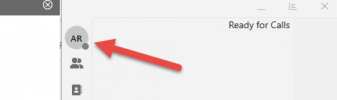
Same issue with v20 Windows Store softphones in multiple countries on four servers so far. The issue is intermittent, but seen on v20 softphones running on both v18 and v20 servers. The extension simply does not register and shows as gray on status.

Trying to get a Wireshark, but this is proving elusive.

1741266321104.png
 
Same issue with v20 Windows Store softphones in multiple countries on four servers so far. The issue is intermittent, but seen on v20 softphones running on both v18 and v20 servers. The extension simply does not register and shows as gray on status.

Trying to get a Wireshark, but this is proving elusive.

View attachment 46837
Are you able to reach the PBX via HTTPS?

Your app is conencted and available for calls but it is the presence that isnt connecting.
 
Webclient HTTPS links appear stable. We've noticed the issue primarily on the v20 Windows Store softphone.

EDIT: "Local users seem OK. Remote users are the ones affected."

Should read: "Both local and remote users are affected." Sorry about that.

We use 5090 for remote user ext and have split DNS.

You mentioned presence. When in the gray state they cannot make or receive calls.
 
Last edited:
The extension is gray too in our side, after we disable the extension and enable it again, it will be green.

1741336701351.png
 
Disabling / enabling works, but not all the time.

Those having issues, what firewalls are you using? Palo Alto here.
 
We are seeing this issue on all six sites now. This is a v20 softphone on v18 server.

1742219821442.png
 
We are facing the same issue with users located in the Philippines who are using the PWA. They are able to make outgoing calls, but their status is displayed as “Not registered” to other team members, causing all incoming calls to be routed to voicemail.
 
Hello Alex100225,

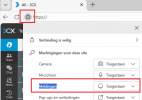
For sure the NOTIFICATIONS are not set for the website.
In this example I have used the Dutch language and the EDGE browser, but should be the same for any country or browser.

1773051618470.png

Paulo
 
@paulodagraca Thank you. Yes, that was the solution.

Also here:
 
Status
Not open for further replies.

Forum statistics

Threads
111,935
Messages
589,823
Members
164,817
Latest member
Innovative Advisory