Fanvil DST Issues

Status
Not open for further replies.

Scott33

New User
Joined
Nov 18, 2022
Messages
3
Reaction score
0
Fanvil X3U phones keep defaulting to the wrong DST location which has a different start and stop date for DST. I have been manually setting the correct location on each IP phone but this is only a temporary fix.

- 3CX Version: 18.0 (Build 418)
- OS Version: Debian 4.19.249-2
- Timezone: -4:00 Canada (Halifax, Saint John)
- Phone model: Fanvil X3U
- Phone firmware: 2.4.12 (Latest in 3CX)
- No custom templates

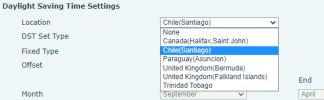
The DST location defaults to Chile (Santiago).

Is there a way to fix this properly/permanently or wait for a template update?
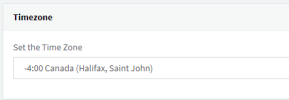
 
What is the time set to for the system or at the extension level?
 
System time setting:
1669039636696.png


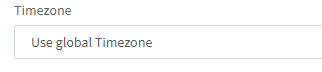
Extension time zone setting:
1669039697432.png


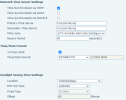
Fanvil X3U Provisioned:

1669039851958.png


The time zone on the Fanvil is set correctly but the DST location is not.

1669040148502.png
 
Hi Scott,

Fanvil has informed us that they will be revising their DST in a future release to correct any recent changes or omissions.

We do not have an ETA on this yet, but it's in the works.
 
  • Like
Reactions: Evolute IT
Thanks John, I will wait for the updates.
 
Every Fanvil phone in our company is incorrect this morning. Any suggestions? It appears that manually changing DST to AUTOMATIC resolves the issue on each phone, but we have hundreds of them on our network. It doesn't appear that rebooting or reprovisioning the phones negates the fix yet (which is strange), but I'm hesitant to take the time to manually update each phone just to have them all be undone by the server somehow.

Yealinks and Grandstreams updated as anticipated.
 
Every Fanvil phone in our company is incorrect this morning. Any suggestions? It appears that manually changing DST to AUTOMATIC resolves the issue on each phone, but we have hundreds of them on our network. It doesn't appear that rebooting or reprovisioning the phones negates the fix yet (which is strange), but I'm hesitant to take the time to manually update each phone just to have them all be undone by the server somehow.

Yealinks and Grandstreams updated as anticipated.
Thanks for reporting, but we will need some more details as these issues are very specific.
We will need to know all of the below details - please reply to all of them if you can:

- What timezone is the PBX set to in the settings?
- What time did you see / what time did you expect to see?
- Name a specific model and what firmware they were running
- Do you use custom templates or default ones?
- What version is your 3CX system?
- Have you checked your Group timezone? Groups can have different timezones to that of the PBX
 
Thanks for reporting, but we will need some more details as these issues are very specific.
We will need to know all of the below details - please reply to all of them if you can:

- What timezone is the PBX set to in the settings?
- What time did you see / what time did you expect to see?
- Name a specific model and what firmware they were running
- Do you use custom templates or default ones?
- What version is your 3CX system?
- Have you checked your Group timezone? Groups can have different timezones to that of the PBX
-6:00 US CENTRAL (What timezone is the PBX set to in the settings?)
We see 8:43am on phones when it should say 9:43am (What time did you see / what time did you expect to see?)
Fanvil X4, fw 2.14.0.7387 (Name a specific model and what firmware they were running)
Default templates (Do you use custom templates or default ones)
18.0 Update 6 (908) Enterprise (What version is your 3CX system)
I don't see any indication of this being an issue (Have you checked your Group timezone? Groups can have different timezones to that of the PBX)
 
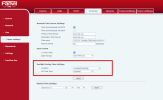
Here are the settings seen in the phone config page. It doesn't appear that reprovisioning the phones affects these settings once changed. We are not in Canada but -6:00 Central is accurate. Simply changing the setting to AUTOMATIC resolves the issue (at least temporarily).
 

Attachments

  • 2023-03-13 09_48_48-VoIP.png
    2023-03-13 09_48_48-VoIP.png
    42.6 KB · Views: 8
According to this site https://www.time.gov/ The change to daylight saving time will occur at 2 a.m. (local time) on Sunday March 12th.

That would make it UTC -5 hence whereas before it would have been 8:43am it should now say 9:43am.
I can confirm that the phones show UTC -6 in this case, and that would indeed be considered the wrong time.

We have spoken to Fanvil regarding DST in general (based on previous cases and customer feedback), and they informed us that some of of the DST libraries used in the phones need to be updated in a future firmware revision. Unfortunately I cannot say when that will take place, it's entirely up to Fanvil to decide to overhaul the DST on all their model lines.

So in short, the same answer applies here as the one I gave above to Scott above https://www.3cx.com/community/threads/fanvil-dst-issues.117745/#post-546067

Note: since we provision them according to Fanvil's own templates (which when reviewed appear to be correct down to the day and time of the DST switch mentioned above), it seems that this is indeed a firmware issue as they informed us. Switching them to automatic would be considered a bandaid and would probably revert within 24 hrs.
 
Agreed, and I can also confirm that the template for that timezone has not changed either for at least over a year.

Put simply, 3CX gives the phone the same DST settings for that timezone today, as it did back a year ago before the last time change.
 
  • Like
Reactions: CKFIT
Switching them to automatic would be considered a bandaid and would probably revert within 24 hrs.
We just manually changed roughly 150 phones to appease the masses for today. Tested by rebooting and reprovisioning a few phones numerous times before changing all 150 and the time seemed to remain accurate. It would be a bummer if this is 1-day bandaid, but we'll see what happens.

Thanks for your help!
 
We will remind them again regarding this issue, but I think it wouldn't hurt if a few Fanvil customers contacted them directly too ;)
 
  • Like
Reactions: CKFIT
Agreed, and I can also confirm that the template for that timezone has not changed either for at least over a year.

Put simply, 3CX gives the phone the same DST settings for that timezone today, as it did back a year ago before the last time change.
Sorry, I seem to have deleted the post you replied to while you were typing your reply. I had conflicting info on when that current X4 firmware was released. Some documents indicated September of 22, some indicated in 2021.
 
Sorry, I seem to have deleted the post you replied to while you were typing your reply. I had conflicting info on when that current X4 firmware was released. Some documents indicated September of 22, some indicated in 2021.
No worries. It's definitely back from 2021, I remember it because they had to replace their root certificates at that time and all phones got an update. The file was originally called X4-2.14.0.7387T20210816112057, the last digits indicating the timestamp 2021 08 16 11:20:57
 
I'm surprised this isn't a considerably larger issue on the forums here. I have to assume that the X4 is probably one of the more common phones on 3CX systems.
 
Switching them to automatic would be considered a bandaid and would probably revert within 24 hrs.

It's the next day and the time is still correct on all of the phones that were changed to Automatic. I know it hasn't been 24 hours, but... fingers crossed.
 
You can select a single device and hit Re-provision in your management console. You will immediately know if the default templates overwrite that specific option you changed.
 
You can select a single device and hit Re-provision in your management console. You will immediately know if the default templates overwrite that specific option you changed.
I mentioned that I rebooted/reprovisioned numerous times in post #6 here. I was thinking the 24 hour thing was some weird arbitrary Fanvil thing. Phew!
 
  • Like
Reactions: JohnS_3CX
This issue is back. I have several customers reporting the time being off on their Fanvil's today. I have one in my office that I know of that also has DST issue.

I can manually set DST on the phone, but some of my customers have multiple systems with 100+ extensions. Manually editing every phone is going to be a massive pain.

If I generate a config from the phone and compare it to the default template, the flags for setting DST look wrong. I have a ticket open with 3CX and my support guy doesn't seem to think that's an issue, but here we are.
 
Status
Not open for further replies.

Latest Posts

Forum statistics

Threads
111,973
Messages
590,074
Members
164,893
Latest member
jbergeon