Invalid timezone when provisioning Yealink phones

Status
Not open for further replies.

Severin Meyer

Free User
Joined
Jul 29, 2017
Messages
135
Reaction score
18
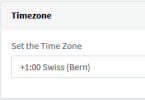
Since 18U6 the value resolved for provisioning Yealink phones is incorrect when the system wide time zone is set to 'Swiss (Bern)'.
The resulting time zone provisioned to the phones will be Namibia, which is currently one hour ahead.

I have solved it by specifying the time zone directly in the provisioning tab on every phone and reprovising the phones, instead of 'Use global Timezone'.
 
If you think the group could have different locale settings, this is not the case.
Every group uses the global settings.
Changing global settings will result in a corrected provisioning file.
So there is no intermediate settings like groups affecting this
refresh page, I edited my answer earlier to add this:
1675701849230-png.34049
 
As for the "Admin" button. A normal User (with Manager Role) can see it. This user can also add new users, which I think is not appropriate.
 
Sorry, but this is way to complicated.
Which settings, of which user, in which client at what update you want to check?
All settings I can see is Use global settings, and they are reflected when changing.
 
After my support provider restored my access and worked on the time zone issue, this is what I have now:
1675789568310.png
And they updated the templates with:
<timezoneParams param="time_timezone_yealink">
<!--The first entry is the selected entry in management console-->
<option value="+1" displaytext="GMT+1 Switzerland(Bern)" id="1" zone="1:00">
<item name="TimeZoneName">Switzerland(Bern)</item>
</option>
</timezoneParams>
But I do not have a trace of what was in before... and I feel like this is more of a work around rather than an actual fix. Luckily I do not need multiple time zones availability.

If this can help anyone...
 
@PIGC this looks like a snom template.
The issue is only present on Yealink, because they don't know the time zone "swiss"
 
It is based on the yealinkT4x template customised for my Yealink T54W. I am not saying this is the ideal solution and I have not tested reverting back to the original template file but, yes, looking at it I see it is missing a "swiss" timezone in its definition (X_X). Now how does this make Namibia selected remains a mystery. I assume the automatic update of the 3CX server would not modify templates, at least the custom ones, so there is something that pertains to 3CX and the update breaking the Yealink timezone setting...
 
Namibia is just the last time zone with +1.
So if the time zone name is not found, the last one with the same offset is taken.
The only way to workaround this, without the need to set the time zone on each phone, is by changing the global time zone to germany
 
Status
Not open for further replies.

Forum statistics

Threads
111,974
Messages
590,081
Members
164,899
Latest member
mazet