No ringtone when PWA in background

Status
Not open for further replies.

Thibz

Premier Customer
Joined
Jul 31, 2024
Messages
9
Reaction score
0
Hello,

I currently have 700 users using the WEB V18 app on Chrome. We're experiencing an issue where, when the web application is in the background, the notification pop-ups appear, but there is no ringtone. However, the ringtone does play correctly when the application is in the foreground.

Is there a solution to have the sound play even when the application is in the background?

Thank you.
 
You should change for the 3CX application available on the Windows Store :
https://www.microsoft.com/store/productId/9NW77489NGJ0
It offers many advantages and is independent of your web browser.
Learn more about the app here ( Blog 3CX )


For now, here is what can be analyzed:
The possibility is that Windows notifications are set not to play sounds.

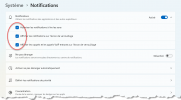
Open the Windows notification settings:
Shortcut : ms-settings:notifications?activationSource=SMC-IA-4028678

Click on the first option (Notifications).
Make sure all three options are checked.


( Sorry, my Windows is in French :oops: )
1724091360334.png


Reference:
Change notification and quick settings in Windows


Another possibility is that your problem is caused by a Chrome (or Edge) extension that prevents inactive tabs from playing audio, which can affect web applications. Here is an example of such an extension:
There are many similar extensions designed to suspend background applications or mute audio to save resources.
These are not viruses; they are functions deliberately added to the web browser.

In the browser where 3CX PWA is installed, paste this into the address bar:
about://extensions

Check if you have any installed extensions that might interfere with the normal operation of Chrome or Edge and remove anything that seems to affect browser behavior.


If not, check if there is a policy installed that prevents background audio from playing:
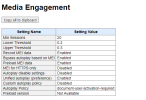
about://media-engagement

Please share with us the information from the first table (Media Engagement).
 
Hi Guillaume,

I confirm that the first three options are indeed checked for notifications.

No Chrome extensions either.

Here is the media engagement.

1724134609378.png
 
I would like to clarify that when a call is received, we do have the ringtone and the popups functioning for 5 to 10 minutes. However, if there are no calls for 10 minutes, the next call will only display the popup without the ringtone. This suggests that the PWA/Chrome might be going into sleep mode or something like that.
 
Maybe there is a 'keep alive' option for PWA like there is for Android? Anyone know if this option exists ?
 
Does sound play for arriving chats, or is it only the ringtone?
 
We have disabled the chat functionality, so don't know :(
 
Do the users have wireless headphones or speakers?
 
We have users with wireless headsets, but the problem also occurs with wired headsets. We have many Jabra MS20 headsets.
 
Does sound play for arriving chats, or is it only the ringtone?
i'll try to reactivate chat and no sound for the chat too, any idea ?
 
Sounds should work as long as the program is running.

What if you change to a different sound device? (Plug in a USB headset or speaker)

Do you maybe have Chrome set to not run in the background? Windows can do that…if I recall correctly it is under System>Apps, behind the 3-dot menu for each app.
 
Sounds should work as long as the program is running.

What if you change to a different sound device? (Plug in a USB headset or speaker)

Do you maybe have Chrome set to not run in the background? Windows can do that…if I recall correctly it is under System>Apps, behind the 3-dot menu for each app.
Same thing if i change sound device.
I don't think the problem is on the client side but rather on the server side. Indeed, we were able to test on the same computer with the same browser and the same headset, using two different 3CX accounts, each on a different 3CX server. One account has the ringtone issue, while the other does not. Therefore, I believe the problem lies on the server side.
 
The PWA is really more "user friendly" to install for people who not working in IT.
I understand, I'm just asking you to test to see if you can reproduce the issue with this version. I assure you that it is just as easy to install, even for people with no computer experience.
I personally had the experience with my 77-year-old father, who has never worked with a computer in his life. He installed and configured it easily.

Fun Fact; I opened Google Street View on a computer and showed my father how to navigate in "immersive view" mode. My father is the one I managed to trick by telling him that Google Street View is a "live" view via drones that he could control through Google Street View. :D I think he still believes it to this day, lol.


Same thing if i change sound device.
I don't think the problem is on the client side but rather on the server side. Indeed, we were able to test on the same computer with the same browser and the same headset, using two different 3CX accounts, each on a different 3CX server. One account has the ringtone issue, while the other does not. Therefore, I believe the problem lies on the server side.
If the ringtone works when it's in the foreground but not when it's in the background, I can assure you that the server has nothing to do with it. That said, to confirm, try using it on a different web browser. If you're using it on Edge (PWA), try using it on Chrome (PWA). Also, try opening the WebClient in incognito mode, leave the tab open in the background without PWA, and see if it rings. Repeat with another web browser: Edge, Chrome, and Firefox. The goal is to pinpoint where the problem lies.
 
Status
Not open for further replies.

Latest Posts

Forum statistics

Threads
111,940
Messages
589,845
Members
164,828
Latest member
Vera Lea Kristensen Raage