• We do not provide troubleshooting help for unsupported phones. Please try with a supported phone.
  • V20 Update 10 Alpha 2 Learn more

Solved Polycom VVX BLF Behaviour, Incorrect - Manual Fix for Hosted Instances

Status
Not open for further replies.

Kieron_Voip

Gold Partner
Basic Certified
Joined
Feb 4, 2021
Messages
10
Reaction score
4
By default 3cx set Polycom VVX BLF to automata, which when pressing the BLF line key immediately transfers active calls to that resource, and if you repeatedly press the BLF key, it will barge you into the call, Which is not a user friendly feature and should not be a default setting for any VoIP Phone.

Official Polycom description of Automa is below:

"Automata, the default action when is to perform a park/blind transfer of any currently active call. If there is no active call and the monitored user is ringing/busy, an attempt to perform a directed call pickup/park retrieval is made,"

Where as the correct setting, normal, By pressing the BLF line key, It places an active call on hold before dialling the selected BLF phone. i.e the same BLF action as per Yealink and Fanvil Phones

Please 3CX Dev Team, Allow us via the 3cx Management Console to select the type of BLF mode, Or change the Default Template so Normal is the default BLF Setting. Automa is not a user friednly mode and behaviour in a way that the user doesn't expect blf to work

Below is the Manual Fix for Hosted Versions,
  1. Provision the phone as normal on 3cx
  1. Once provisioned, log into the phone using the Web GUI

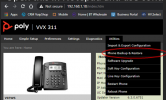
  1. Hover over the “utilities” tab and click on “Phone Backup and Restore”


VVX1.png
  1. Click on the “Phone Backup” Tab and you will see the Phone configuration file download.


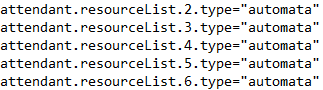
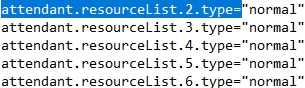
  1. Open this in Notepad and use control + f and paste the following “attendant.resourceList.2.type=”


  1. Now where on the file you see "automata", Replace it for "normal"


Original:


VVX 2.png


Edited/Fixed version


VVX2.png


  1. Save the file, Make sure you just click save as in notepad, it needs to stay as a .pdu file, Make sure u name this different to the original, e.g called it ext302_edited.pdu


  1. Go back to the Web GUI and now under “Phone Backup” click on “Restore Phone”, Upload the edited file and then click on “Restore” tab underneath.


  1. The phone will reboot, once done, make a call and test Busy lamp field, it should put your current call on hold and ring the BLF extension.
Again for large customers with a lot of extensions, this is very time consuming, so please can a Dev look into this
 
Hi @Kieron_Voip

While we do indeed see the very good point you make in case a user presses the button too many times, I'm afraid that "normal" mode is not quite the same as Yealink. We tested it and it seems it breaks other operations that we currently support, like transfer and pick-up and shared park.

Hence the setting will remain as-is for now at least, and the users need to be mindful not to press the key multiple times. Keep in mind this is not a 3CX limitation, it's just how Polycom phones happen to work and this is the template they provided us with but will contact them to see if they can offer an alternative solution, and if they can provide us with one we will include it in a future template update.


Also please note for the time being:

- Your modified backup will be overwritten by the PBX auto provisioning, you will have to restore it often

- If you remove the provisioning URL to prevent this, you lose the ability to update the phone settings and reset the credentials in case of emergency

- Hosted-by-3CX has known restrictions, so if you want you can create your own templates but you will have to use your own hosting solution
 
Last edited by a moderator:
Hi @Kieron_Voip

While we do indeed see the very good point you make in case a user presses the button too many times, I'm afraid that "normal" mode is not quite the same as Yealink. We tested it and it seems it breaks other operations that we currently support, like transfer and pick-up and shared park.

Hence the setting will remain as-is for now at least, and the users need to be mindful not to press the key multiple times. Keep in mind this is not a 3CX limitation, it's just how Polycom phones happen to work and this is the template they provided us with but will contact them to see if they can offer an alternative solution, and if they can provide us with one we will include it in a future template update.


Also please note for the time being:

- Your modified backup will be overwritten by the PBX auto provisioning, you will have to restore it often

- If you remove the provisioning URL to prevent this, you lose the ability to update the phone settings and reset the credentials in case of emergency

- Hosted-by-3CX has known restrictions, so if you want you can create your own templates but you will have to use your own hosting solution
John,

Thanks for the Prompt reply, if it help, we are more than happy to help yourselves and Polycom do some demo testing of configs, Provide wire sharks and feedback, as we do have an instance we use internally for testing and we can route a lot of call to it.

In short, if we can help 3CX and Polycom resolve this issue, please let us know, we are more than happy to help !
 
Last edited by a moderator:
Hi Kieron,

We are currently waiting for feedback from the manufacturer.
In the meanwhile, kindly share exactly what result the following actions produce, when you edit the phone as you suggested

1. You are in an active call, and your press a BLF for another extension
Result: ?

2. You are in an active call, and you press a SP1 BLF
Result: ?

3. You are idle, and an extension in your BLFs is ringing. You press the BLF while it is flashing
Result: ?


- Please describe what happens as logically and as literally as possible.
- Assume I know absolutely nothing, have never seen such a device before, and need an explicitly literal description of what happens, what you see on screen, and what actions you then took (if any)
- This will help me understand if the behavior I saw matches with what you saw
 
Hi Kieron,

We are currently waiting for feedback from the manufacturer.
In the meanwhile, kindly share exactly what result the following actions produce, when you edit the phone as you suggested

1. You are in an active call, and your press a BLF for another extension
Result: ?

2. You are in an active call, and you press a SP1 BLF
Result: ?

3. You are idle, and an extension in your BLFs is ringing. You press the BLF while it is flashing
Result: ?


- Please describe what happens as logically and as literally as possible.
- Assume I know absolutely nothing, have never seen such a device before, and need an explicitly literal description of what happens, what you see on screen, and what actions you then took (if any)
- This will help me understand if the behavior I saw matches with what you saw
1. You are in an active call, and your press a BLF for another extension


Result: if I am on an active call the party who is currently on a call, and if i press a BLF key to another extension, the original party is placed on hold, The VVX device then proceeded to ring the New party, I can choose to end (merge the new connected call with the original and have two active calls), during this process the original party is placed unless the calls are merged.


2. You are in an active call, and you press a SP1 BLF

Result: The Active Calls is placed on hold the device tires to retrieves the call in SP1, if there is no call active in SP1, device will hear the 3CX hold Music.


Note, If the active call is transferred to SP1, the called now is in SP1 and hears the hold music, if I press the SP1 BLF the call is retrieved and both parties can hear each other

3. You are idle, and an extension in your BLFs is ringing. You press the BLF while it is flashing

Result: The result of pressing a Ringing BLF is that I intercept the calling party called, e,g Person one is trying to ring person two, if person 3 presses person 2 flashing BLF indicating there are being rang, Person 1 is connected to person 3


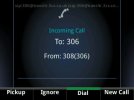
Note to add on this, By Default Polycom Template when changing the BLF to normal, it also enables spontaneous Call Appearance, which leads to a remote extension call being monitored and when they recieve an incoming call, the below call appearance is displayed and the user’s desk phone plays the default calling ringtone,

screenCapture.jpg


(All testing was used using the first BLF config changes in addition to the below Config Changes)


To resolve this, you need to edit the following in the config


Original:

attendant.behaviors.display.remoteCallerID.automata="0"

attendant.behaviors.display.remoteCallerID.normal="1"

attendant.behaviors.display.spontaneousCallAppearances.automata="0"

attendant.behaviors.display.spontaneousCallAppearances.normal="1"


Edited:

attendant.behaviors.display.remoteCallerID.automata="0"

attendant.behaviors.display.remoteCallerID.normal="0"

attendant.behaviors.display.spontaneousCallAppearances.automata="0"

attendant.behaviors.display.spontaneousCallAppearances.normal="0"


Please let me know if you need anymore feedback or if you need anything clarifying.

Kieron
 
Thanks Kieron,

We want to maintain the intended 3CX behavior which is where case 1 and case 2 differs from what best suits your preferences. Generally it was ok until now except the fact it was able to retrieve back a transferred call - this was not intended and thank you very much for pointing it out. Polycom has provided some changes to achieve this, hence solving that problem.

As for the BLF mode request, I'm afraid that will not be possible because it breaks the way shared parking is intended to work (ie. it should blind transfer the active call into SP).

If you wish to deploy Polycoms with customized templates you may do so manually of course, with the only exception being Hosted by 3CX instances.
 
Thanks Kieron,

We want to maintain the intended 3CX behavior which is where case 1 and case 2 differs from what best suits your preferences. Generally it was ok until now except the fact it was able to retrieve back a transferred call - this was not intended and thank you very much for pointing it out. Polycom has provided some changes to achieve this, hence solving that problem.

As for the BLF mode request, I'm afraid that will not be possible because it breaks the way shared parking is intended to work (ie. it should blind transfer the active call into SP).

If you wish to deploy Polycoms with customized templates you may do so manually of course, with the only exception being Hosted by 3CX instances.
Afternoon John,

Understood all of the above, but surely 3CX and Polycom can set the default template to keep Shared Park's in automa mode but keep extension's BLF as Normal.

Again is this something that can be looked into ?
 
Afternoon John,

Understood all of the above, but surely 3CX and Polycom can set the default template to keep Shared Park's in automa mode but keep extension's BLF as Normal.

Again is this something that can be looked into ?
That would then Resolve Case 3.

Meaning Polycom Device would work as intended and would be very user friendly
 
Hi Kieron,

Case 3 already works as intended. There are no further plans to make other changes.

With the main issue fixed, we will mark this as solved
 
New template is now live.
 
Status
Not open for further replies.

Forum statistics

Threads
112,147
Messages
590,959
Members
165,167
Latest member
Finatra.us