Transcription Suddenly No Longer Working

f1_power

Gold Partner
Basic Certified
Joined
May 8, 2020
Messages
2
Reaction score
0
We have been using the 3CX Transcription service and until recently has been working fine but recently it has just stopped working.

We have done all the troubleshooting, restarting services, checking Firewall ports etc but can't understand or work out how to resolve. Does anyone have any clues or places we could look to troubleshoot further?

Current version installed is Version 20.0 Update 9 (Build 995 Release - AI 1.4.48) with 32SC AI Licence
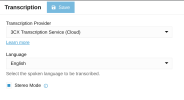
Screenshot 2026-09-14 at 10.36.28 am.png
 
Are you sure you have the Enterprise Plus license? Not just the AI edition license? Transcription via 3CX Cloud requires an upgrade to the license and this has been required for quite some time now.

If you don't have it, then no need to buy the upgrade - Our own transcription service is being retired at some point as there are plenty low cost transcription providers now Grok, OpenAI etc and more coming. So just go with Grok or OpenAI, Google right away
 
@N_G Is this a new thing? According to the documentation on 3CX's website, only the AI Edition is required. I don't even see an Enterprise Plus license available to upgrade to:1789661386768.png

This is the link it brings me to when I choose 3CX Transcription Service (Cloud) ^^^. I'd use OpenAI, but there is no Stereo option. Any ETA on that feature?

The local transcription option requires 24G RAM minimum. For a virtual environment, that jacks the cost up of the server quite a bit.

Not keen on using X's Grok either (sorry Elon).
 
Hi @jaywagener could you please check this blog post

For the AI edition, using the 3CX Transcription Service (Cloud) it will not work for call recordings, it will transcribe only the Vmails.

If you need call transcription, then you need to use one of these providers:

For the speaker diarization (stereo mode) it is possible only with Grok and 3CX AI Server
 
Last edited:
  • Like
Reactions: Evolute IT and N_G
Hey @Alejandro_3CX , Thanks for sending that link. I knew I saw something about the license names changing but couldn't find it. Thanks for the clarity on the Recordings transcriptions as well.

Any timeframe on Open AI having Stereo mode? Our company is so in bed with OpenAI, it would be more convenient for us to stick with them. If there is not a definitive timeline, I think our next option would be the 3CX AI Server.
 
  • Like
Reactions: Alejandro_3CX
Any timeframe on Open AI having Stereo mode?
The thing here is that OpenAI's models do not currently offer built-in speaker diarization, that is the problem.

If you need that feature then you have to go with Grok or the 3CX AI Server for AI 16SC+ following the steps in this manual
 
Actually, OpenAI provides diarization support but with the following restrictions:
  • Only mono is supported.
  • The speakers are only recognizable if you provide a sample of their voice.
Which means that either all conversations will be marked as between A and B, or every user of the system needs to have his/her voicemail self id message recorded. The latter is a very rare situation so decision was made not to expose diarization for OpenAI.
 
  • Like
Reactions: Evolute IT
In case someone wants to try this unofficial option:
  • Set up OpenAI provider in Integrations > Transcription.
  • Go to Advanced > Parameters, lookup OPENAI_TRANSCRIBE_MODEL parameter.
  • Replace its value with gpt-4o-transcribe-diarize.
To revert, just select a different model from the Transcription page.
 

Forum statistics

Threads
112,276
Messages
591,633
Members
165,393
Latest member
Carlos - EC Mates