Transfer + Disconnect in same function

Status
Not open for further replies.

nextcx

Customer
Joined
Apr 20, 2022
Messages
33
Reaction score
3
Hello All,

I am working on a menu where I transfer the caller, but after the transfer when I want to disconnect it ends in a dead end because the call is not connected anymore. So a function to Transfer + Disconnect.
What the problem is that if DTMF input is registered the prompt plays and transfer works but the call will not end.

I have tried to use a parallel execution but the call can only be controlled once.

What will be the best solution to get this done?

Many Thanks


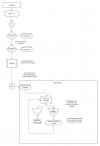
A summary of the call flow:
See attached file:

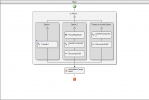
Warnings:
Warning: Dead code detected following component 'DisconnectCall1'. (file Main. Flow)
Warning: Dead code detected following component 'DisconnectCall2'. (file Main. Flow)
 

Attachments

  • 1651490949600.png
    1651490949600.png
    22.5 KB · Views: 14
You get a warning in that case because any component after the Transfer component, will not be executed. When the Transfer component is executed, the call is disconnected from the CFD app, so the main flow is not executed anymore. Anything you put after the Transfer will not be executed.
 
Thank you for your answer, so is there a solution to transfer and end call at the same time?

For example: Agent presses 2, call will transfer and menu will end (call disconnected)
 
A CFD app deals with the call connected to it. In your case, it will provide a menu to the caller, and then transfer the call. When the CFD app transfers the call, the call is disconnected from the app. This doesn't mean that the call is still alive. The call is being sent somewhere else in the PBX, but the CFD app will not know anything about that.

If the agent presses a key or not, the CFD app will not know, except if the agent is the caller..... If the call is connected between an external number and an agent, a CFD app will not know anything about that call, because it's not connected to it....
 
Okay, thank you for your answer. Is there a workaround for this problem?
 
Okay, thank you for your answer. Is there a workaround for this problem?
I don't understand what you want to do.... Please elaborate a bit.
 
A summary of the call flow:

1. Inbound call on external number
2. Ring queue #1
3. If nobody pickup the call ring queue #2
4. If nobody pickup the call park the call and trigger a IVR.
5. The IVR will start the callflow app which will:

Dial an external number
If the dialed number pickup it plays a prompt: "Press 1 to accept the call, 2 to reject"
When 1 is pressed it pulls the parked call, if 2 is pressed or disconnected it should dial the next number in list, etc. etc. until someone presses 1.

So if "2" is pressed the call needs to transfer to next number and ends for the person who pressed "2" in the menu.

Do you understand the situation? Otherwise I will provide you with more information.
 

Attachments

  • Call flow (1).jpeg
    Call flow (1).jpeg
    94 KB · Views: 5
I thought this case was solved, as you mentioned here.

So if "2" is pressed the call needs to transfer to next number and ends for the person who pressed "2" in the menu.
No, you can't transfer the call to the next number. Because the CFD app is connected to the first number, if you transfer the call, you will end up with the first number talking to the second number. When a CFD app transfers a call, the CFD app gets removed from the call. You're replacing the CFD app party, not the external number party.

In your case, you need to start a new call to the second number, using the Make Call component. And then drop the call with the first number, which you don't need anymore. This second call will be connected to the CFD app. But there is no shared state between the CFD app executing for the first call, and executing for the second call. From the CFD app's perspective, these are 2 different calls being handled. So you need to store the status externally somewhere (the numbers you already called and the numbers you still need to call).
 
  • Like
Reactions: Evolute IT
  • Like
Reactions: edossantos
I have found a workaround, this post can be closed.
 
Status
Not open for further replies.

Latest Posts

Forum statistics

Threads
111,973
Messages
590,074
Members
164,895
Latest member
jasonkkrause