Unable to route a DID to a users extension

Status
Not open for further replies.

GameCrasher545

New User
Joined
Mar 8, 2023
Messages
4
Reaction score
1
I am trying to give my users a direct line number and have obtained the DIDs from my SIP trunking provider (Breeze Connect) however I can't get the direct line to route to their extension instead it will only route to my digital receptionist which I have set to my main trunk number. I have tried to follow the instructions in the user manual however when I change the routing under the office hours tab it changes the routing for every number, not just the one I have assigned.

Any help would be greatly appreciated.
 
Hello

Can you please check the following:

1. All DIDs are added in the correct format
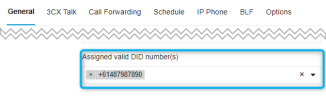
2. When you edit the appropriate user, you can see the correct DID select in the "Assigned valid DID number(s)" field
1678269251942.png
3. When you edit the Breeze Connect Trunk, you can see that the selected DID is assigned to the appropriate user
1678269233319.png
 

Attachments

  • 1678269049202.png
    1678269049202.png
    10.1 KB · Views: 2
Hello

Can you please check the following:

1. All DIDs are added in the correct format
Numbers are added in the format of +6108xxxxxxxx, I have also tried removing the zero between the country code and the 8 which also has not worked.
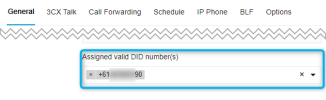
2. When you edit the appropriate user, you can see the correct DID select in the "Assigned valid DID number(s)" field
View attachment 34548
All of the users that I want to have direct lines have their DID numbers assigned inside of their profile as per the image above.
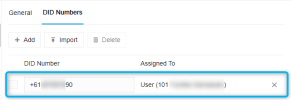
3. When you edit the Breeze Connect Trunk, you can see that the selected DID is assigned to the appropriate user
View attachment 34547
The correct assignments are shown when I look under the DID tab in the Breeze Connect SIP trunk as per the image above.
 
on Breese connect SIP Trunk add this Format (+618XXXXXXXXX) and on 3CX go to setting ----> E164 and do the local settings, then try to add the DID on the 3CX sip trunk with 08XXXXXXXX
 
Numbers are added in the format of +6108xxxxxxxx
Numbers should be formatted as +618XXXXXXXX. Numbers like +6108XXXXXXX are invalid.
Also you may want to contact Breeze to switch your account to E164 if it's not already. I think there is also an option in the customer portal you can switch your self to switch to E164.
 
Numbers should be formatted as +618XXXXXXXX. Numbers like +6108XXXXXXX are invalid.
Also you may want to contact Breeze to switch your account to E164 if it's not already. I think there is also an option in the customer portal you can switch your self to switch to E164.
I have changed the format of the numbers so that they are now +618XXXXXXXX, however, it is still not directing correctly. I shall open a support ticket with Breeze tomorrow morning to see if they can switch the account to E164 if it isn't already and will report back.
 
  • Like
Reactions: YiannisH_3CX
@YiannisH_3CX I have been working through getting the E164 support for the trunk enabled with Breeze and they have finally enabled it however I am still having the same issue.

Edit: Reworded for clarity.
 
Status
Not open for further replies.

Members Online Now

Forum statistics

Threads
111,831
Messages
589,277
Members
164,660
Latest member
RJenkinsROCK