Version 18 Update 6 Simplified. Modernized.

Thanks for the awesome update and the hard work by the 3CX team!

We did notice that when a new user is created, the "Send email notification on missed call" option is enabled by default. That is a change from previous versions, but I did not find anything in the blog posts, or the change log about that change. Did I miss an announcement about that somewhere?

Thanks!!!

Can this be changed back on the next update as most users prefer this option to be off?
 
Yes thats a good question.

The message is always posted to the queue as its not real time and any agent can then answer if they want or not.

However, they will only receive a push notification if they are logged in. You can make logged in status in sync with extension status

Let me know if this is as its working on your install.
Thank You, Nick.

Yes, that is how it works on our installations.

Excellent suggestion to use the "Log out from queues" option to mirror status and queue logins to avoid the SMS push notifications.

We will figure out how to make this work for our customer's needs within the framework of the 3CX design, as it pertains to the desktop app notifications.
 
  • Like
Reactions: N_G
The root credentials will work for the management console for the foreseeable future. There will be ample warning in advance when it will be replaced.
Thanks for confirming. Was a bit worried there for a moment.
 
  • Like
Reactions: N_G
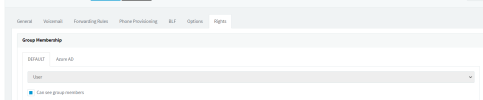
How do you set system owner if you use the Azure AD integration. Our options are greyed out, and I suspect that's the reason why I don't see the Admin button on the webclient. 1676047494736.png
 
  • Like
Reactions: N_G
How do you set system owner if you use the Azure AD integration. Our options are greyed out, and I suspect that's the reason why I don't see the Admin button on the webclient. View attachment 34197
Change it on the default group
 
  • Like
Reactions: N_G
Also greyed out there. Even if I created a new group, it is still greyed out.
 
  • Like
Reactions: N_G
Figured it out -- had to log in with non-azure AD login before I could make the change.
 
  • Like
Reactions: N_G
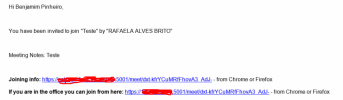
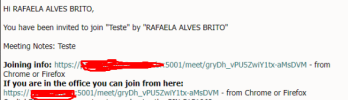
After my update to 6, the conference e-mail sends links different between organizator and participants.
The link of the participants it's correct when access in my office, link number 2, and external, link number 1.
The link of the organizator not is the same. When I access in my office, the access it doesn't work, and then, it redirect to external link, but the access is internal.

E-mail to participants
error_3CX1.png
E-mail to organizator
error_3CX2.png
 
The organizer is supposed to have their own link because "meeting starts once organizer joins" is the default setting for video meetings. I'm not sure I understand what isn't working...define "doesn't work"?
 
On the router phone setup, is there a way to get RPS password again? When the phone is factory reset, it asks for the uname/password (as it should), is there any way to see this or resend it? I've looked in the admin console and the webclient but I could be overlooking it.
 
On the router phone setup, is there a way to get RPS password again? When the phone is factory reset, it asks for the uname/password (as it should), is there any way to see this or resend it? I've looked in the admin console and the webclient but I could be overlooking it.
Hi Les,

The first time you add the phone it sends an email to the user with the login details titled: "Your phone configuration instructions".

If it has been less than two weeks, it is still valid and you can go ahead and use it.

Currently there is no way to re-send the same one, you will have to delete and add the phone again.
 
  • Like
Reactions: Les Webb
Hi Les,

The first time you add the phone it sends an email to the user with the login details titled: "Your phone configuration instructions".

If it has been less than two weeks, it is still valid and you can go ahead and use it.

Currently there is no way to re-send the same one, you will have to delete and add the phone again.
I hope there are plans for both of those to change. The user shouldn't have infrastructure information and deleting phone setups is disruptive.
 
Hi, was there a communication that one of the (local) prerequisites for the next release was SPLIT DNS? How do we do if the client is not a DNS server? Will this impact 3CX in the park when updated? Thanks in advance
 
Hi, was there a communication that one of the (local) prerequisites for the next release was SPLIT DNS? How do we do if the client is not a DNS server? Will this impact 3CX in the park when updated? Thanks in advance
Take a look here where this was discussed
 
Hello,

I noticed something a little bit weird with the permissions:

If I configure the permissions of one random user with 'Group Owner' with "IP Trunks Administration (Can manage SIP trunks, inbound & outbound rules)" disabled, when this user logs-in to the administration console that section is 'greyed' so it's ok, but that same user logs into the webclient and he/she is able to Create-Edit-Delete trunks as well as SBCs and Chats

That comes because before the update I had some users that was able to manage the Chats and the reports, but now after the update the users with with the old permissions 'Manager' has no access to the reports and also the chat are missing (despite having selected all permisions but IP trunk admin), and I'm unable to find any set of permissions that make me able to let some user manage the chat and the reports wihout being able to create/delete trunks or incoming rules

Maybe someone can give a hand with this...
 
From the webclient I try to configure an holydays for a Group, but I noticed that there is no way to enter the custom prompt message !

Forgot to put it?

Question: Does the group still follow the general holidays as well?
 
Hello Kevin, before the response of Microsoft you can deploy with 5060 and after use magic command on ssh for relunch wizard and change port :) juste think to adjust port on azur nat.
Thanks Alexandre :). I hope you're well. That's what I did when I was stuck. Thanks for the tip
 
@snowg - no it doesnt, only follows group holidays
@TTelecom - no roles only apply to the webclient admin section and the SIP trunks admin are for management console only. Group owner will have access to everything in the group. By default SIP trunks are not part of a group.
 
  • Like
Reactions: accentlogic
  • Like
Reactions: N_G
And the user option; Play holiday prompt when it's group holiday
 
  • Like
Reactions: Evolute IT

Forum statistics

Threads
111,973
Messages
590,079
Members
164,898
Latest member
grahamaskew