Vmail attachment not displaying relevant called ID info

Status
Not open for further replies.

dlaborde002

Joined
Feb 9, 2018
Messages
8
Reaction score
0
Our receptionists just got new Yealink T46S IPphones and they have worked phenomenally. The only issue we are having is that whenever someone leaves a voicemail, the VMail attachment does not display any information regarding the Caller ID of the caller. Instead, it shows the information of the receptionist that transferred the call to voicemail. We have an expansion module for each receptionist, and we have a key for each employee that will transfer to his/her voicemail. The Voicemail keys are configured as followed.

Code:
expansion_module.1.key.10.label = Jon Doe VM
expansion_module.1.key.10.line = 1
expansion_module.1.key.10.type = 12
expansion_module.1.key.10.value = *98123

They key works great for transferring purposes, but we would like for the relevant caller information to send in the vmail attachment. I have tried using the key types: Voicemail, BLF, Speed Dial, Direct pickup, Forward. All have given me the same result. Any suggestions?
 
Hello @dlaborde002

Just to make sure that i got this right. From your example above, a call comes in and answered by 8123, then he/she presses the BLF that sends to *98123. Is this the call flow?
Also, i'm assuming that *9 is the dial code to connect to the voicemail of an extension?

Can you please clarify what is shown in the From and To fields in the email received? Is it the same or there's not a from field?
 
Hello @dlaborde002

Just to make sure that i got this right. From your example above, a call comes in and answered by 8123, then he/she presses the BLF that sends to *98123. Is this the call flow?
Also, i'm assuming that *9 is the dial code to connect to the voicemail of an extension?

Can you please clarify what is shown in the From and To fields in the email received? Is it the same or there's not a from field?
A call comes in, Extension 221(Our receptionist) answers the call. Then hits the transfer key (which places the caller on hold), and presses the BLF key that has the value of *98123. This sends the caller straight to the extensions voicemail.

The *98 is our dial code used for "Connect to voicemail of extension".
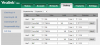
I will attach a snip shot of our config UI if that helps clarify. You will see that we have a BLF key, along with a Transfer to Voicemail key for each employee.expansion mod.PNG

The Subject, and To and From lines look like this:

Subject: New Voicemail from 221 - Receptionist

You have received a new voice mail from "221 -"Receptionist"

From:221
To: 243" - "John" "Doe"
Received:"2018-02-26 09:28:16"
Duration:"00:00:25"
File:"vmail_221_243_20180226152816"
 
Last edited:
Hi @dlaborde002

So one can transfer the call to the voicemail of any of the configured extensions(receptionists), right? And this happens regardless of the extension's voicemail that they are transferring the call to?
I have tested this and i cannot replicate the issue and the email i get shows the following:
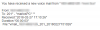
upload_2018-2-27_17-13-27.png
In your case, when the issue occurs, what is indicated in the From and To fields in the email that the receptionist receive?
 
@mariosM_3CX

Yes the keys are set to directly call the voicemail of the configured extension. To clarify, the "receptionist" is the employee that answers the initial call. Then, if she knows the caller's desired employee is unavailable, she presses transfer, and then presses the configured key to the employees Voicemail. The key is doing exactly what we want it to do, but the From and To fields do not display information about the initial caller. Instead it shows the information of our receptionist(the internal employee that answered the outside call). It shows:

Subject: New Voicemail from 221 - Receptionist

You have received a new voice mail from "221 -"Receptionist"

From:221
To: 243" - "John" "Doe"
Received:"2018-02-26 09:28:16"
Duration:"00:00:25"
File:"vmail_221_243_20180226152816"
 
Hello @dlaborde002

Are your BLF's configured to do an attended transfer? If yes, then this is the reason. You must do a blind transfer so the call is routed directly to the voicemail. Attended transfer means that the receptionist will first connect to the voicemail and then transfer the caller.
 
@mariosM_3CX

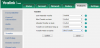
Yes, it is configured to do a Blink Transfer when using Transfer Mode via Dsskey. The other options are "New Call" and "Attended Transfer".

expansion mod2.PNG
 
Hi @dlaborde002

I'm afraid i cannot replicate this when doing a blind transfer. Caller ID of the original caller is showing in the email received. What version is your PBX?
Also, can you try blind transferring the call to the extension's voicemail using the dial code instead of using the BLF? When you answer the call, click on transfer, dial *98123 and Blind transfer. See if this works, just to eliminate any possibility that the expansion module's BLFs are causing this.
 
Also, please post a screenshot of the email template for the new missed call that is found in Management Console >> Settings >> Email >> Email Templates Tab >> New missed call template(from drop down)
 
Status
Not open for further replies.

Latest Posts

Forum statistics

Threads
111,884
Messages
589,542
Members
164,742
Latest member
Zain101