Solved Whatsapp working only one way

Status
Not open for further replies.

ODD Network BV

Gold Partner
Advanced Certified
Joined
Oct 24, 2017
Messages
22
Reaction score
6
Hi guys,

i did implement the whatsapp integration to 3CX.
But is working one way. i can receive whatsapp message from customers in webclient, but can not reply to my customers.
So, seems to be working one way at this moment.

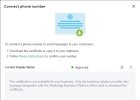
In my whatsapp certificate I get this message also. Maybe 3CX have to finish with the integration???

Whatsapp Certificate message:
The certificate is not available for your business. Only the business solution provider who manages integration with the WhatsApp Business Platform will be able to download the certificate.
 

Attachments

  • Whatsapp Certificate.jpg
    Whatsapp Certificate.jpg
    40.1 KB · Views: 54
  • Like
Reactions: stefanprasch
@ConceptsWeb - To be honest its not. We dont have the time and its not a platform that everybody can take part in, only very large companies (the ones to send the message, not 3CX) and there is a long vetting process by Apple. So we will focus on messaging platforms that are available to all. Whatsapp and telegram, maybe signal in time. Open standards, open API, this is a requirement.

We have alpha 2 coming out soon and this will remove the requirement of the Whatsapp number not being used anywhere else.
 
  • Like
Reactions: Evolute IT
Hello;

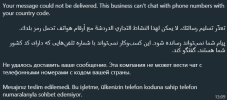
I integrated the Turkey number following the instructions, verified the number, the certificate was approved and everything seems to be normal. When I send a message from whatsapp on my phone, I get the error seen in the picture.

1659780586169.png
 
The whatsapp number I use is +90 850 460 0702, if I ask you, can you write a message for the test? I wonder if it will give you the same error message.
 
This looks like a message from Facebook itself? it seems self explanatory maybe that number or your country is not supported yet by the Facebook platform?
 
If so, wouldn't it warn about this when making settings and/or confirming the number? After successfully completing all the settings, it seemed strange to me that it said this during the message sending phase. Also, 3CX is used around the world, and while making global connections, is it possible for you to at least have information about which countries it will work or not? Please correct my words if I am wrong.
 
hi all,
same issue here. we can receive a message from whatsapp, but wenn we reply, the contact doesnt receive the answere...
change did to 000000 is not fixing this issue.
 
Same problema here. My version: 18.0 (Build 368).
I tried with 000000 to did and not fixing...
 
This looks like a message from Facebook itself? it seems self explanatory maybe that number or your country is not supported yet by the Facebook platform?
Hello;

Turkey is a country where many applications by whatsapp and facebook work, but it seems a little strange that it cannot be used in our country. Of course, if this is the case, we have a lot of customers waiting for this application.
 
I found the problem and it is solved: When you configure the whatsapp trunk in 3cx, in "Configure", in "Phone number ID", there you do not have to put your whatsapp number, you have to put the Id of the Whatsapp number that you find in the facebook developers page, in Whatsapp first steps, under your Whatsapp phone number you have a "Phone number Identifier", which has 15 digits, copy, paste in the 3cx trunk in Phone number ID, and it comes out singing.
 
Hi, I update the 3cx to last version and now show the debug messagem:

Failed to send message(s) to the provider 'whatsapp' from '+xxyyzzzzzzzz' to '+xxyyzzzzzzzz'. Exception: {"error":{"message":"Unsupported post request. Object with ID '0000000xxxx00000' does not exist, cannot be loaded due to missing permissions, or does not support this operation. Please read the Graph API documentation at https:\/\/developers.facebook.com\/docs\/graph-api","type":"GraphMethodException","code":100,"error_subcode":33,"fbtrace_id":"dafsd_fB"}}
 
Hi, I update the 3cx to last version and now show the debug messagem:

Failed to send message(s) to the provider 'whatsapp' from '+xxyyzzzzzzzz' to '+xxyyzzzzzzzz'. Exception: {"error":{"message":"Unsupported post request. Object with ID '0000000xxxx00000' does not exist, cannot be loaded due to missing permissions, or does not support this operation. Please read the Graph API documentation at https:\/\/developers.facebook.com\/docs\/graph-api","type":"GraphMethodException","code":100,"error_subcode":33,"fbtrace_id":"dafsd_fB"}}
Yes
 
Being able to receive inbound messages from WhatsApp but not outbound please check the following

- The guide is followed step by step https://www.3cx.com/docs/manual/whatsapp-integration/
- The WhatsApp account phone number and Phone Number ID are in the correct format (no spaces, dashes etc)
- Check the limitations (guide above)
- In case App Control (or similar security services) for Facebook, is applied on the network level (UTM devices) make sure that the traffic from/to the 3CX system is excluded (I would recommend disabling completely the service during testing). The certificate related error can be related to this configuration.
 
check that you have selected all required options in permanent token
 
I made a free video walkthrough for setting up the WhatsApp integration for 3CX. You can access the video here. There is a little longer introduction than is perhaps necessary, but hopefully you will find the information helpful.
 
I can recieve messages but I am unable to reply to messages
 
I had this problem and changed the DID to 000000 for the trunk number. After doing this WA worked fine.
Where did you do this? please help?
 
I found the problem and it is solved: When you configure the whatsapp trunk in 3cx, in "Configure", in "Phone number ID", there you do not have to put your whatsapp number, you have to put the Id of the Whatsapp number that you find in the facebook developers page, in Whatsapp first steps, under your Whatsapp phone number you have a "Phone number Identifier", which has 15 digits, copy, paste in the 3cx trunk in Phone number ID, and it comes out singing.
This worked for me! I actually found myself signing how happy I was
 
I found the problem and it is solved: When you configure the whatsapp trunk in 3cx, in "Configure", in "Phone number ID", there you do not have to put your whatsapp number, you have to put the Id of the Whatsapp number that you find in the facebook developers page, in Whatsapp first steps, under your Whatsapp phone number you have a "Phone number Identifier", which has 15 digits, copy, paste in the 3cx trunk in Phone number ID, and it comes out singing.
Yes, works for me. Thanks
 
Status
Not open for further replies.

Forum statistics

Threads
111,973
Messages
590,078
Members
164,896
Latest member
sameage